


PICBOX
For the registration each section of data is enclosed in a PICBOX, this creates a neat divide between different blocks of data.
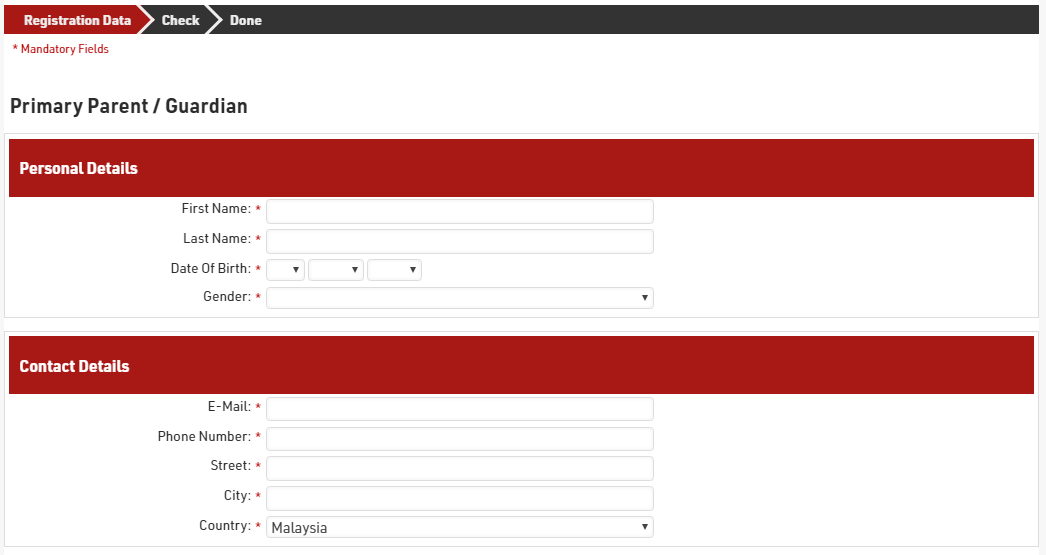
When using the PICBOX each box is opened with PICBOXSTART and closed with PICBOXEND, we also put a separator line between each PICBOX to space them apart slightly.
There is a separator text included at the beginning of the form fields for the same reason but only for the Single Registration, the Group Registration had a header which is used and explained later.

Within each PICBOX we also include a header, this is entered using an HTML line using the common tag <h3> used for headers. This is allows some additional customisation to the display of the field by using CSS which is explained later.

The header line is shown for all participants.
A similar effect could be achieved with a standard separator text as used in the Virtual Triathlon Solution.
Group Member Header
The Group Registration is for families which must consist of at least one adult, but not more than 2. To make this clearer in the registration we create headers for each participant in the group to make this clear. This corresponds to the data fields setup too.
Three headers were setup for the "Primary Parent / Guardian" (Registration 1), "Additional Adult or First Child" (Registration 2) and "Children" (Registrations 3 and 4). For these we used an HTML line again which allow us to use a larger header to make these stand out.

The headers are then set to show only if they meet certain criteria, for this we use the Line option, which corresponds to the Group Registration Position. The 3 headers were set to show only for line 1,2 or 3 respectively.


CSS
Note: CSS can be a powerful tool to customise the appearance / display of your online registration, however this is not something for which we are able to offer training or support due to the complex nature of it. There are many resources available online which guide you through using CSS. This solution assumes you have a basic understanding of how CSS styling works.
CSS can be applied in the RACE RESULT 12 registration under the Basic Settings CSS Styling section.

Registration Number Headers
In our form we used our own custom headers for each group member, and as such we didn't want to show the standard "Registration X" header in our registration too. This line was hidden using a single line.
The headers all use the same class name "RRReg_divListHead", so the CSS is applied directly to all divs with that class.
div.RRReg_divListHead { display: none !important }
PICBOX Headers
Within each PICBOX we have a header which describes the data being collected. To make these stand out we wanted to change the colour and spacing of the text. This is why we used the <h3> HTML line to create the header.
To change this we first identify the PICBOX for which all divisions have the class "RegPicBox", as our header is the first element inside the PICBOX we then apply our CSS to the first child within the div.
div.RegPicBox > div:first-child
{
    background-color:#A81815;
    color: #FFFFFF;
    padding: 0 0 0 10px;
}
For each header we set tha background colour, text colour and add some padding to the left side.
T-Shirt Size Chart
The T-Shirt size chart is shown as an image, by default all images within a PICBOX are compressed to the left side, however we wanted this to display in full size. For this we adjusted the max width for all images which appear in a PICBOX.
div.RegPicBox img
{
    max-width:100% !important;
    float: none !important;
}
We also removed the float, this allowed the image to be displayed centered in the PICBOX. Both settings had to use the !important tag as they are normally hard coded.