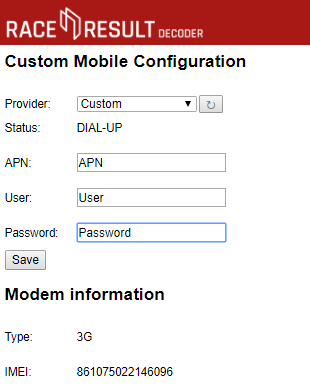
If your SIM card will not connect using auto-apn then it may require custom APN settings in order to connect.
To enter custom APN settings you should connect to the decoder via the Browser Interface, and open the Configuration tab.
Once inside you will see the option to configure settings for 2G/3G.
The list of providers has a list of already supported APNs or the option for a Custom APN, these APN settings should be provided by your GSM provider, they normally consist of an APN name / URL, a username and password, some APN settings only require the APN name and the username / password can be left blank.
Note that GSM providers may have multiple APN settings depending on which service you have subscribed to.
To store these press save and ensure to switch your decoder to use the Custom 2G/3G APN configuration.