


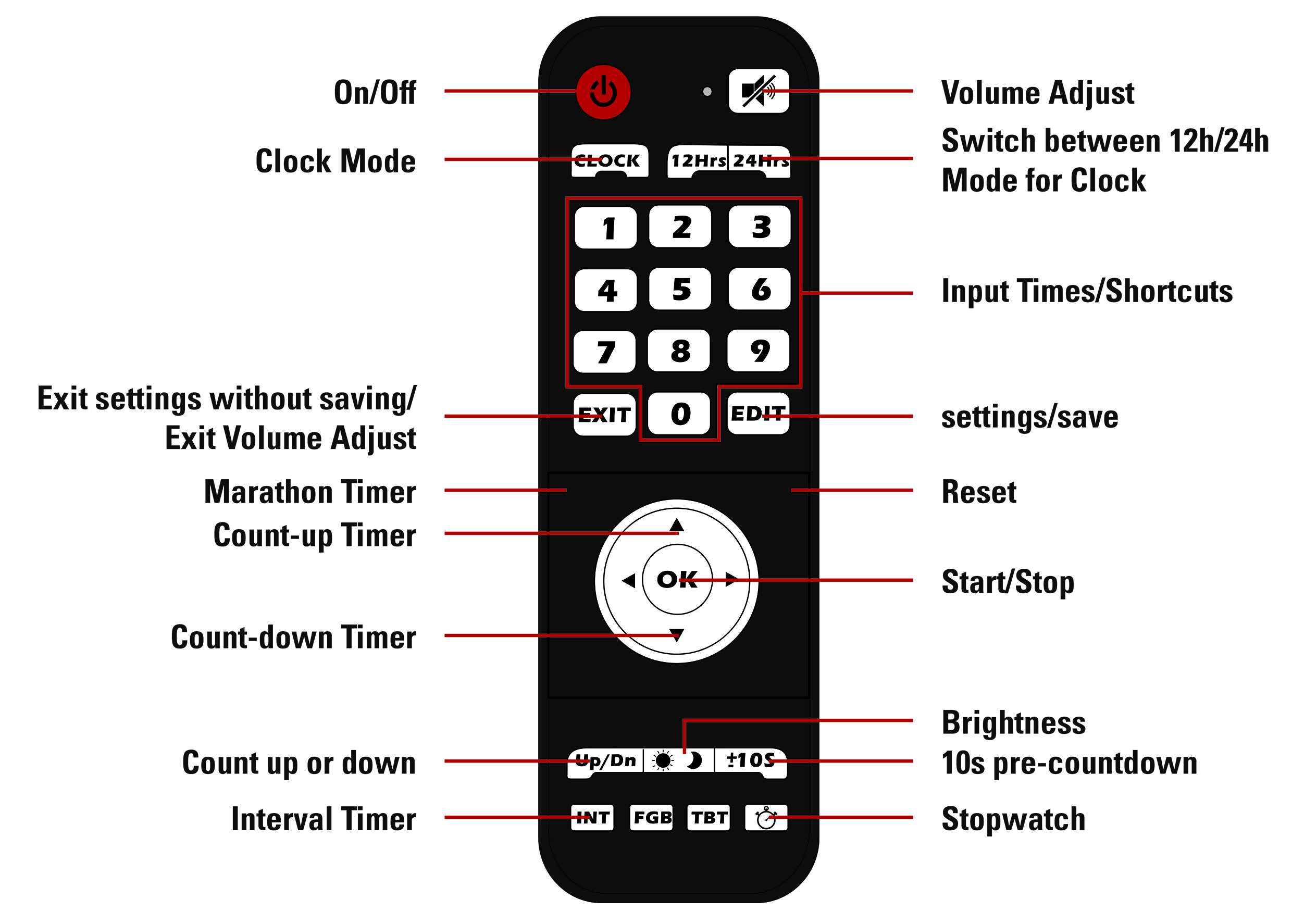
Countdown / -up
Function: count up to or down from a specified time
Time format: hh:mm:ss
Accuracy: ±40 ppm
Caution: it is possible to enter non valid minutes (over 59) on the next full minute the minutes will jump to 00
To access and use countdown / - up:
- Press the "Up" button to count up, or the “Down” button to count down
- Use the “Edit” button to set the time to count up or down from
- Enter the desired time using the number pad
- Press “Edit” again to save
- Use the “±10S” button to turn the 10 second pre-countdown on or off
- “-10” stands for no pre-countdown
- “10” stands for 10 second pre-countdown
- Press “OK” to start/pause the timer
Clock
Function: displays a normal clock in either 12h or 24h format
Time format: hh:mm:ss
Accuracy: ±120 ppm
To access and use the Clock mode:
- Press the “Clock” button
- Use the “12Hrs” and “24Hrs” buttons to switch between 12 and 24-hour format
- Use the “Edit” button to set the clock
- the first digit will start flashing and can be set using the number pad
- when done setting the time press “Edit” again to save the time
Stopwatch
Function: stopwatch
Maximum time: 99:59.99
Time format: mm:ss.kk
Accuracy: ±40 ppm
To access and use the stopwatch:
- Press the stopwatch button to enter Stopwatch mode
- Use the “±10S” button to turn the 10 second pre-countdown on or off
- – “-10” stands for no pre-countdown
- – “10” stands for 10 second pre-countdown
- Press “OK” to start/pause the stopwatch
- Use the reset (not labeled) button to reset the stopwatch when it is paused
Marathon Timer
Function: stopwatch
Time format: hh:mm:ss
Accuracy: ±120 ppm
To access and use the Marathon Timer:
- Press the marathon timer button (not labeled)
- Use the “±10S” button to turn the 10 second pre-countdown on or off
- “-10” stands for no pre-countdown
- “10” stands for 10 second pre-countdown
- Press “OK” to start/pause the stopwatch
- Use the reset (not labeled) button to reset the stopwatch when it is paused
Interval Timer
Function: repeats timer until count is reached
Time format: cc.mm:ss
Maximum time: 99.99:59
Accuracy: ±40 ppm
To access and use the Interval Timer:
- Press the “Int” button to enter interval mode
- Press the “Edit” button
- Set the number of intervals using the number pad
- Press the “Edit” button
- Set the time for the f rst interval using the number pad
- Press the “Edit” button
- Set the time for the second interval using the number pad
- Press the “Edit” button
- Use the “Up/Dn” button to decide if the timer should count up to or down from the set times
- Use the “±10S” button to turn the 10 second pre-countdown on or off
- “-10” stands for no pre-countdown
- “10” stands for 10 second pre-countdown
- Press “OK” to start/pause the timer