


The example file is at the bottom of this article!
Fitness races are becoming increasingly popular. They combine endurance and strength activities where participants alternate running legs with activity zones — for example, a format with eight running sections and eight workout activities.
This article explains a simple approach to setting up such an event using the Splits function in RACE RESULT 14.
Event Concept
In this example event file, four timing points are used:
- START
- IN_ZONE
- OUT_ZONE
- FINISH
Participants start the race, run 1 km, enter the IN_ZONE to perform the first activity, and exit via OUT_ZONE to begin the next running segment.
This pattern repeats until the final activity, after which competitors go directly to the FINISH, skipping the OUT_ZONE.
Splits Setup
The entire event is structured using the Splits table.
Each row defines either a running segment or an activity. Running legs are measured by distance (e.g., 1 km), while activities are time-based and use the “Other” sport type.
The Label field is used to name each split — for example, 1KM Running, 1000m SkiErg, or 50m Sled Push.
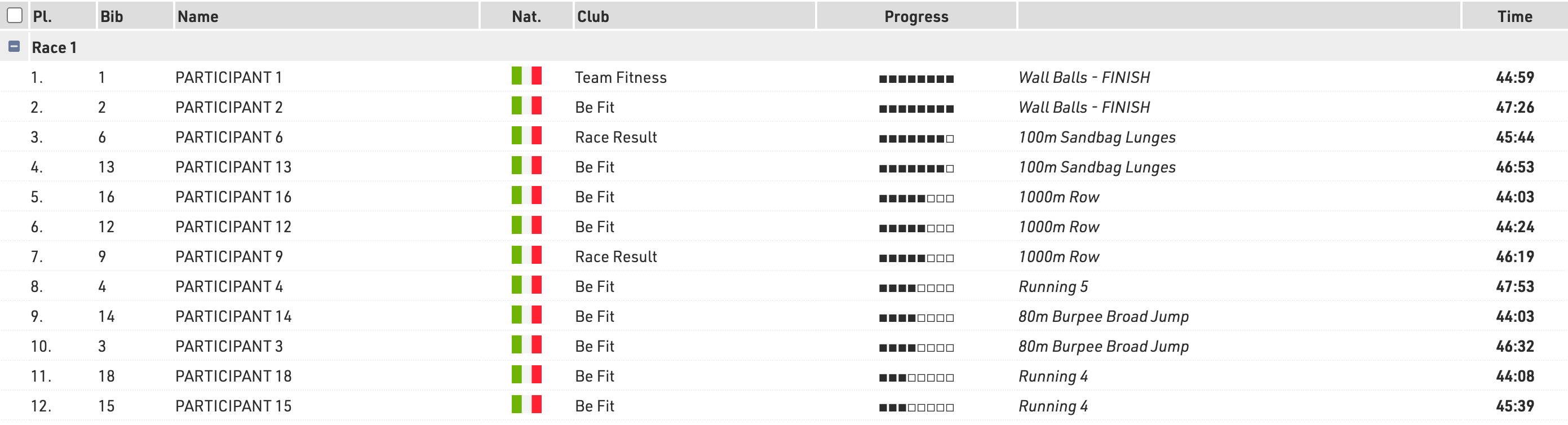
These labels can then be shown on the LIVE list, so spectators can follow which part of the race each participant is currently in.
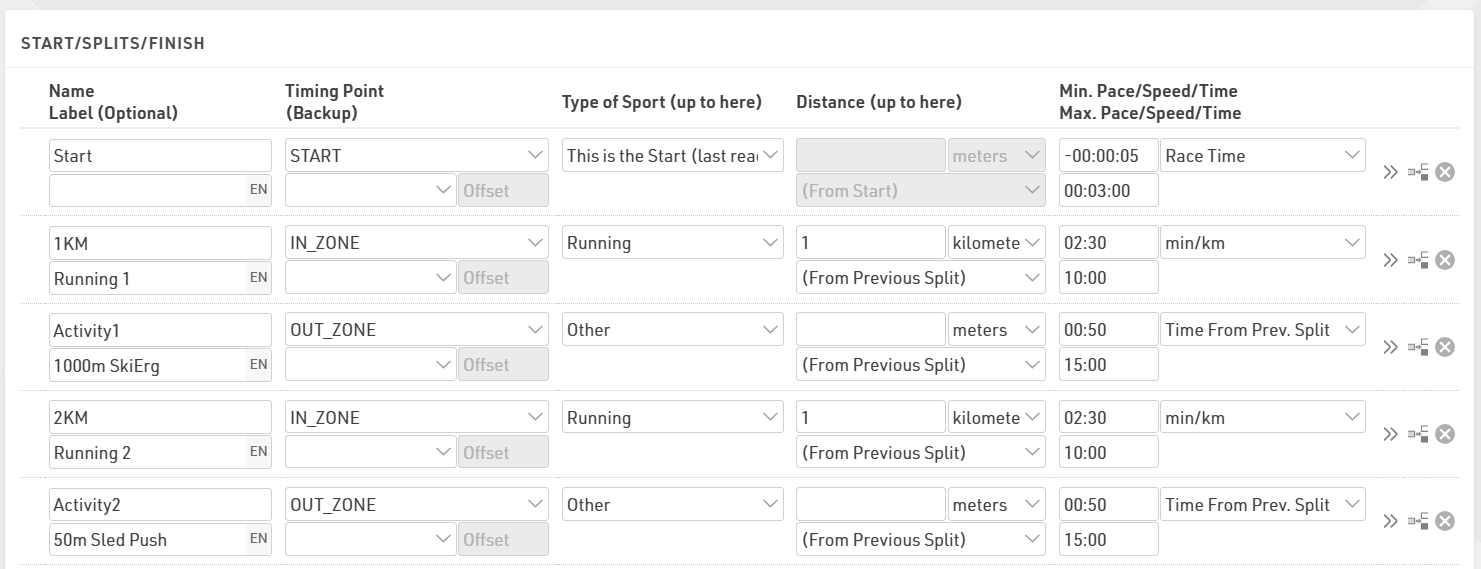
In this example, the event is set for a single contest (Race 1) with the Start split open for 3 minutes. All participants must cross the start line within this time window from the official race start (T0).
When working with multiple start groups, there are two different approaches depending on the structure of the event:
- Different race categories - Create separate Contests
For example, if your event has Elite Men, Elite Women, and Open divisions running independently, each category should have its own contest. This ensures separate rankings, timing logic, and results.
- Multiple start waves within the same category - Use Wave Starts
If participants in the same category simply start in several waves — for instance due to capacity limits or flow — you can use Wave Starts and assign participants based on their wave field. Waves allow staggered starts while still keeping the group ranked together in one contest.
Displaying Participant Progress
To make the LIVE view more interactive, a User Defined Function (UDF) is used to display a progress bar indicating how far a participant has advanced through the course.
The function, called ProgressBar(x), uses the number of completed splits {Selector}.SplitCount to determine progress:
choose(([x]-1)\2+1;
"□□□□□□□□"; "■□□□□□□□"; "■■□□□□□□"; "■■■□□□□□"; "■■■■□□□□"; "■■■■■□□□"; "■■■■■■□□"; "■■■■■■■□"; "■■■■■■■■")
Each full square (■) corresponds to the completion of an activity section. As participants complete runs and activities, the bar fills up, giving a clear visual overview of their progress.
Optional Improvements
This example keeps the setup simple, but it can easily be expanded.
For more detailed timing, you can add dedicated IN/OUT timing points for each activity to capture the exact time spent inside each station, rather than combining the short running transition.
Since these events typically attract large participation numbers, it’s strongly recommended to use a Check-In Kiosk. This helps efficiently manage and recycle transponders by reassigning them to new participants as soon as previous participants finish their race.
The event template attached already includes a Check-In Kiosk setup configured for this purpose. The kiosk uses Transponder Assign mode: Delete Existing Assignment, meaning that when a transponder is assigned to a new participant, any previous assignment is automatically removed.
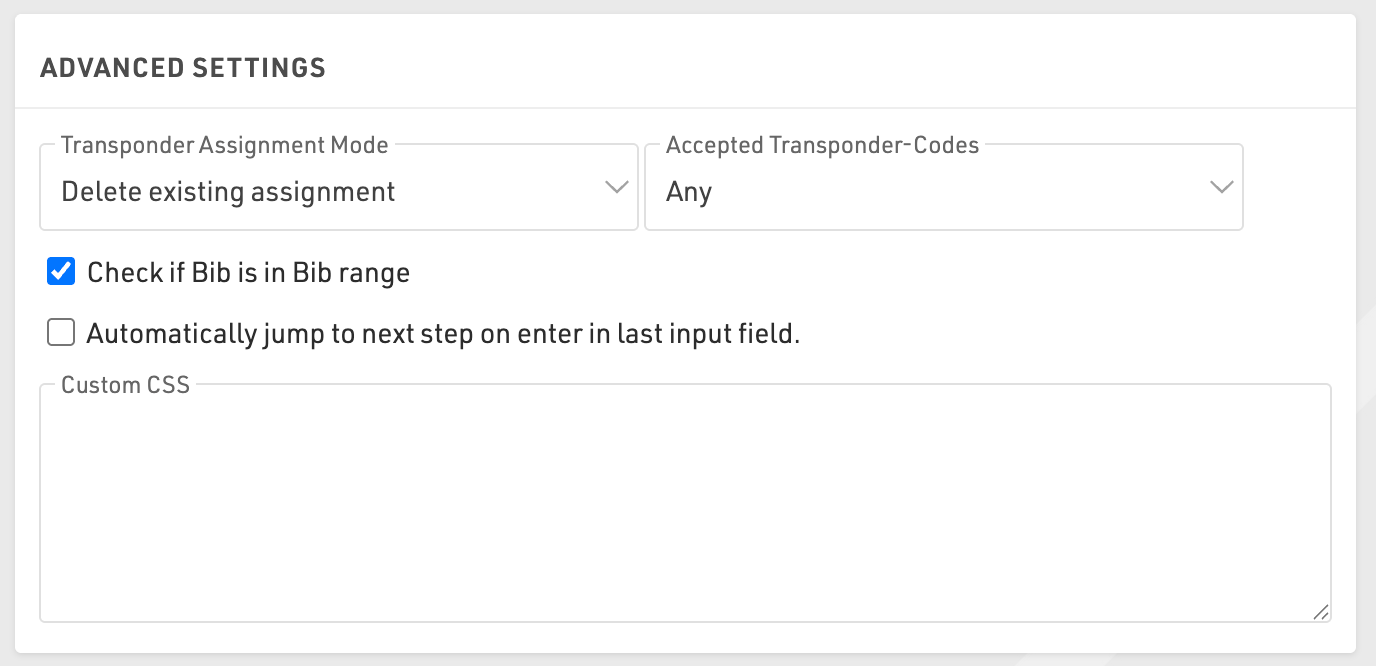
This ensures a smooth transponder-reuse workflow without manual intervention.