


After the end of the race the list of times and the list of bibs will be mapped, and the results be written in the event file.
In case you worked with a copy of the event file at the finish line, you first need to export the times (button “Export”), save them on a thumb drive and import them in the race office (button “Load Times”).
Next, the bibs will be added. If you wrote them down by hand, enter them in the third column (“Bib”) now. If there are discrepancies (for example too many or too few times taken), you need to decide how to solve the problem (for example insert or delete a time).
If you used the Manual Timing tool to record the bibs, you can now load the file by clicking the button “Load Bibs”.
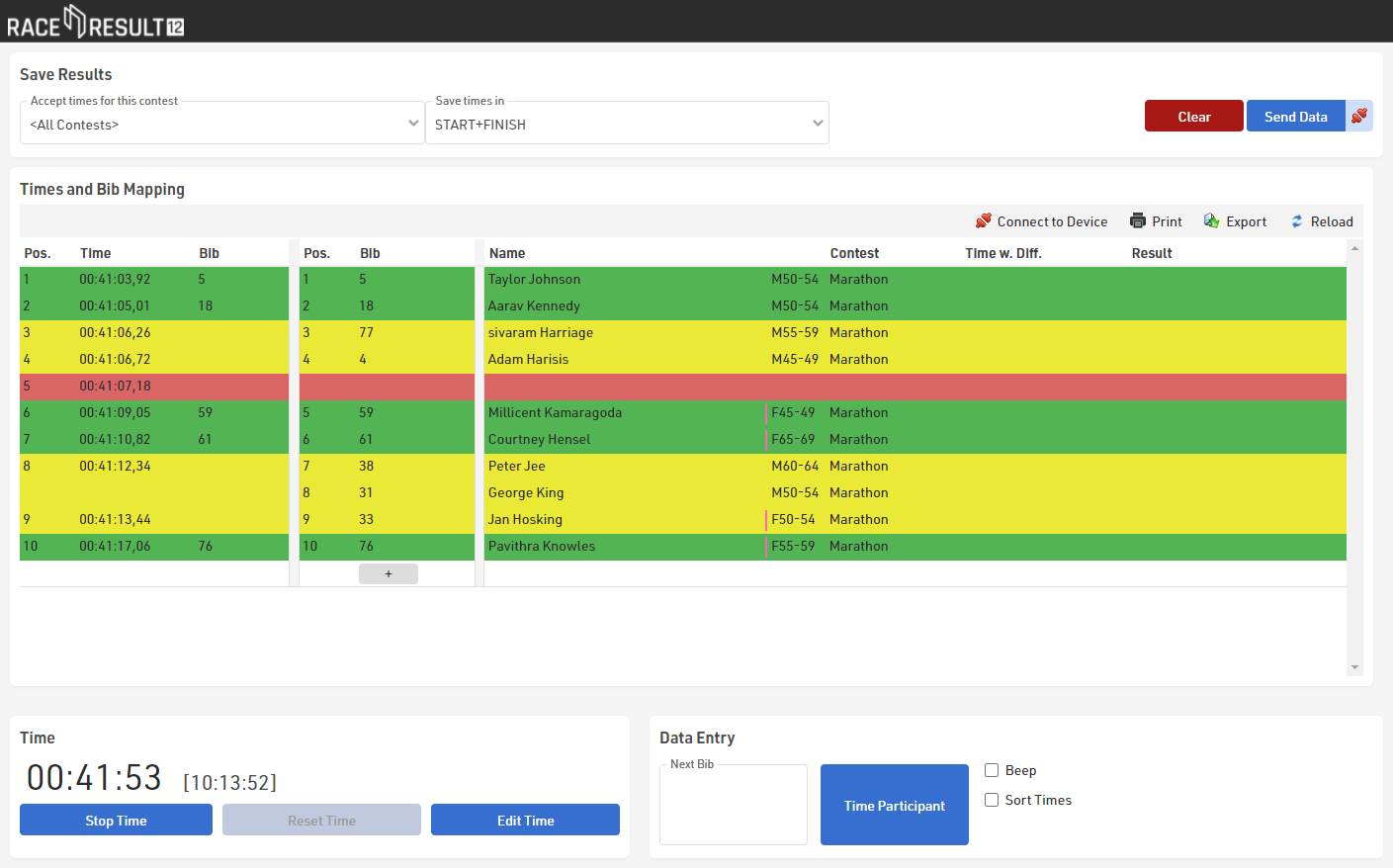
The tool tries to map the times and bibs automatically, but if the number of times and bibs in a block does not match, you need to investigate the situation and solve the problem manually. You can identify these blocks through the yellow and red background colors.
In the example above, a bib may be missing in the lines 3 to 5. This bib can be entered in line 5 or inserted in line 3 or 4 (when you hover the bib column, an Insert symbol will appear).
In line 8/9 a time may be missing or a bib was recorded accidentally. Either insert a time or delete a bib
In the end, all lines should be green and you can save the results in the event file by clicking the button Send Data:
