


Special Results are defined with the following settings.
First, choose an ID and a name for the result. The times of the results can be accessed by either the ID or the name of the result, see Time Fields.
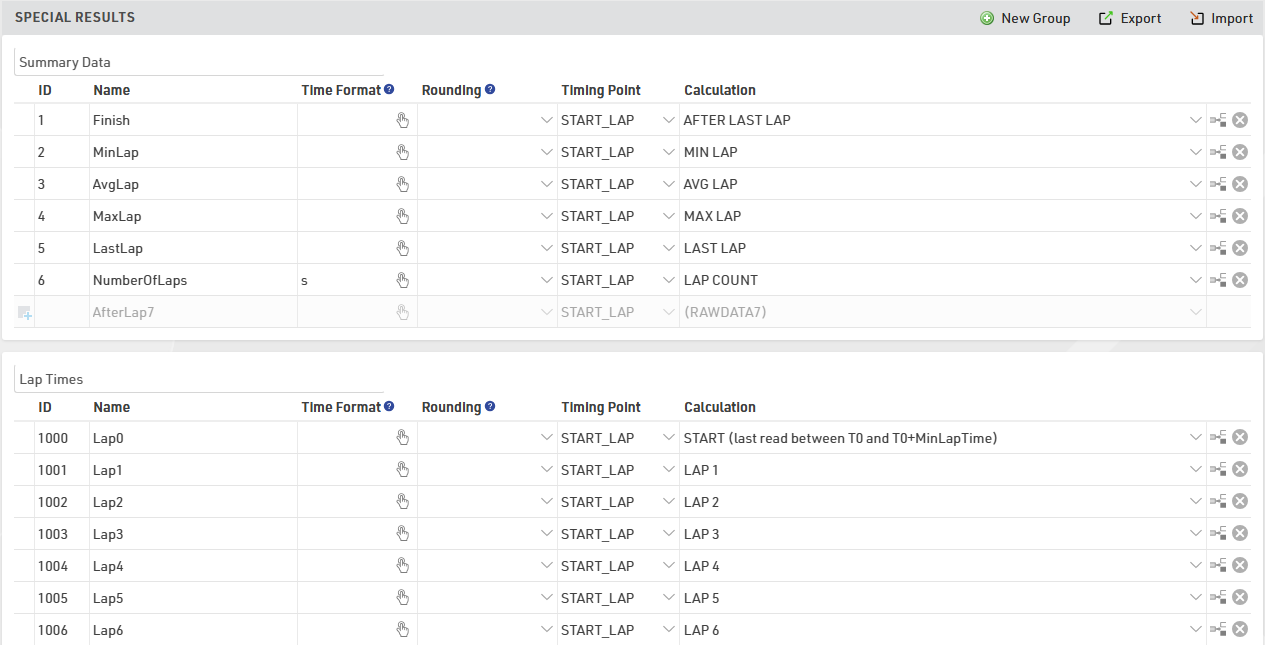
Make sure to choose your IDs wisely so that they are intuitive:
- For example save lap 1 in result 21, lap 2 in result 22, lap 3 in result 23, and so on – instead of lap 1 in result 27.
- Make sure to leave gaps in your IDs, maybe you would like to add something in between later.
- Use the low ID numbers for important results - these will be more visible in the Participants Window.
- Convention is that the result with ID 1 is the most important result, usually a Finish Time.
Next, you can optionally select a Time Format that defines how the times will be displayed, for example h:mm:ss. This time rounding will take priority over the Contest Settings, if you do not define a time format, the format from the Contest Settings will be used. Usually you would define the time format per contest and enter a time format for a result only if that result needs different formatting.
If you have results like number of laps or points, which are a numerical value instead of a time, you can use the time format: s
The same applies to the Time Rounding. If the result shall be rounded other than defined in the contest setting, select a rounding option.
It's possible for an event to have hundreds of special results. Grouping results can help organize the data for easier viewing and handling in the Participants Results Tab and Side-Bar Overview.