RACE RESULT ofrece numerosas opciones para integrar la inscripción en línea y los resultados al sitio web de su evento.
Esto se realiza mediante pequeños fragmentos de JavaScript que cargan los resultados directamente en su sitio web, sin utilizar iframes. Todos los estilos CSS de su sitio web también se aplicarán al formulario de inscripción en línea y a los resultados. Si es necesario, puede añadir CSS adicional para ajustar y personalizar la apariencia.
El código JavaScript que debe copiar y pegar en su sitio web se encuentra en my.raceresult.com → Website Integration.
En la sección Embed Single Tab, seleccione la pestaña o la Vista de Participantes (Participant View) que desea integrar y configure las opciones correspondientes. El fragmento de JavaScript y el shortcode de WordPress que aparecen debajo se actualizan automáticamente, por lo que solo necesita copiar el que corresponda a su sitio web.
Cualquier pestaña puede integrarse de esta manera, incluidas:
Las opciones que configure se incluirán tanto en el shortcode de WordPress como en el fragmento de JavaScript. Antes de utilizar el shortcode, actualice el complemento de WordPress a la versión 1.1.4 o posterior. Puede descargarlo desde la misma página.
Los artículos que se muestran a continuación explican con más detalle los distintos tipos de código de integración disponibles.
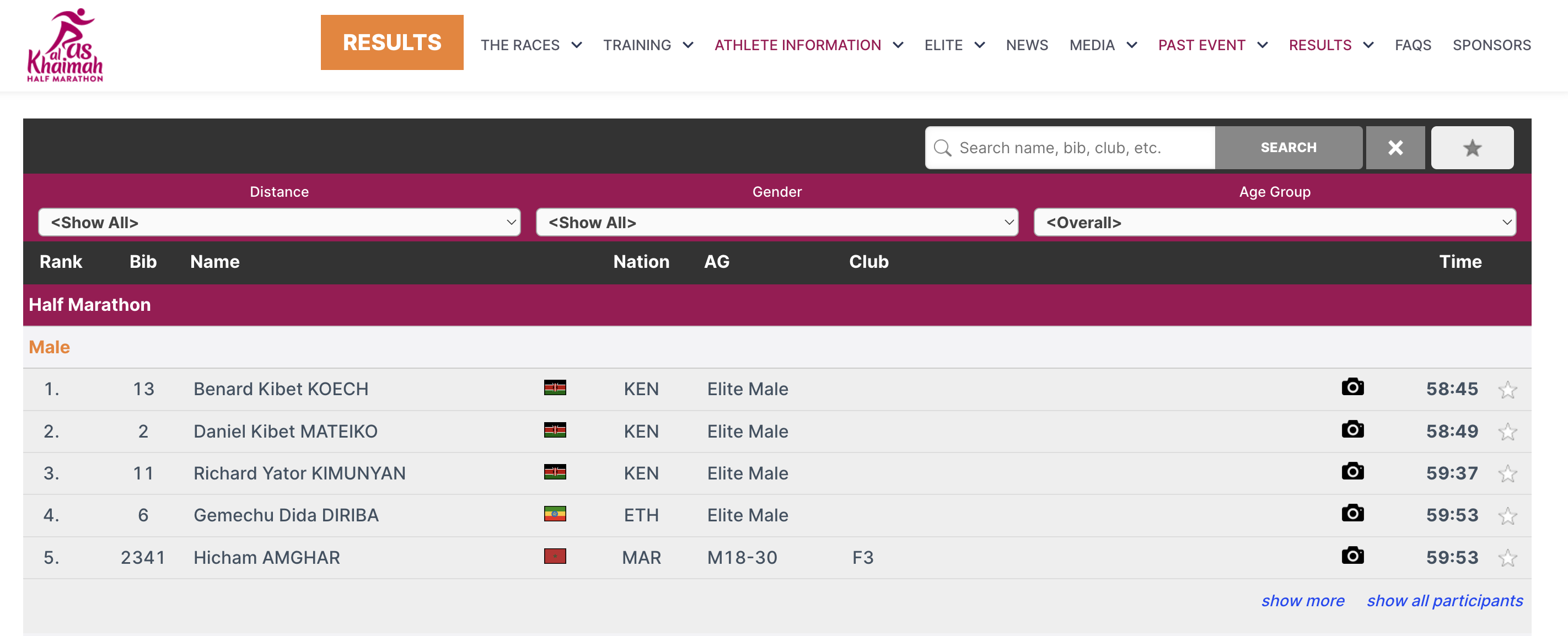
Para los resultados, esto podría verse de la siguiente manera:

En la captura de pantalla anterior, algunos de los colores del marco de resultados han sido modificados. Esto se logra utilizando CSS personalizado dentro de las etiquetas <style>, lo que permite adaptar la apariencia de los resultados para que coincida mejor con el diseño y la identidad visual de su sitio web.
Embed Lists
In order to embed the lists you need to copy the corresponding source code. You might notice that all of these are very similar. There are a few key things to note that make them different and some features that allow you to customize these lists.
Here is the source code for reference.
<div id="divRRPublish" class="RRPublish"></div>
<script type="text/javascript" src="https://my.raceresult.com/RRPublish/load.js.php?lang=en"></script>
<script type="text/javascript">
<!--
    var rrp=new RRPublish(document.getElementById("divRRPublish"), 123456, "results");
    rrp.ShowTimerLogo=true;
    rrp.ShowInfoText=false;
-->
</script>
<style>
  /* Add custom CSS here or elsewhere to change the design */
</style>
This source code loads data based on the Event ID specified and the tab url specified. All of the sections in red are variables you can change to customize the embedded code. The above example will load the Results list for event 123456. If you want to load the Participants or Live lists you will need to change "results" in red to either "participants" or "live". In the case of a custom list tab you would simply use the custom url.
There are also two boolean options to turn on and off features.
- rrp.ShowTimerLogo - when set to true will show the timer's logo at the bottom of the results.
- rrp.ShowInfoText - when set to true will show the info text defined for the specified page.
Embed Registration and Online Self-Service
The online registration source code allows you to embed the registration portal directly on your site. This also allows you to link the ChangeLink for Online Self Service directly to your site when using the ChangeLink() function.
To start you will need to embed the online registration source code on your site, the same code will enable both standard registration and online self service.
<div id="divRRRegStart" class="RRRegStart"></div>
<script type="text/javascript" src="https://my.raceresult.com/RRRegStart/load.js.php?lang=en"></script>
<script type="text/javascript">
<!--
  var rrp=new RRRegStart(document.getElementById("divRRRegStart"), 230672);
  rrp.ShowInfoText=false;
-->
</script>
<style>
  /* Add custom CSS here or elsewhere to change the design */
</style>
There are 2 variables here as highlighted in red.
- EventID - the ID of the event to be embedded.
- rrp.ShowInfoText - Either true or false to define whether the info text of the registration page should also be included.