


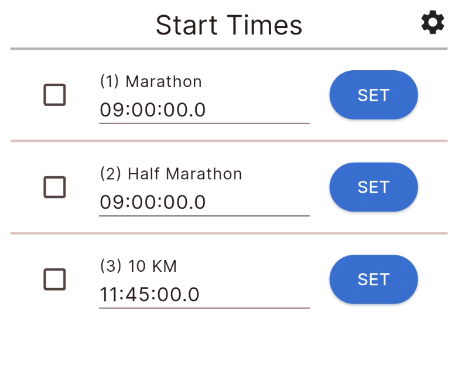
Start times can be set directly from the EventTools app making it easier to set start times remotely. This does not allow you to change the wave configuration, only set the times for each wave group. If the definition of waves has changed you can pull down on the screen to reload the current data from your event file.
Time Source
The time will be automatically taken from your device's internal clock, since this normally runs on NTP (Network time protocol) it may NOT be accurate when compared to the GPS time of a decoder.
The timing screen will automatically try to check the difference between your device time and an online server and will display a warning if this differs by more than 2 seconds.
If a time sync warning is displayed you may wish to compare the time to a decoder set to GPS and update your device time manually.
When initialising the timing screen the app will check if any start date is set in the RACE RESULT 12 Timing tab for mult-day events. If a start date is set then this will be used automatically by the app to calculate the time. If enabled then this will be shown below the main clock.
Setting Times
As with the Start TImes window within RACE RESULT 14 you can set an individual wave time, multi-set waves to the same time, or manually edit a time as needed.
Manually edited times will be saved when the field is submitted (pressing done on your keypad) or you can click the save icon. When exiting the Start Times screen if you have unsaved manual edits the app will prompt you to save your changes.