


Now everything is set up you can start timing the race, the following looks at a race where we just want the FINISH time for everyone.
The Chip Timing Window can be used for most types of races, alternatively there is an Advanced Timing menu which gives you more controls for specific cases (such as if you have multiple timing points to monitor).
Using the Chip Timing view, you simply need to click Set, next to the Start Time of the contest which is to be started, when the race is started. This will have the following effects:
- The Start Time (T0) for that contest is set based on the USB Timing Box internal time which is synchronised to Time Of Day.
- Results start calculating for athletes in the started contest according to your Splits setup.
- A running clock is displayed next to the Finish Time Limit which is the elapsed time since T0.
- Any times for athletes in other contests are still recorded but because these are before the start time no results are affected.
If multiple contests start together you can press start for one of them and then type in the same time to the Start Time of the other(s), because data is all handled dynamically these will re-calculate whenever the Start Time is updated.
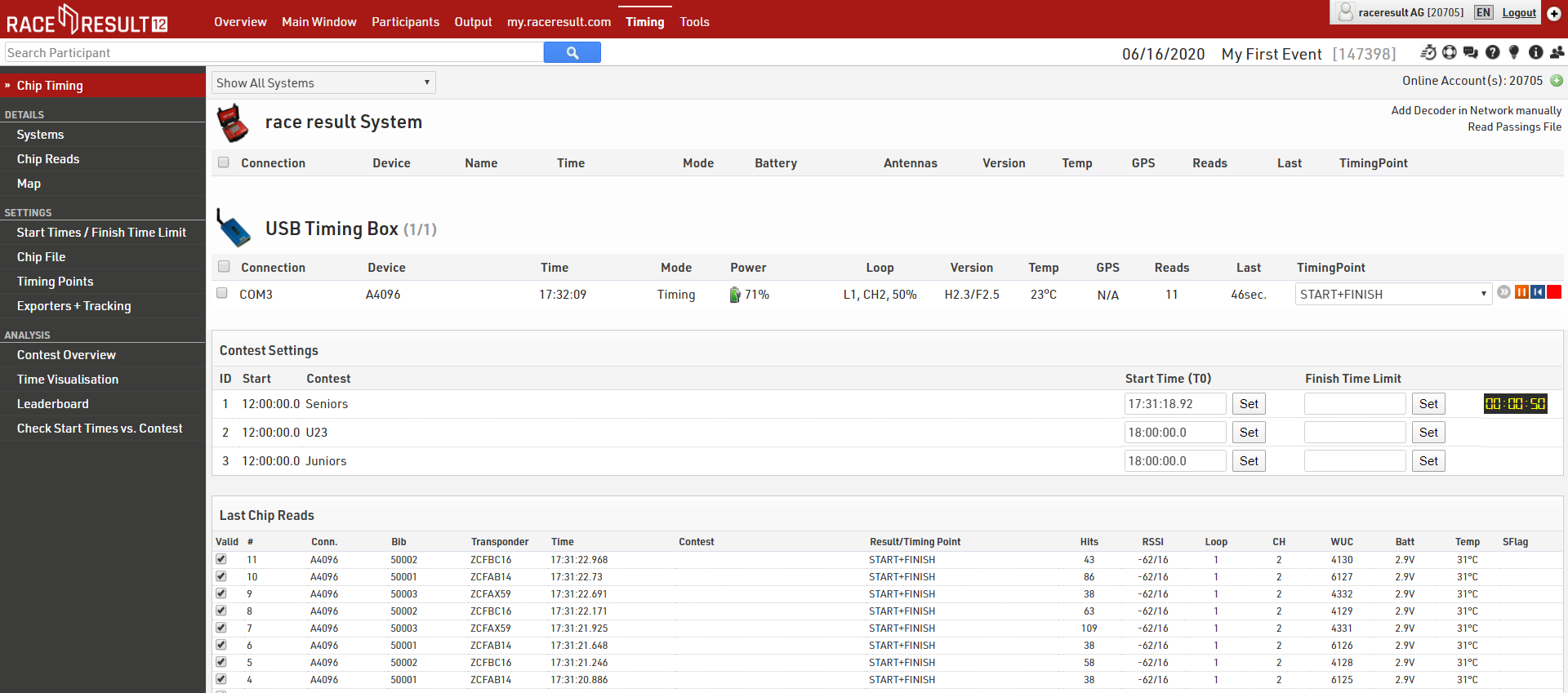
Once all athletes are finished you can set the Finish Time Limit, this lets the system know that it does not need to try and calculate any Finish results recorded after this time, the raw data is still saved so if you do make a mistake you can simply update this and it will re-calculate automatically.