RACE RESULT ponúka množstvo možností na bezproblémové vloženie online registrácie a výsledkov na webovú stránku podujatia.
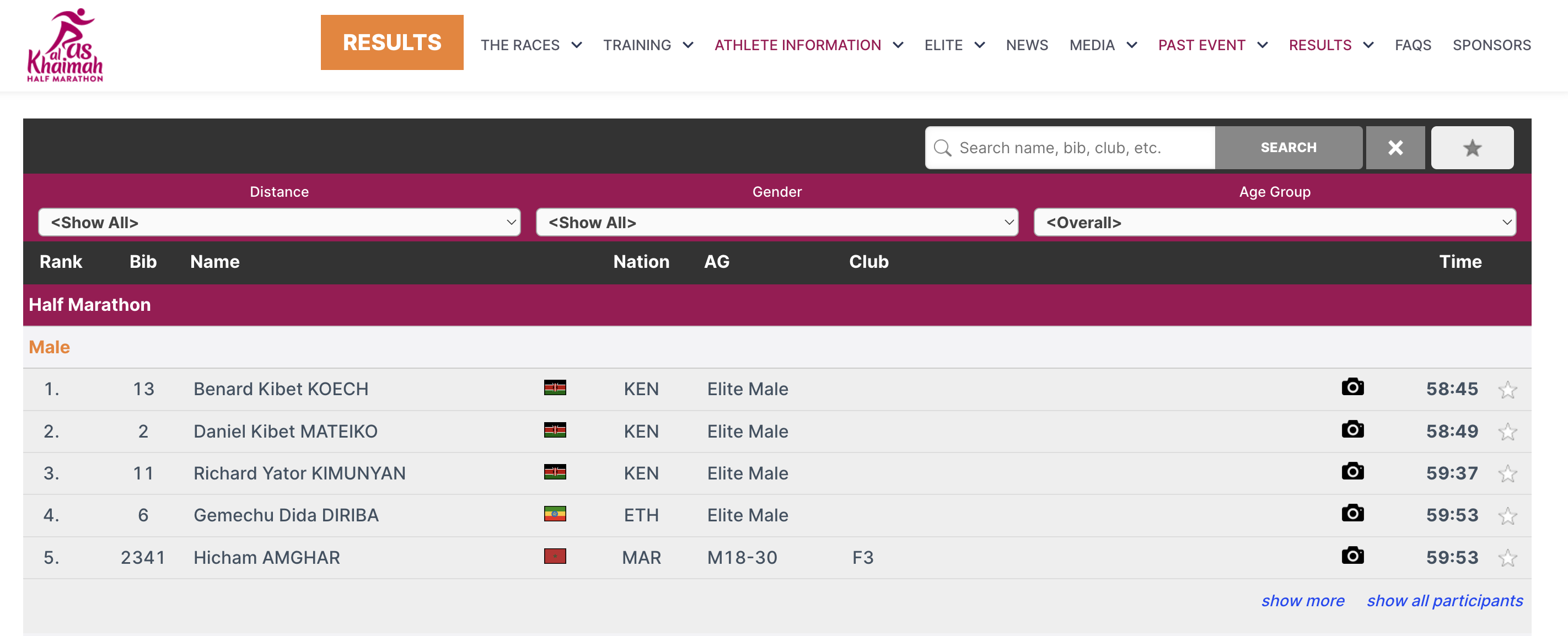
To sa deje prostredníctvom malých útržkov JavaScriptu, ktoré načítajú výsledky priamo na vašu webovú stránku (bez prvkov iframe). Všetky CSS štýly z vášho webu sa použijú aj pri online registrácii a výsledkoch. V prípade potreby môžete pridať CSS na doladenie vzhľadu.
Kód Javascript, ktorý je potrebné skopírovať a vložiť na vašu webovú stránku, nájdete v časti Základné nastavenia->Integrácia webovej lokality.
V nižšie uvedených článkoch sú podrobnejšie vysvetlené rôzne typy kódu na vloženie.
Pre výsledky to môže vyzerať takto:
<div id="divRRPublish" class="RRPublish"></div>
<script type="text/javascript" src="//my.raceresult.com/RRPublish/load.js.php?lang=en"></script>
<script type="text/javascript">
<!--
   var rrp=new RRPublish(document.getElementById("divRRPublish"), 58385, "results");
-->
</script>
<style>
   /* Add custom CSS here or elsewhere to change the design */
</style>
Na snímke obrazovky vyššie boli upravené niektoré farby rámca výsledkov, a to pomocou vlastného CSS v značkách štýlu.
Embed Lists
In order to embed the lists you need to copy the corresponding source code. You might notice that all of these are very similar. There are a few key things to note that make them different and some features that allow you to customize these lists.
Here is the source code for reference.
<div id="divRRPublish" class="RRPublish"></div>
<script type="text/javascript" src="https://my.raceresult.com/RRPublish/load.js.php?lang=en"></script>
<script type="text/javascript">
<!--
    var rrp=new RRPublish(document.getElementById("divRRPublish"), 123456, "results");
    rrp.ShowTimerLogo=true;
    rrp.ShowInfoText=false;
-->
</script>
<style>
  /* Add custom CSS here or elsewhere to change the design */
</style>
This source code loads data based on the Event ID specified and the tab url specified. All of the sections in red are variables you can change to customize the embedded code. The above example will load the Results list for event 123456. If you want to load the Participants or Live lists you will need to change "results" in red to either "participants" or "live". In the case of a custom list tab you would simply use the custom url.
There are also two boolean options to turn on and off features.
- rrp.ShowTimerLogo - when set to true will show the timer's logo at the bottom of the results.
- rrp.ShowInfoText - when set to true will show the info text defined for the specified page.
Vložená registrácia a online samoobsluha
Zdrojový kód online registrácie vám umožňuje vložiť registračný portál priamo na vašu stránku. To vám tiež umožňuje prepojiť [ChangeLink] pre Online samoobsluhu priamo s vašou stránkou pri použití funkcie ChangeLink().
Na začiatok budete musieť vložiť zdrojový kód online registrácie na vašu stránku, rovnaký kód umožní štandardnú registráciu aj online samoobsluhu.
<div id="divRRRegStart" class="RRRegStart"></div>
<script type="text/javascript" src="https://my.raceresult.com/RRRegStart/load.js.php?lang=en"></script>
<script type="text/javascript">
<!--
  var rrp=new RRRegStart(document.getElementById("divRRRegStart"), 230672);
  rrp.ShowInfoText=false;
-->
</script>
<style>
  /* Add custom CSS here or elsewhere to change the design */
</style>
Sú tu 2 premenné zvýraznené červenou farbou.
- EventID – ID udalosti, ktorá sa má vložiť.
- rrp.ShowInfoText – buď true alebo false, aby sa určilo, či má byť zahrnutý aj informačný text registračnej stránky.