Ak chcete importovať účastníkov z externého zdroja, môžete importovať súbor Excel/CSV v hlavnom okne->Importovať účastníkov.
Požiadavky
Súbor Excel musí spĺňať nasledujúce požiadavky:
- Údaje, ktoré chcete importovať, sú na prvom pracovnom hárku.
- Prvý riadok obsahuje hlavičky stĺpcov, ktoré určujú, do ktorého Pole sa importujú hodnoty stĺpcov.
- Súbor medzi nimi neobsahuje žiadne prázdne riadky. Hneď ako sa nájde prvý prázdny riadok, import sa zastaví.
Najjednoduchšie je vyplniť príklad platnej tabuľky Excel prepojenej na obrazovke importu.
Okrem toho by mal súbor Excel obsahovať iba údaje, ktoré skutočne chcete importovať. Ak súbor obsahuje iné stĺpce, import bude odmietnutý s chybovým hlásením „Neznámy stĺpec“. V tomto prípade je možné aktivovať možnosť Ignorovať neznáme stĺpce, je to však trochu riskantné. Ak je názov jedného stĺpca nesprávny (napr. Meno namiesto Priezvisko), stĺpec sa bude ignorovať a údaje sa importujú bez neho.
Poznámka: Poznámka: Na prečítanie súboru Excel/CSV/text v rámci programu RACE RESULT 14 potrebujete na svojom lokálnom počítači nainštalovaný tabuľkový procesor, ako napríklad Microsoft Excel alebo Libre Office Calc.
Pridávanie a aktualizácia účastníkov
V predvolenom nastavení sa záznamy zo súboru Excel pridajú do súboru udalosti. Ak súbor programu Excel neobsahuje číslo podpisníka, pridelí sa mu nové číslo podľa Nastavenia čísla podpisu.
Ak však súbor Excel obsahuje stĺpec Bib a je zadané číslo, použije sa tento bib. Na druhej strane to znamená, že záznam nebude importovaný, ak už v súbore udalosti existuje bib číslo.
Pri aktivácii možnosti Aktualizovať existujúcich účastníkov sa existujúce záznamy v súbore aktualizujú o informácie zo súboru Excel. Nastavenie Mapovanie účastníkov cez definuje, ktorý záznam v súbore udalosti a ktorý záznam v súbore Excel si navzájom zodpovedajú. Zvyčajne sa záznamy mapujú pomocou čísla bib, ale môžete si vybrať napríklad aj prvé dva stĺpce, ktoré môžu obsahovať priezvisko a meno.
Ak v súbore udalosti nenájdete zodpovedajúci záznam, vytvorí sa nový záznam, pokiaľ neaktivujete možnosť Nepridávať účastníkov.
Na zváženie
Je dôležité importovať iba vek alebo dátum narodenia alebo rok narodenia. Ak importujete viac ako jedno z týchto polí, budú vo vzájomnom konflikte a vaše údaje budú nesprávne. Viac informácií o týchto poliach nájdete v našom článku YearOfBirth and DateOfBirth.
Importovanie účastníkov podľa súboru podujatia
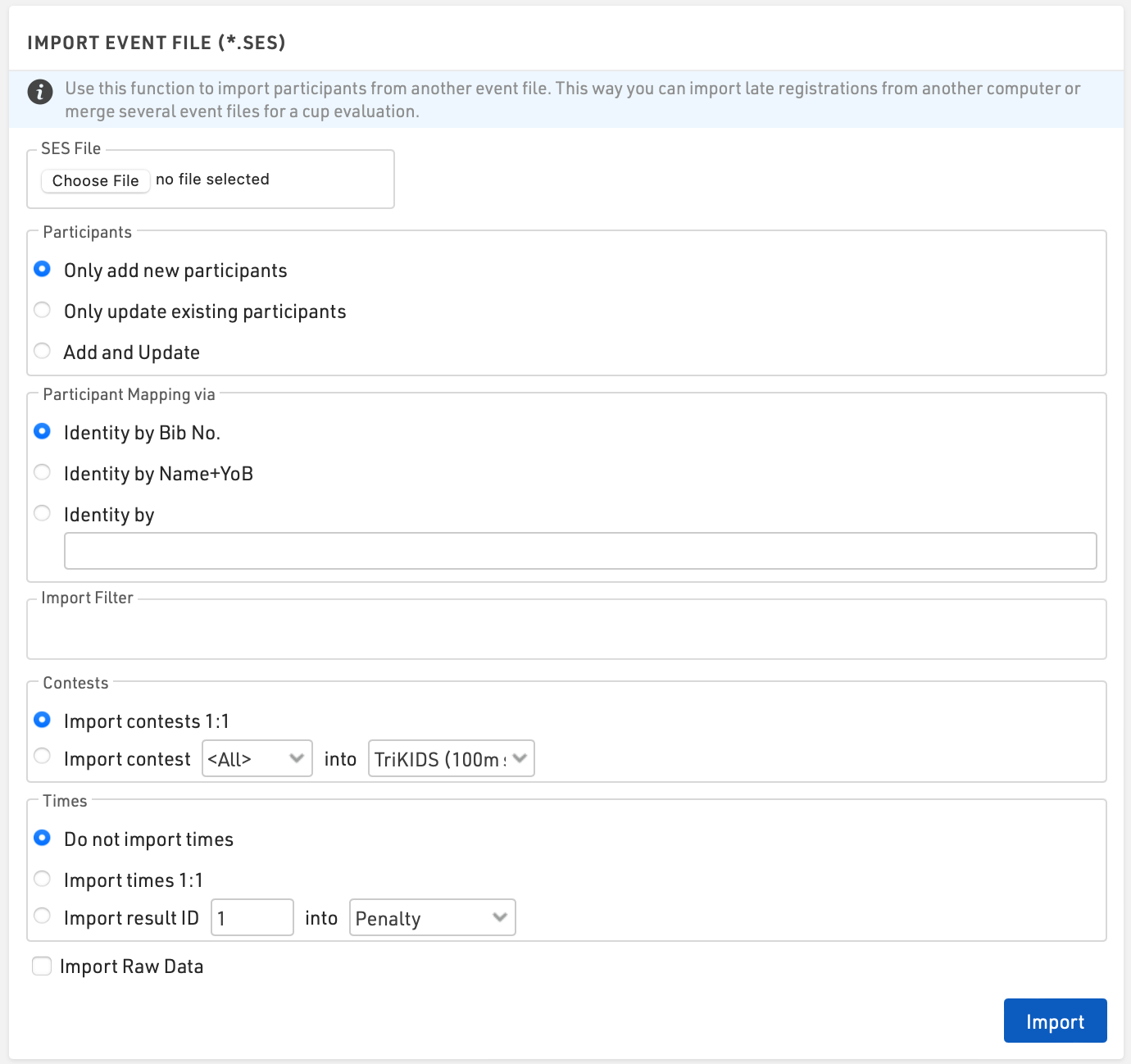
Používa sa na import účastníkov a časov z iného súboru udalosti. Týmto spôsobom môžete importovať neskoré registrácie z iného počítača alebo zlúčiť niekoľko súborov udalostí na vyhodnotenie série.
Tip: When importing and identifying participants it is recommended that you first make a local backup of the event file.
Participants
Choose how to handle the data you are importing
- Only add new participants
- Only update existing participants
- Add and Update
Participant Mapping
Most commonly participants are identified by bib. If participants do not use the same bib number alternative identity options such as Name+YOB or a unique identifier such as Registration Number can be used.
Filter
A filter can be applied to the import, for example, you may only want to import records for bibs between 1 and 500 or for a specific Contest
Contests
Participants will be assigned to a Contest according to the contest matching settings.
Contest 1:1 requires the contest ID number of both event files to match exactly. This option is commonly used when a copy of the same event files is being used, such as when late registrations are being taken.
Contests that do not have matching ID’s can be imported by selecting the contest number and corresponding contest name.
Tip: If a participant enters a series event and changes contests partway you should identify participants by your preferred identifier and contest e.g. [Bib] & [Contest].
Times
Times in Special Results can be imported similarly in the same way. Times with matching result IDs can be imported with Times 1:1. If the imported file is being used for a series evaluation you can map the result ID into another result field.
Raw Data
When the option Import Raw Data is selected, all Raw Data records will be imported. It is important that the timing points name match in both files.
Possible Excel import error messages
When importing participants it is possible to receive an error message if something in your import file is incorrect. Below is a list of possible error messages with explanations and possible fixes.
Unknown column
- A column in your Excel file does not exist as a data field in your event file. You should change the column name in the Excel file to match the data field in your event file. If the data field doesn't exist, you can create a custom field in Main Window > Participants Data > Additional Fields.
- Check your import file for hidden columns. In Excel, it is possible to hide columns from view. When importing these columns are still visible. Look at the column lettering and see if a letter is missing. This will indicate a hidden column.
- Check the spelling of the column name in your import file to make sure it matches the field you are trying to import.
- ADVANCED. Check the box labeled "Automatically create additional fields for unknown columns". This will generate additional fields for any unknown columns - but you should check that you do not have an error in an existing column name before using this option.
File contains more than one participant assigned to Bib 100, which is not allowed. Please correct this problem and import again.
- This indicates you have more than one of the same bib numbers in the Bib column.
- In your Excel file, check the Bib column for duplicates. It helps to sort your file by the Bib value.
Error: Invalid col name: My Data
- This error indicates a column name that is invalid.
- Column names cannot contain spaces or special characters.
Bib Existing
- This error happens when you are trying to import a list of participants and mapping on a value other than Bib.
- This error indicates that one of the participants being imported has a Bib value that already exists in the event file and the mapping value does not line up.
- For example, Bib 100 exists in the event file with a mapping value of 1. You try to import bib 100 under a mapping value of 2. Bib Existing error will be thrown.