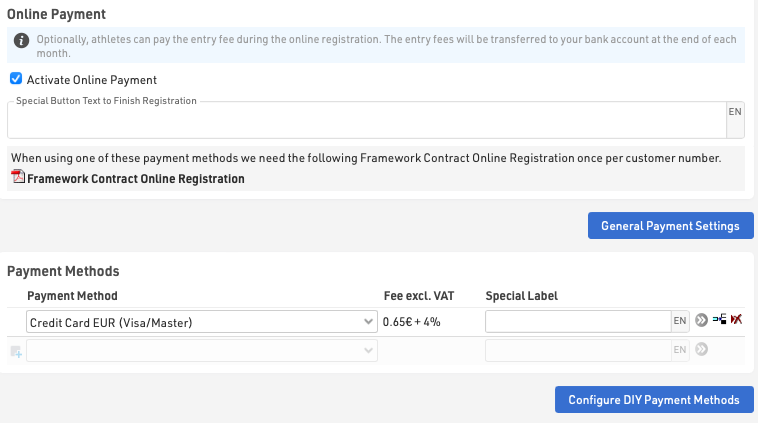
Online platba vám umožňuje zachytiť platbu priamo v rámci registrácie, keď je aktivovaná, dodatočné kroky na výber a uskutočnenie platby sa automaticky vygenerujú po načítaní registračného formulára.
Spôsoby platby
RACE RESULT ponúka celý rad možností platby prostredníctvom online registrácie. Upozorňujeme, že nie všetky spôsoby platby sú dostupné vo všetkých krajinách.
Pri platbách, pri ktorých sú poplatky prijímané spoločnosťou RACE RESULT, sa vyžaduje zmluva o online registrácii, odkaz na ňu sa zobrazí pri výbere spôsobu platby, ktorý si to vyžaduje. Tieto spôsoby platby sú spoplatnené a vyplácané v súlade so zmluvou, poplatky za jednotlivé spôsoby sú uvedené v nastaveniach.
Špeciálny text tlačidla na dokončenie registrácie sa zobrazuje pri metódach, pri ktorých používateľ nie je presmerovaný na inú platobnú stránku (napr. SEPA, bankový prevod alebo hotovostné platby).
Okamžité spôsoby platby
Účastník vykonáva priamu platbu online, zvyčajne pomocou kreditnej alebo debetnej karty, ktorá je k dispozícii iba pre transakcie v EUR, CHF, GBP, USD s Európou.
Spôsoby oneskorenej platby
Účastník môže vykonať prevod neskôr na účty RACE RESULT v Nemecku alebo Švajčiarsku, tieto budú označené ako zaplatené až po prijatí finančných prostriedkov.
Spracovanie platieb DIY
Ak máte účet s podporovanou platobnou platformou, účastníci uskutočnia priamu platbu prostredníctvom tejto platformy, ktorá bude následne vyplatená priamo na váš účet, je to úplne na vaše vlastné riziko. Upozorňujeme, že zvyčajne je platba prostredníctvom kreditnej karty jediným podporovaným spôsobom platby v rámci týchto DIY platobných brán, aj keď môžu ponúkať množstvo rôznych spôsobov platby.
Budete musieť zadať podrobnosti o svojom účte podľa zvoleného spôsobu.
Za určité spôsoby platby DIY si RACE RESULT účtuje určitý poplatok ako percento z celkovej sumy platby, pričom tento poplatok má zabezpečiť údržbu a údržbu takýchto metód. Tieto poplatky budú fakturované na mesačnej báze v posledný deň každého mesiaca.
Entry Fee Collection / Payout
Availability of Entry Fee Collections
Due to technical reasons, transactions via RACE RESULT are only feasible within the EUR currency zone, including the UK and Switzerland.
For countries outside these regions, we provide country-specific DIY Payment interfaces. The number of providers is continually expanding. If your preferred solution is not currently offered, please contact support@raceresult.com.
Online-Payment Contract
When do I need to complete a Payment Agreement?
During the registration fee collection, you have the option to handle the transaction yourself or engage RACE RESULT as a service provider. Once you decide to utilize the service of RACE RESULT, you must fill out our Online-Payment Agreement.
You can find this on our website, and it establishes the legal basis for the transaction. This contract is customer-specific, not event-specific, and remains valid as long as there are no changes (see "When do I need to fill out the contract again?"). In the event that you choose to handle the entry fee collection yourself, no contract is required.
When do I need to fill out the contract again if necessary?
You need to complete the contract again if the contact details in your customer account have changed or if the payout account has changed in general.
If there have been changes to the contract terms, we will prompt you to fill out the contract again.
Payout of Entry Fees
When are entry fees paid out?
The payout of entry fees takes place at the end of the month, but with minimum delays according to §3 of the contract. Please refer to the contract for further conditions.
In which currency is the payout made?
The payouts of entry fees are made in the national currency. The fees are calculated in EUR.
Example: An event in Switzerland will be paid out in CHF. The payment fees are in EUR.
Invoice for Payouts
Can I change the billing address afterwards?
The invoicing of entry fees is automated at the end of the month based on the stored customer data. A subsequent change to the invoice is not possible once it has been issued; once the invoice is generated, it cannot be altered.
If no alternate billing address is provided, the invoice will automatically be issued to the address stored in the customer account.
Can I specify a different billing address?
You can specify an alternate customer number as the billing address in the general payment settings of your registration forms.
The owner of the event undertakes to inform the customer with the alternate customer number of all rights and obligations arising from the contract and ensures their complete compliance.
Payment Methods
| OPMethod | Abbreviation | Payment Method | RACE RESULT Fees |
| Instant Payment Methods | |||
| 2 | CCEUR | Credit Card EUR | 0.65€ + 4% |
| 3 | CCCHF | Credit Card CHF | 0.65€ + 4% |
| 6 | SPF | Swiss PostFinance | 0.65€ + 3% |
| 7 | PPAL | PayPal EUR | 0.78€ + 4% |
| 12 | UEBSOF | Sofortüberweisung.de | 0.55€ + 2.5% |
| 14 | PPALGBP | PayPal GBP | 0.78€ + 4% |
| 15 | PPALUSD | PayPal USD | 0.78€ + 4% |
| 16 | SEPA | SEPA | 0.06€ + 1% |
| 17 | CCGBP | Credit Card GBP | 0.65€ + 4% |
| 19 | SEPADATA | Collect SEPA Data ONLY | |
| 30 | TWINT | TWINT (CHF) | 0.65€ + 3% |
| Delayed Payment Methods | |||
| 4 | UEBD | Transfer to European Bank Account | 1.00€ |
| 8 | UEBCH | Transfer to Swiss Bank Account | 1.50€ |
| 10 | EINZCH | Swiss Payment Order | 1.50€ |
| DIY Payment Methods | |||
| 20 | OWNEPAY | Your Own EPay Account | - |
| 21 | OENPPAL | Your Own PayPal Account | - |
| 22 | OWNWIRET | Wire Transfer to Own Account | - |
| 26 | OWNONEPAY | Your Own OnePay Account | - |
| 27 | TELR | Your Own Telr Account (Auth + Capture) | - |
| 28 | OWNONEPAYDOM | Your Own OnePay Account (Domestic) | - |
| 29 | FATORA | Your Own Fatora Account | 1.25% |
| 31 | STRIPECARD | Your Own Stripe Account | 1% |
| 32 | OWNPAYTRAILV2 | Your Own PayTrail Account (V2) | 1.25% |
| 33 | TELRSALE | Your Own Telr Account (Sale) | 1.25% |
| 34 | REDSYS | Your Own RedSys Account | 1% |
| 35 | MOLLIEBANCONTACT | Your Own Mollie Account for Bancontact | 1.25% |
| 36 | PAYTABS | Your Own PayTabs Account | 1.25% |
| 37 | AsiaPay | Your Own AsiaPay Account | 1% |
| 38 | MercadoPago | Your Own MercadoPago Account | 1% |
| Other | |||
| 0 | No Payment | - | |
| 5 | BAR | Cash At Event | - |
| 9 | VOUC | Voucher | - |
| 99 | CB | Chargeback | - |
Charges / Payouts
Entry Fees collected by RACE RESULT (Instant Payment Methods and Delayed Payment Methods) will be paid out at the end of each month.
For DIY payment methods which incur a fee, RACE RESULT will invoice based on the total fees collected through the corresponding payment method. These invoices may be sent less frequently to avoid unnecessary accounting for small amounts. If you require an invoice sooner for your own accounting please contact support@raceresult.com.
How are the payment fees calculated?
Example using the payment method PayPal (EUR) with 0.78 EUR + 4% of the total amount and an entry fee of 20.00 EUR plus 19 % VAT:
| PayPal (EUR) 0.78 EUR + 4% | |
| Entry fee | 20.00 EUR |
| Fixed fee | 0.78 EUR |
| Toatal amount | 20.78 EUR |
| 4% Transaction-based fee | 0.83 EUR |
| Total payment fee | |
| Fitxed fee | 0.78 EUR |
| Transaction-based fee | 0.83 EUR |
| Total payment fee (excluding VAT) | 1.61 EUR |
| 19% VAT | 0.31 EUR |
| Total payment fee (including VAT) | 1.92 EUR |
Stripe API - Your Own Stripe Account
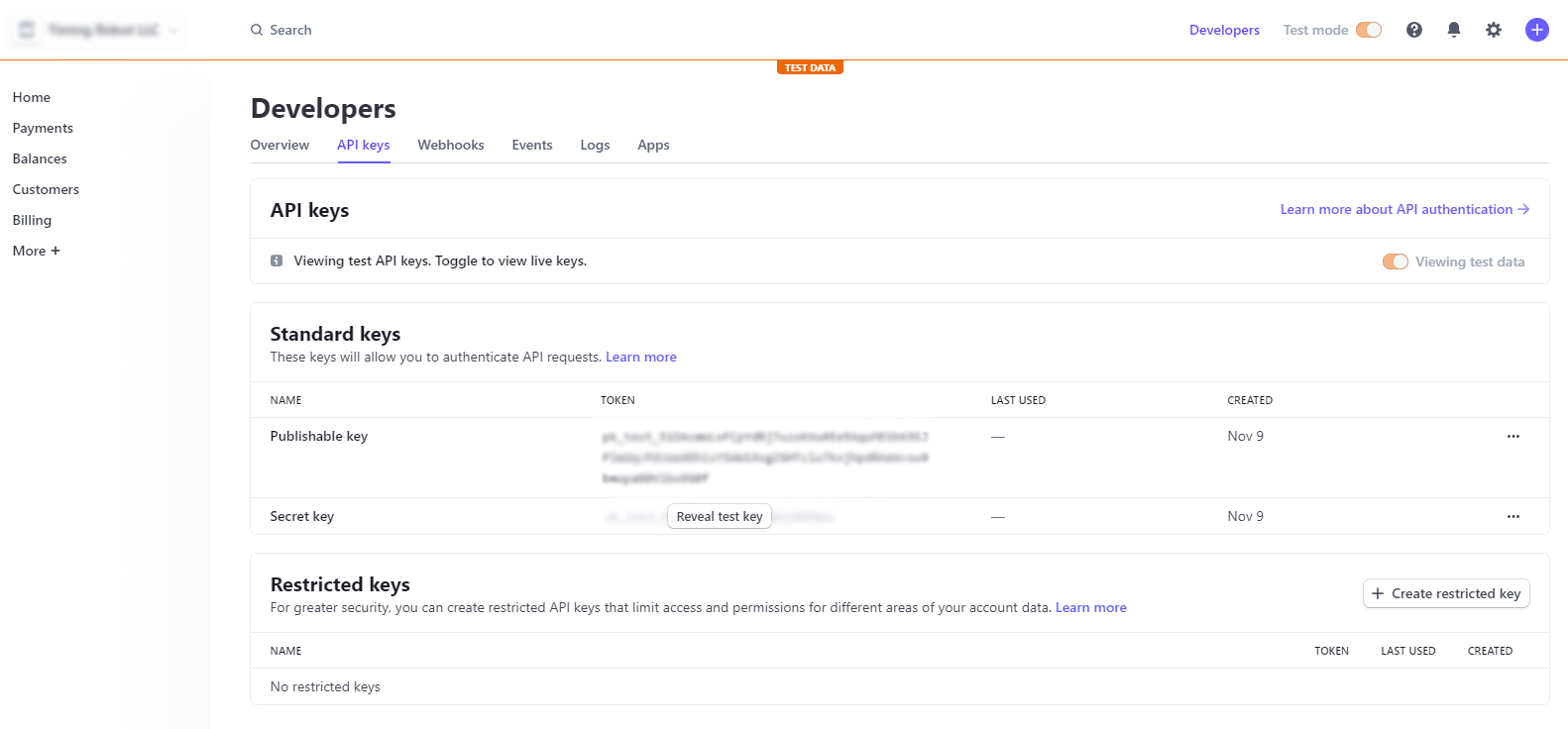
In order to accept Stripe payments, you need to connect your Stripe account using an API key. Stripe requires both a Secret and a Public key.
To obtain a Stripe API key, log in to your Stripe account on stripe.com. From there, select Developer in the top right corner and API keys from the available tabs toward the top of the screen. In the top right-hand corner, switch from Test Mode to Live Mode. In the center of the screen, you will find the necessary keys.
| Stripe | RACE RESULT 12 |
|---|---|
| Publishable key |
Public key |
| Secret key | Secret Key |
More information on Stripe API keys can be found here.
PayPal API - Your Own PayPal Account
Note: Instructions and screenshots are accurate at the time of writing. Updated on January 22, 2025. Subject to change.
You can only receive payments through PayPal API with a PayPal business account. If you have a personal PayPal account, you will have to upgrade it to a business account, or you will have to create a new PayPal account that is set up as a business account.
Log in to https://developer.paypal.com/dashboard with your business account and navigate to Apps & Credentials. In the top right corner, make sure to toggle to Live, then press Create App.
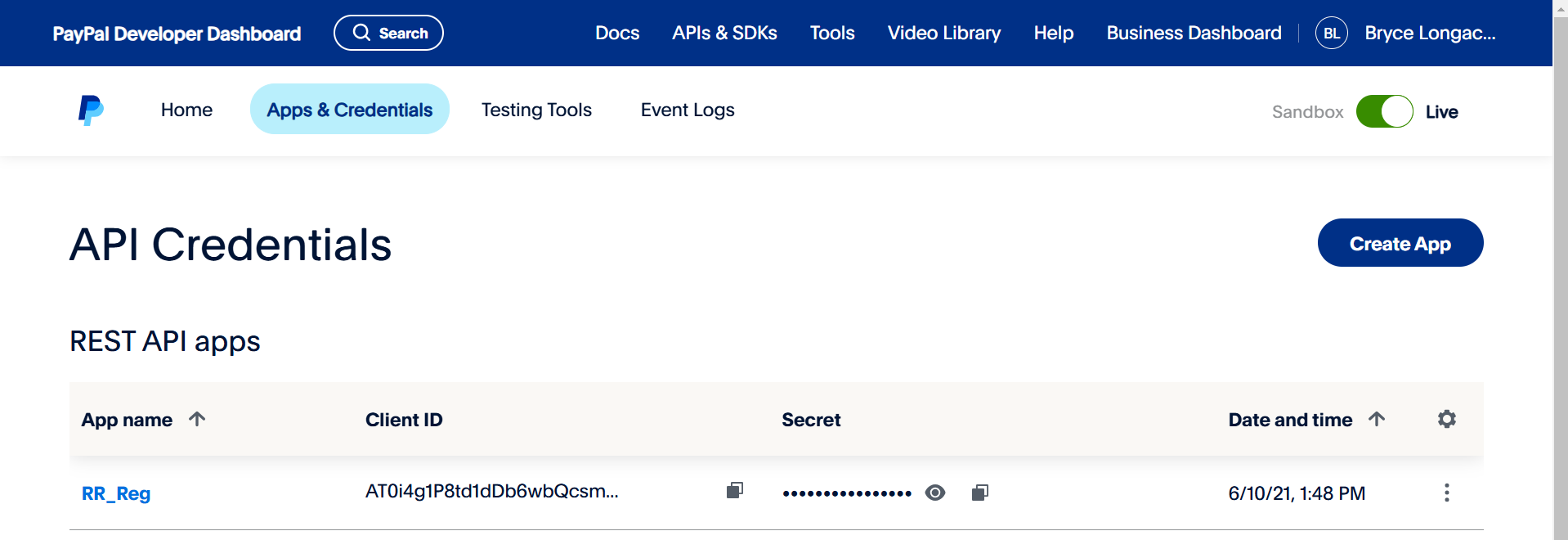
The app will generate a Client ID and Secret automatically. Make sure to copy these exactly as they are. The API signature is ONLY required for the legacy classic integration. Most events no longer use this legacy integration.
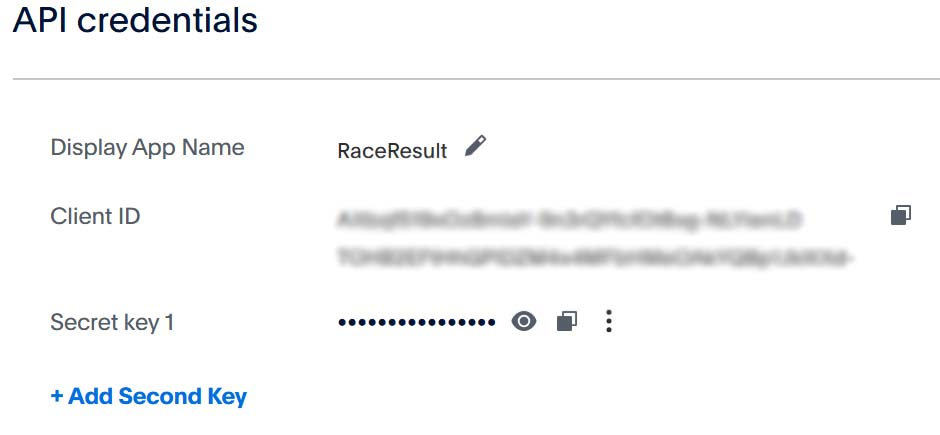
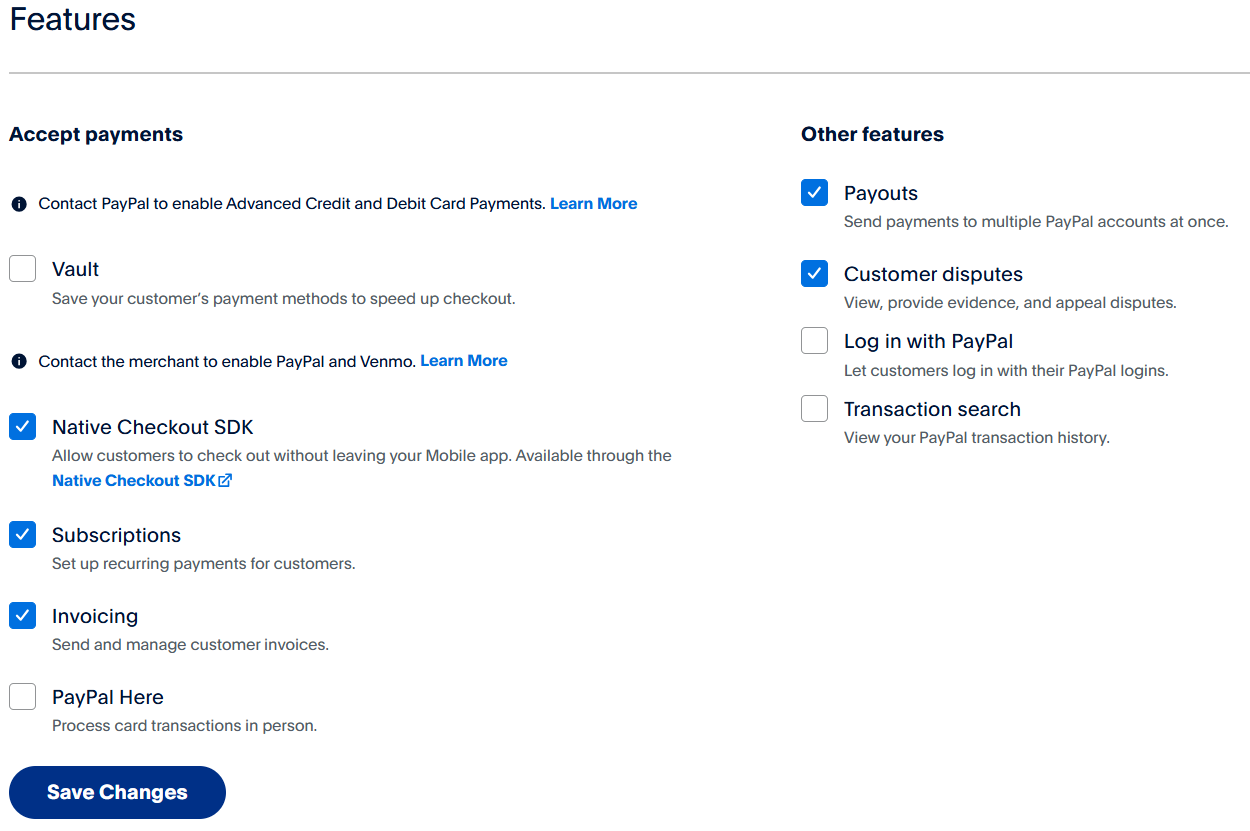
After naming and creating the App you may need to adjust some of the features to suit your needs.
Mercado Pago API - Configura tu propia cuenta MP
Para aceptar pagos de Mercado Pago en RR12, debes conectar tu cuenta de Mercado Pago a RR12 mediante una clave API. Mercado Pago requiere un ID de usuario y una clave secreta.
Para Obtenerlas, debes seguir los siguientes pasos:
1- Debes ingresar a tu cuenta de Mercado Pago desde un ordenador. (No es posible obtenerlas ingresando desde la app móvil)
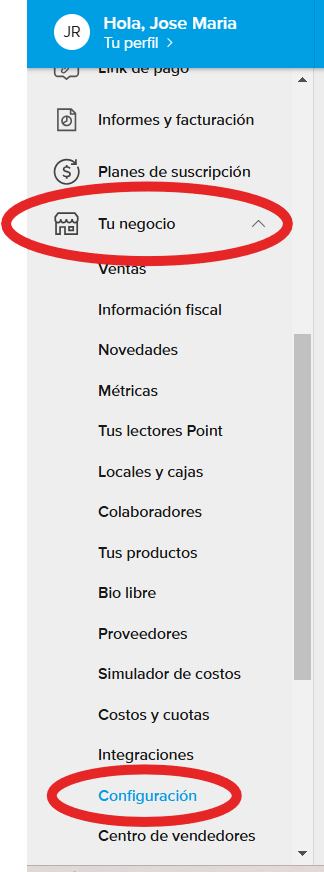
Una vez allí debes dirigirte al menú "Tu Negocio" > "Configuración"
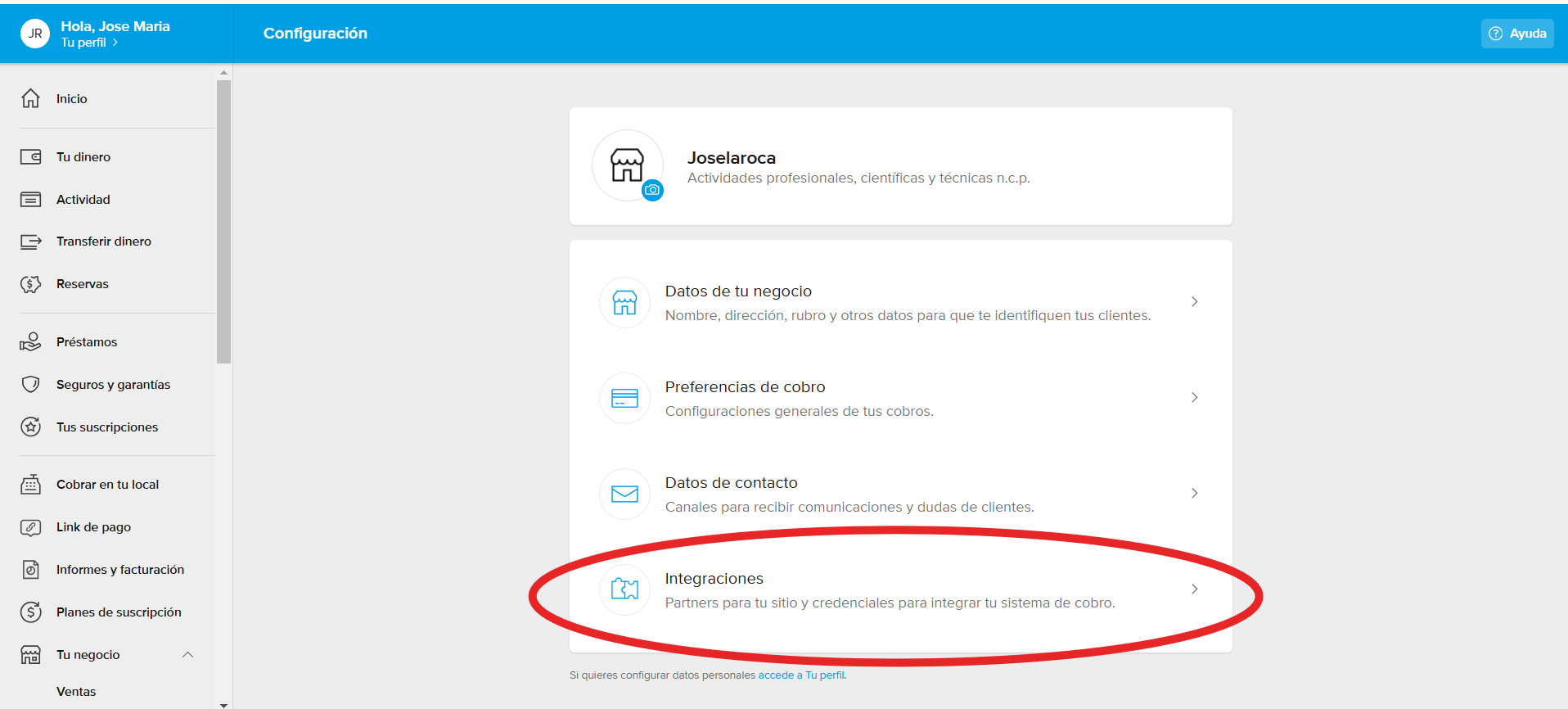
2 - Luego, ingresar al menú "Integraciones".
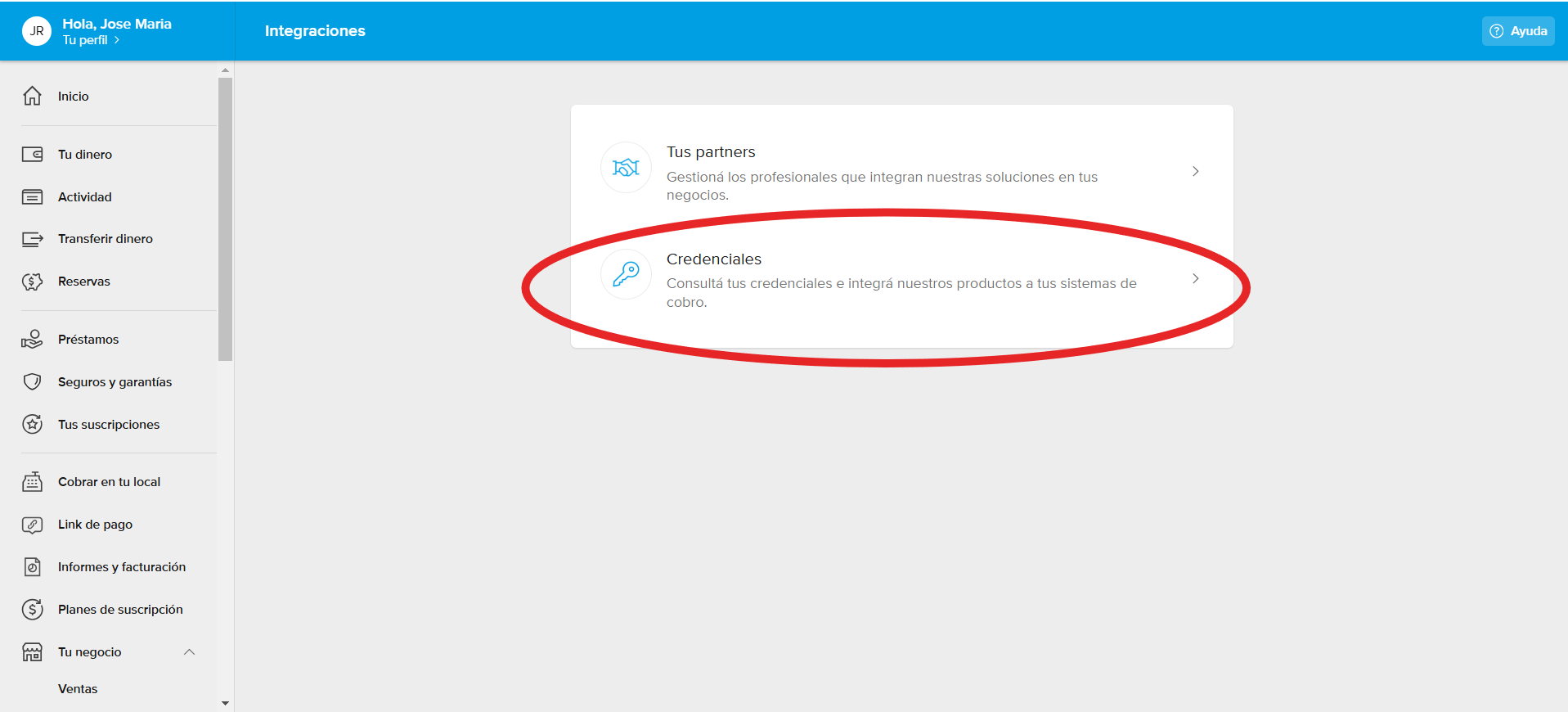
3 - Acto seguido, ingresar a "Credenciales":
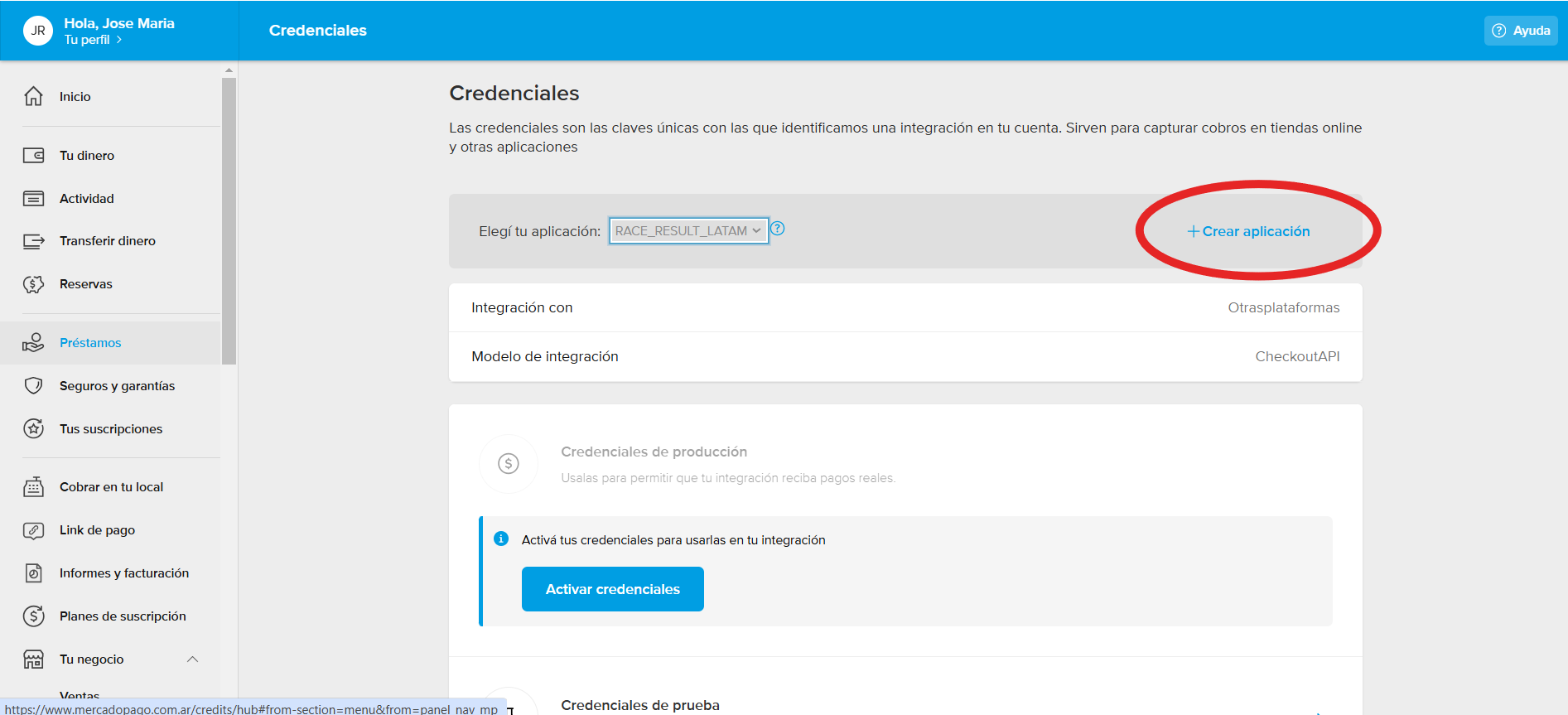
4 - Se deberá crear una aplicación a integrar en su cuenta de MP a través del siguiente botón.
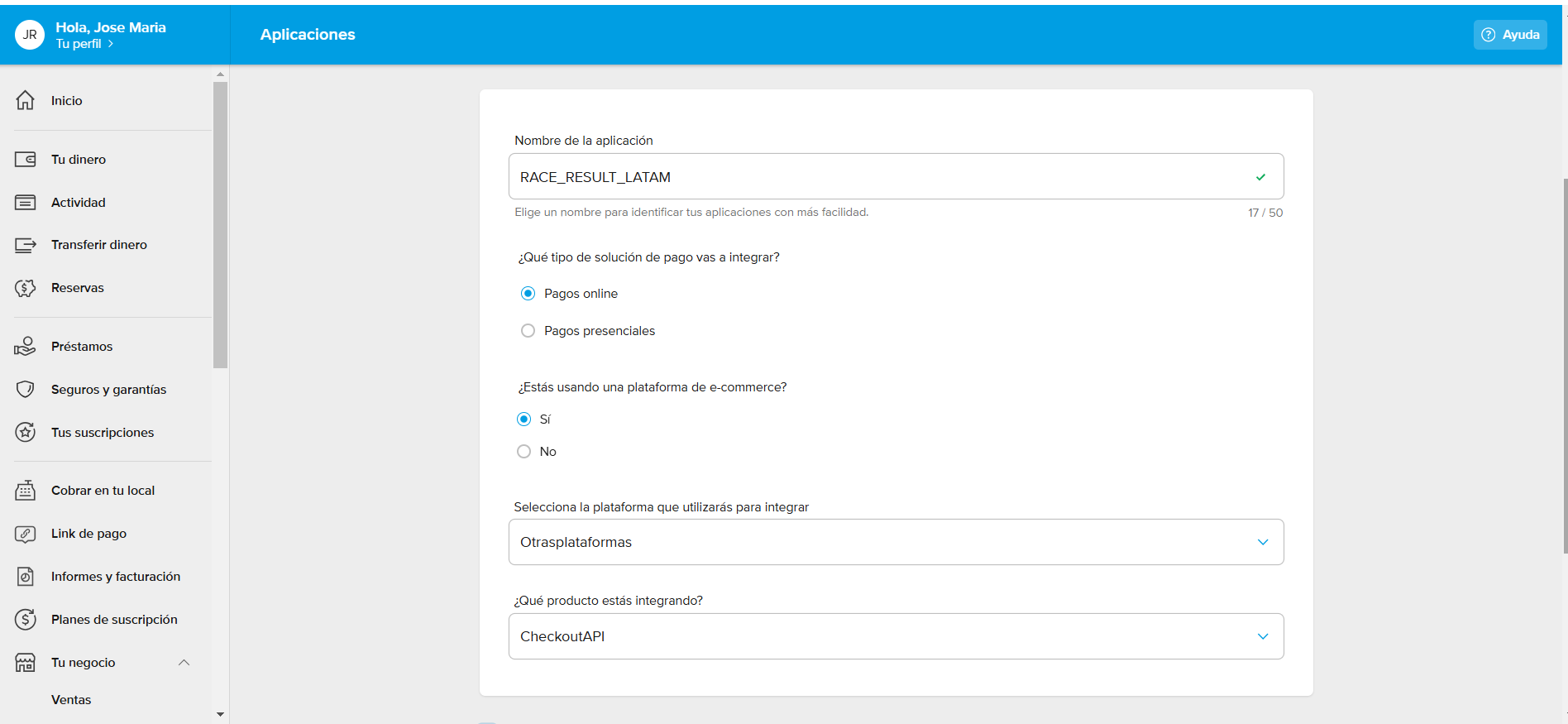
5 - Luego, configurar en calidad de integración con "Otras plataforma" > "Chekout API", como a continuación:
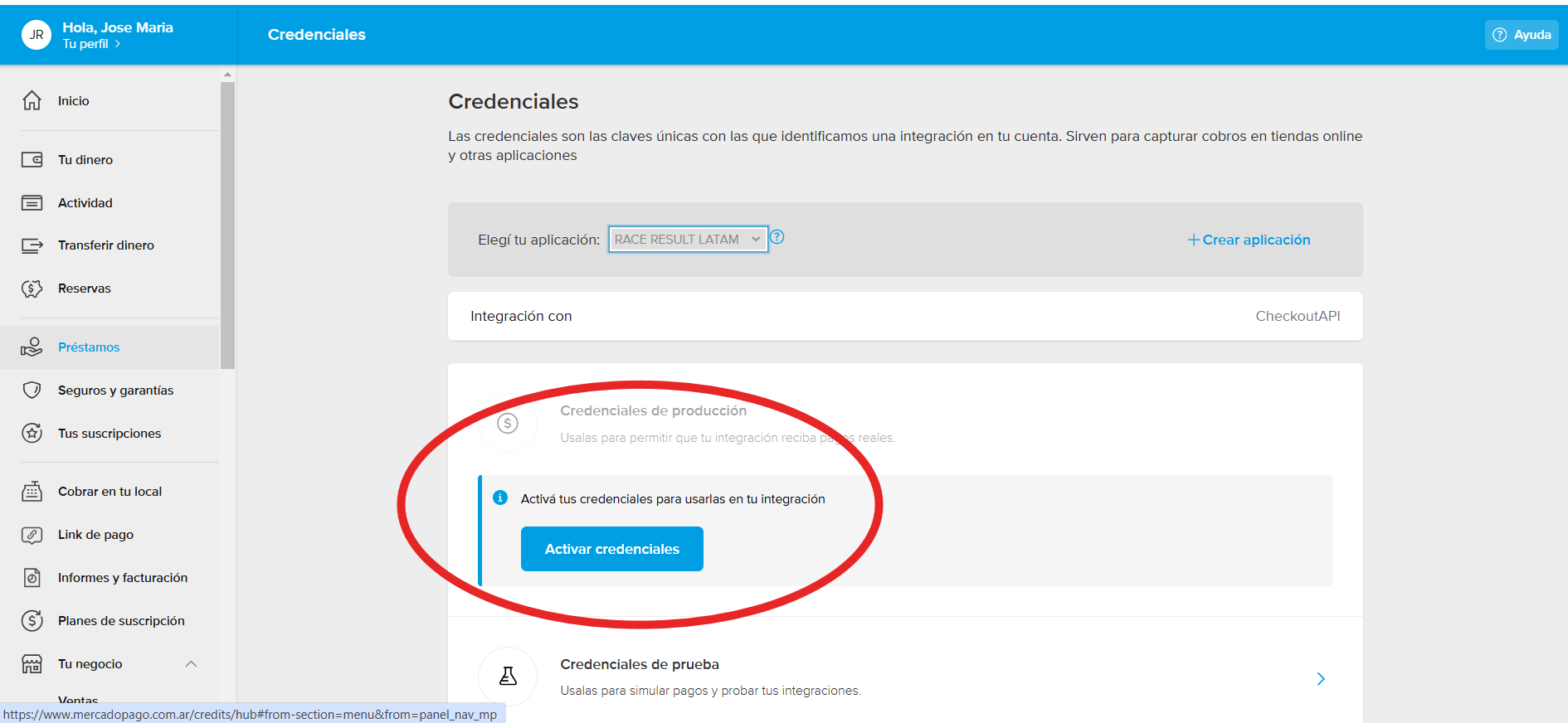
6- Una vez creada, verá el detalle de su nueva aplicación como a continuación, para lo cual, deberá "Activar las Credenciales":
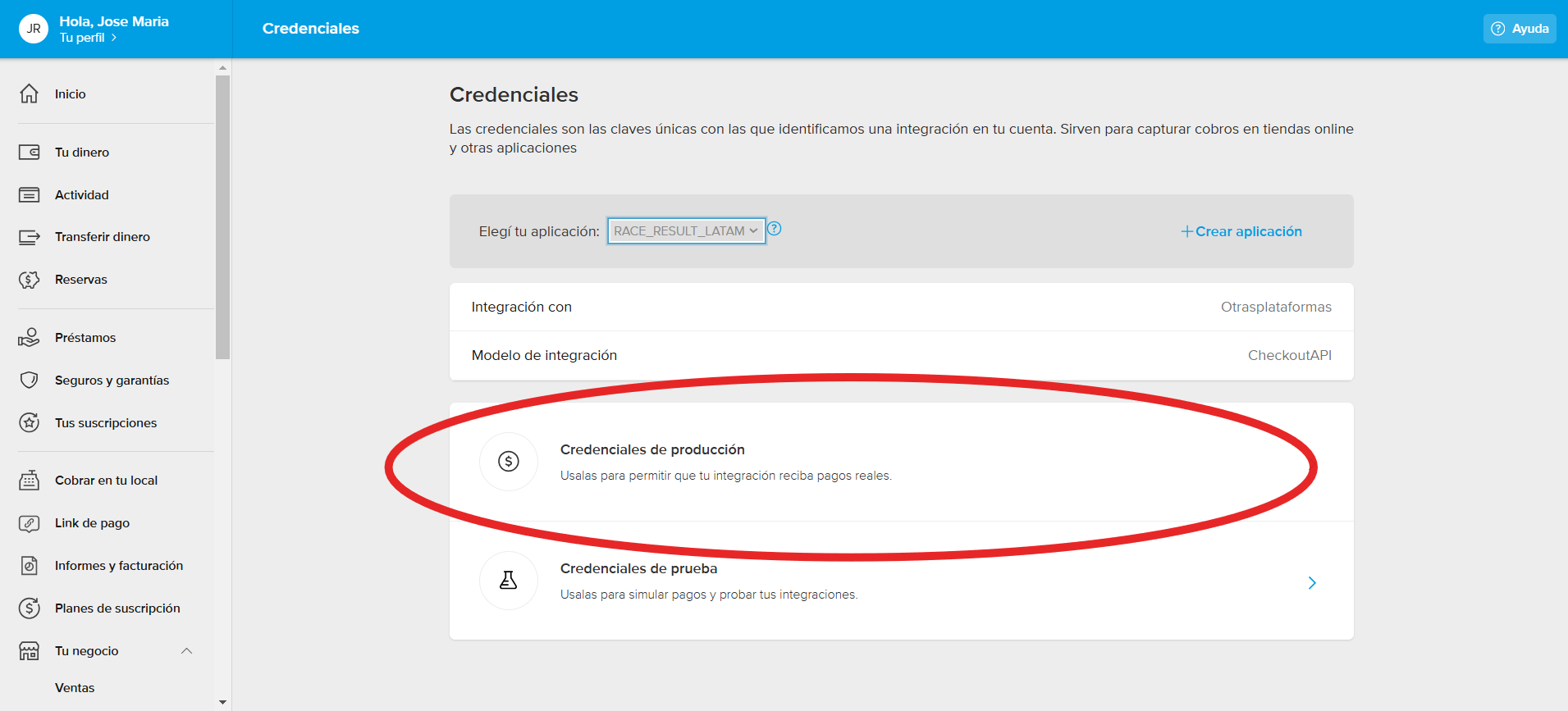
7 - Una vez Activadas, podrá ingresar a las mismas para cnsultar su Client ID y su Secret Key:
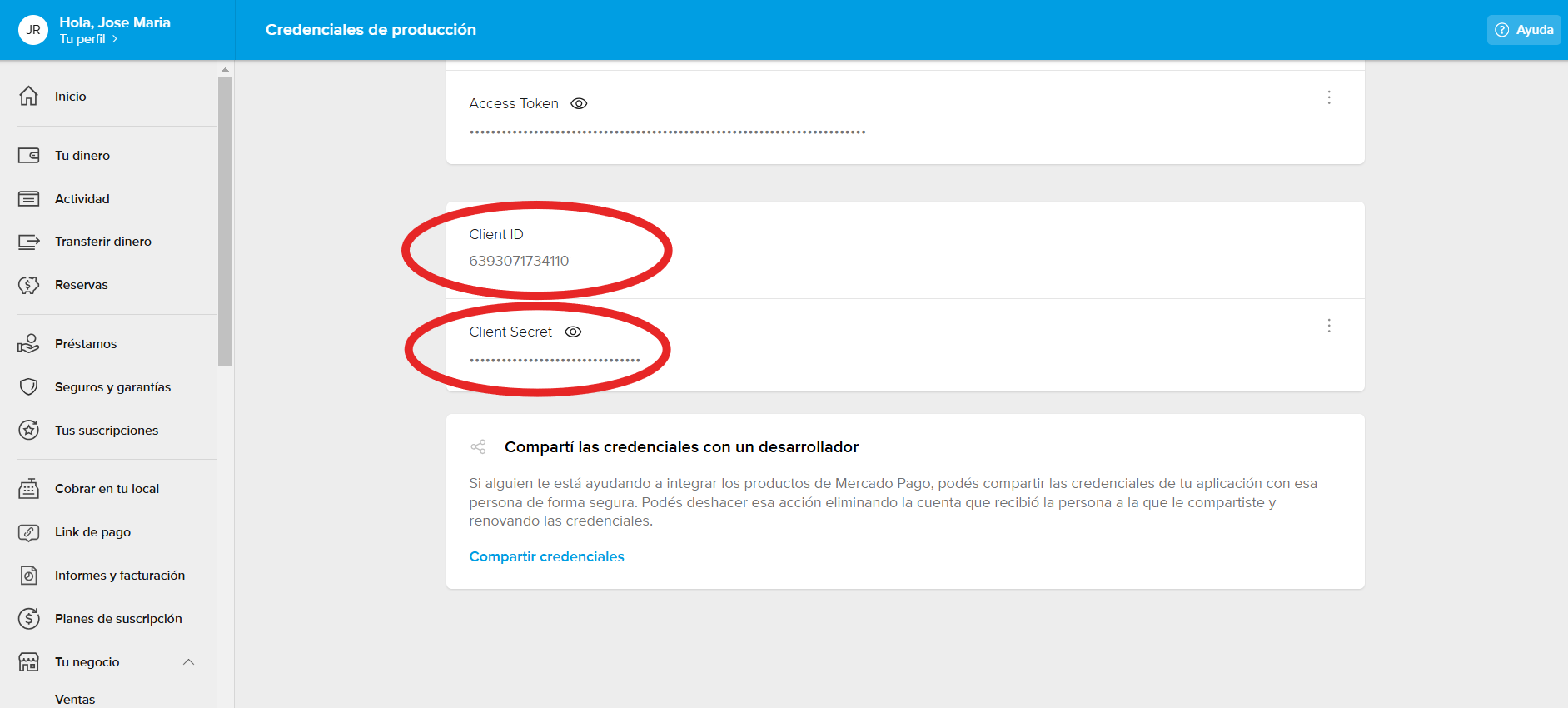
Si tiene mayores dudas acerca de las Creddenciales de Mercado Pago puede visitar la plataforma de ayuda y documentación de Mercado Pago haciendo click aquí.
Online Payment Risks
If offering online payment you should take note of the following risks before proceeding
- Currency Risk
If you offer a payment method with a different currency (e.g. event in Switzerland, payment method using Euro) you carry the currency risk meaning that you might get less money if the exchange rates worsens. Of course, it might also happen the other way and you will get paid out more.
- Security of Payment
If you accept wire transfer as a payment method, you do not have assurance that the participant will really transfer the amount. Even if they receive payment reminders, there is always a percentage that does not pay which leads to additional effort during the event. Transfer has its charms when there is a high entry fee as the fees are independent from the entry fee. However, there is also loss of money as participants register for the event, never pay and then do not take part, for example due to illness.
- Chargeback Risk
Depending on the payment method, there is the risk involved that the money might be charged back. This might happen quite easily with direct debit - a short call to the bank is sufficient. The same might happen with credit card payments - a chargeback is possible but it demands more effort from the participant. If you allow a direct debit in the future, the likelihood of chargebacks will also rise.