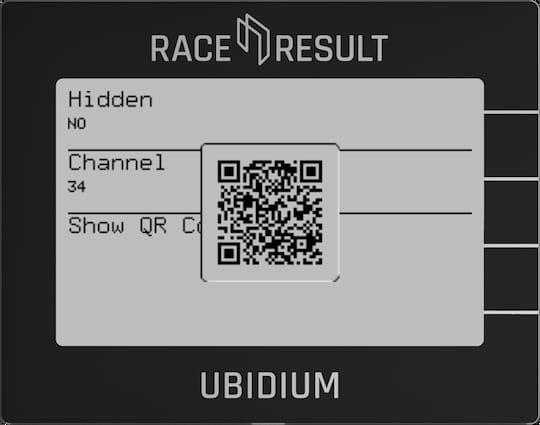
Ubidium contains an onboard Wi-Fi module which can be used to operate the system as either a Client (connect to an existing network) or Access Point (broadcast a new Wi-Fi network).
When connected as a client the system can connect to the internet via the Wi-Fi connection if available, but the access point mode will not share any internet connection, it will only create a local area network.
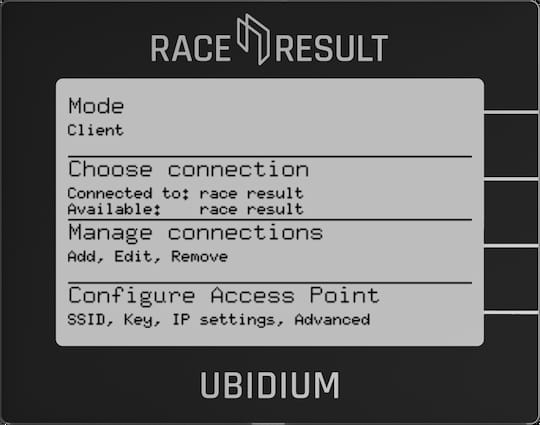
Mode
Switch the Wi-Fi between Client Mode, Access Point or Off.
Choose Connection
When in client mode, select which network to connect to, networks should first be setup using Manage Connections.
The currently connected network, and currently available configured networks will be listed under the menu header.
When in Access Point mode the name of the Access Point will be shown as connected to.
Manage Connections
For Wi-Fi client mode networks must first be configured.
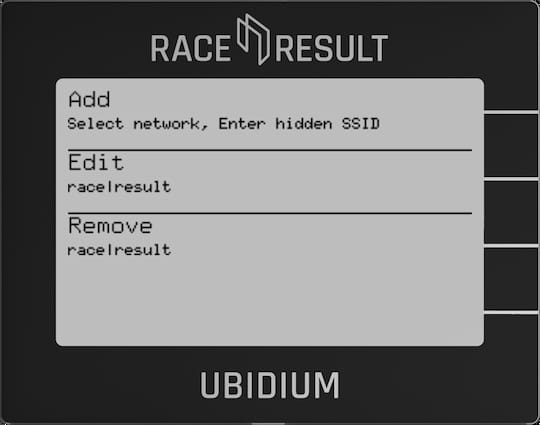
Add
Select a network connection from a list of currently visible Wi-Fi networks, or add a hidden network using SSID. When selecting a network you will then be sent into the Edit menu.
Edit
Select a network connection to edit, set the Key (password), Use DHCP (automatic IP assignment), and the Static IP settings (if Use DHCP is set to NO).
Remove
Remove the settings for a specific network connection.
Configure Access Point
Configure settings for the Ubidium Access Point
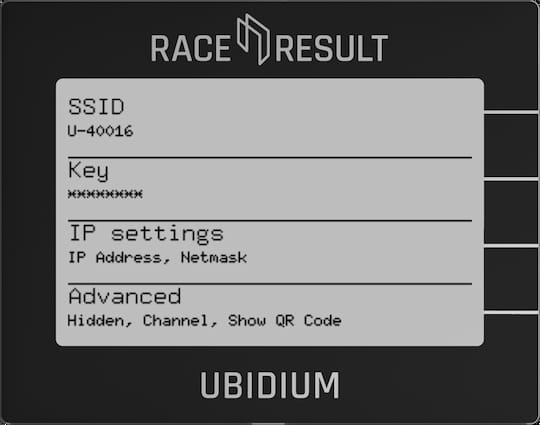
SSID
The name of the wireless network
Key
Ubidium uses a WPA-2 security protocol to protect the network, which uses a password. This key must be at least 8 characters.
IP Settings
Set the IP address of Ubidium when creating the Access Point, and the Netmask (for advanced use cases).
Advanced
Hidden
When hidden is set to YES then the network will not be visible to other devices, you will still be able to connect using the SSID.
Channel
Change the Wi-Fi channel being used, for advanced use cases in high-noise environments.
Show QR Code
Displays a QR code which can be interpreted by mobile devices to connect to the network automatically. This contains the SSID and key for automatic connection.