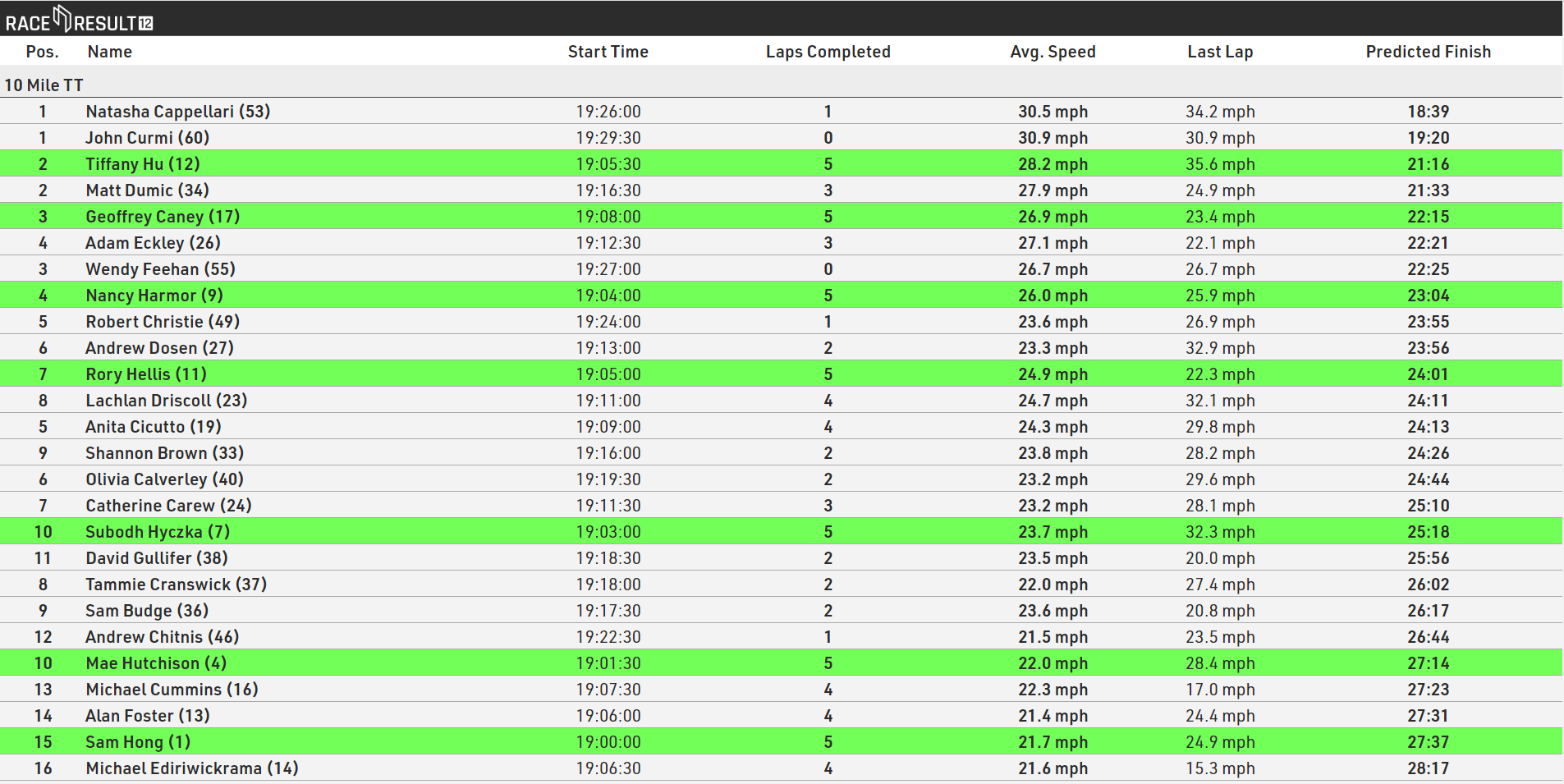
This solution uses an output list in the browser-based Present Results and is designed for a quick and easy display for participants on-site using a basic display screen. The Present Results could be set to a constant scroll or fly in by page to show all participants.
Below we explain the setup of the output list used to set this up.
Grouping / Sorting / Filter
As per most standard output lists the display is sorted and grouped by Contest to show the current race, although this is not strictly necessary where only 1 Contest is setup.
Following this the list is then sorted by Finish.Predicted.Decimal, which is a standard Split field which calculated a participant's predicted time based on their existing Splits. This creates a virtual leaderboard based on the predicted finish time for each participant.

Since the predicted time relies on having at least 1 split after the start split, those who have started but not yet crossed the first split will be shown first, since their predicted time is equal to 0. To prevent this the list is filter by Lap0.TimePositive, so only participants who have crossed this split will be shown.

Fields / Columns
To setup the fields we wanted to show we setup an additional Result and Rank.
LapsCompleted - With 5.5 laps we wanted to show how many laps had already been completed by a participant. This solution uses the Split fields to calculate the number of laps completed, it could be done using Raw Data Lap Race Rules, however this would rely on having no passings between T0 and the participants individual start time which may not be possible.

We setup an Advanced Result to calculate this, the calculation uses the .SplitCount field which returns the number of Splits which have times up to and including the specified Split. In this case We wanted the difference between the Finish and Lap0 splits to return the number of completed laps.
PredictedRank - As we will order participants based on their predicted time it wouldn't be possible to use a standard Split Rank, we also wanted to show separate ranking for Males / Females.

A custom Ranking was setup for this, similar to the filter on the Output list we filter by Lap0.TimePositive, then group by Contest and Gender, and again the ordering is based on Finish.Predicted.Decimal.
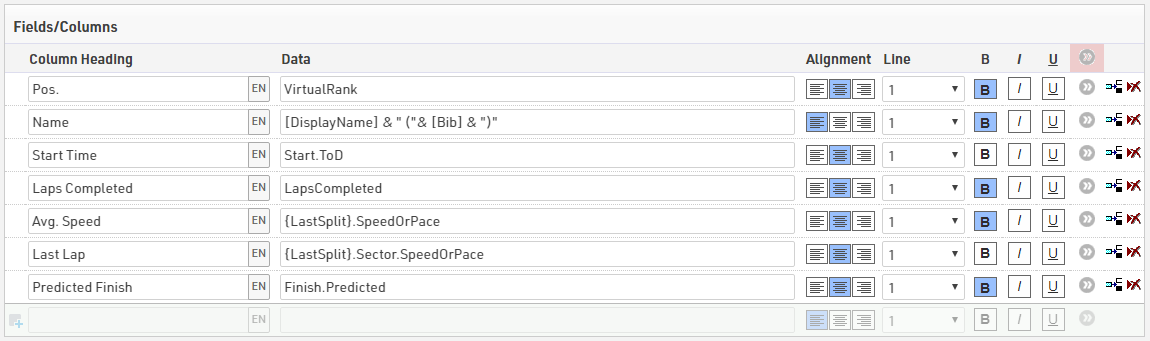
The fields are setup to show some relevant information for each athlete.
- VirtualRank - as setup above
- [DisplayName] & " (" & [Bib] & ")" - A small change was made to the DisplayName User-Defined Field to convert this to a personal preference using the CorrectSpelling() function to convert the FirstLastName to titlecase. The bib is then shown in brackets after the name.
- Start.ToD - The time at the Start Split for each participant
- LapsCompleted - As setup above to show the number of laps the participant has already completed
- {LastSplit}.SpeedOrPace - This returns the participant's average speed from the start to the last recorded split, using .SpeedOrPace returns the speed and unit defined in the Split setup.
- {LastSplit}.Sector.SpeedOrPace - This returns the speed for the last sector, which is the previous split to the last recorded split, in this case that is the last lap completed. This is useful to show if they are above or below their current average.
- Finish.Predicted - Returns the predicted time for the Finish Split, or if already finished will return the actual time at the Finish Split.
Dynamic Formatting
To make it easier for participants to find themselves once finished and also to show those who have already finished and may or may not be beaten we highlighted finished participants green using the Dynamic Formatting.
This was applied to all fields using the general advanced field settings.
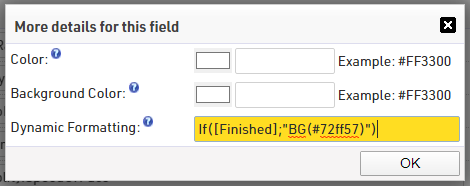
If([Finished];"BG(#72ff57)")