Client mode is used for outgoing connections to third party software / platforms, it is configured through the decoder Browser Access, client mode can be used to connect to either local TCP/IP servers or online servers. Common uses include third-party tracking platforms and photofinish software integration.
When client mode is enabled the decoder will try to make a connection to the specified server, once connected it allows for the server to send commands to the decoder to pull data and also change settings.
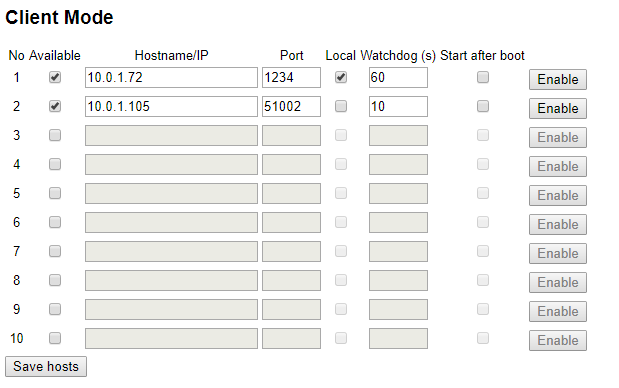
To configure Client Mode you will need the server hostname / URL / IP address and port number, if the server is on the local network then ensure to tick local. The watchdog is the frequency at which the decoder expects commands from the server otherwise it will try to reconnect.
When Client Mode is enabled the upload counters on the screen will cycle between your normal upload counts (Upload / HTTP Up) and TCP Out. TCP Out will show the number of connections which are active through Client mode, if it shows 1 or more then it is connected to the server(s).