There are three ways how to score Series:
- All races of the series will be managed in one Event File. This is most feasible when the athletes keep their bib numbers for the entire series. The main advantage is that you can produce series results at any time, even while one race of the series is running.
The disadvantage is that you will have to set up separate Results, Rankings and Lists for each race of the series. This is similar to how a Stage Race would be setup.
- Alternatively, the event file can contain the result, relevant for the series scoring, from each race (like finish time or points) and is used for timing the current race at the same time. After each race, the finish times or points will be copied to a separate result, the file will be copied for the next race and the timing results will be deleted in the copy.
- The last alternative is to have one event file per race of the series and an additional event file for the series scoring into which the results of each race will be imported. Usually these races are completely independent. Athletes have different bib numbers per race. Often the races will even be organized by different race directors.
The sub-sections below give guides for options 2 and 3.
Series Scoring with One Event File per Race, Series Results in each File
In this case, the event file contains the points from each race of the series and does the timing for the current race. Set up the event file like this:
- The timing points do not require any special configuration. In this example there will be only one timing point for start+finish:

- Set up the results:
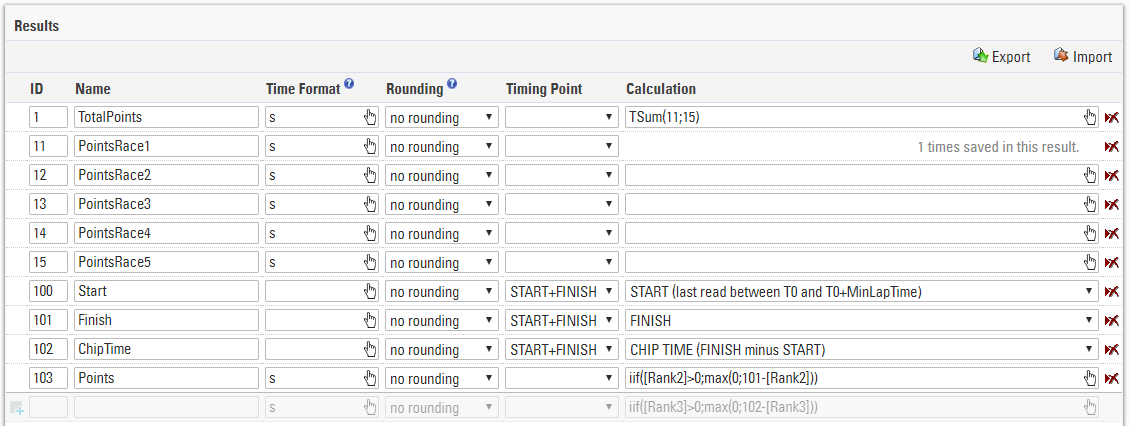
Results 100, 101, 102 are used to time the current race. Result 103 calculates points for the current race based on the rank for the race (rank2).
Results 11 to 15 save the points from each race and result 1 sums up the points. - The rankings could look like this:

Rank1 calculates the rank of the series, Rank2 calculates the rank for the current race.
After one race, proceed in the following steps:
- Write the points in one of the results 11 to 15 using a Data Manipulation, for example:
SET DecimalTime12 to [DecimalTime103] - Create a copy of the event file for the next race.
- Delete the Raw Data from the copy, but keep the points in results 11 to 15.
Series Scoring with One Event File per Race, Series Scoring in Separate File
In this example, there will be one event file used only for the scoring of the series.
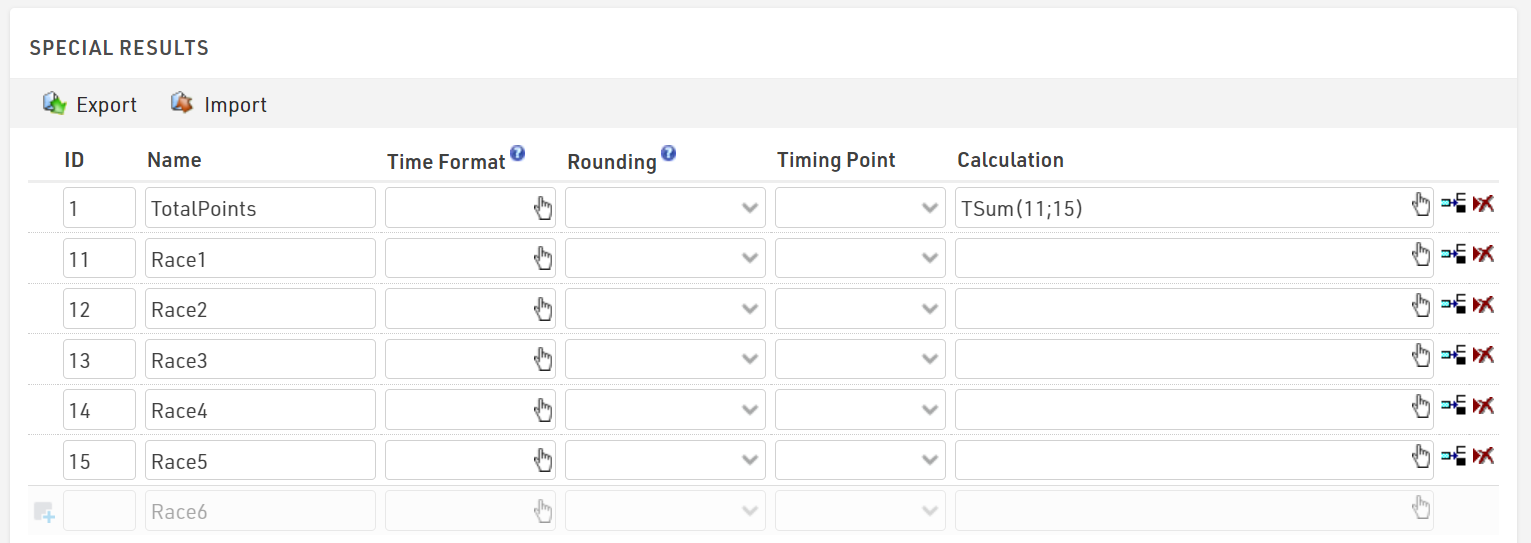
The results in your series event file may look like the below example. The series score (Result ID 1) is the sum of points earned in each race. Results 11-15 are the individual point values for each race once imported.
The results from each race can be imported via Participants⇒Import Participants⇒Import Event File (*.ses):
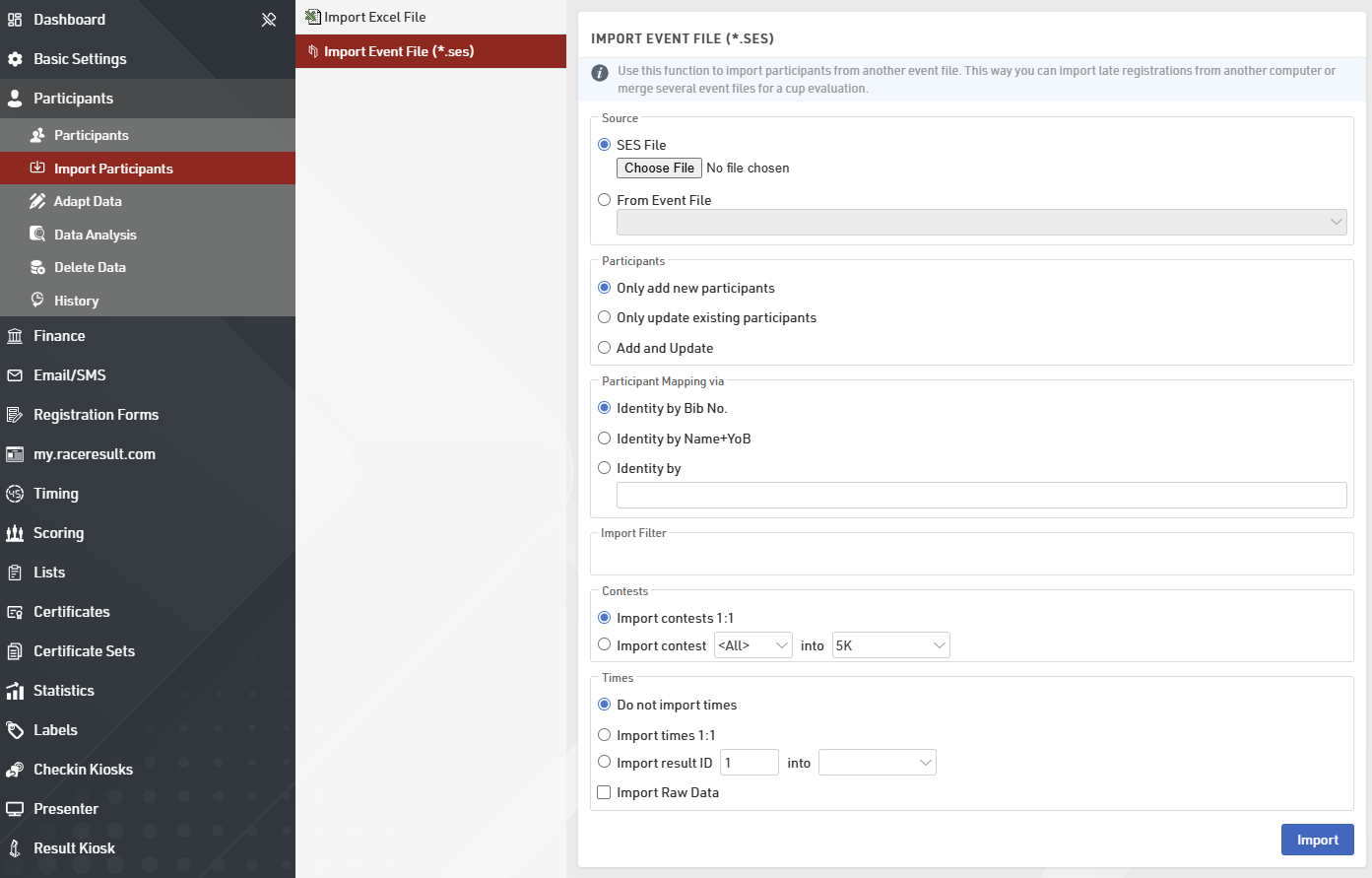
Select the file you wish to import and define the following settings:
- Define how it is decided if two participants are the same person. In most cases, it will be by name and year of birth. If, however, participants have the same bib throughout the series, choose Identity by Bib No.
- Optionally, enter a Filter to select the participants you would like to import.
- Decide how to handle contests. Either participant can be assigned to the same contest (ID) in the series file as in the source file, or if you decide to put the participants in a certain contest in the series file.
- Decide how to import times. In this example, you would calculate the points in each individual race file. When importing, you select the result that contains the points to be imported into one of the results 11 to 15 of the series file.
Make sure to run a Name Compare after the import to find participants with different spellings of their names. For a detailed explanation of the settings available when Importing Participants by Event File.