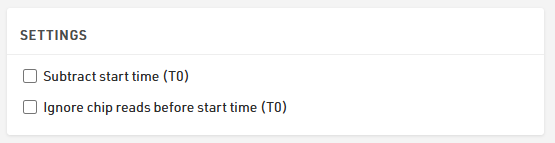
In more formal or structured time trials, you might need to assign each participant a specific start time — either scheduled manually or triggered precisely at the start line. This is where Special Results come into play.
The setup involves a few more components, but allows for much finer control. Here’s how it works:
First, you define a scheduled start time for each participant. This is done using the Single Start tool in RACE RESULT 14, where you can assign start times based on bib numbers or other criteria. This scheduled time is then saved in a dedicated result field, in this case inside the PlannedStartTime special result.
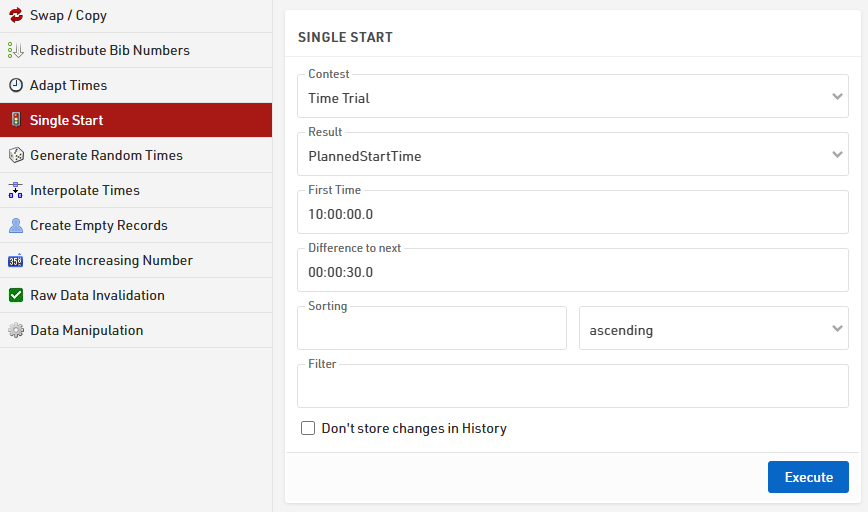
If start times are already assigned in an Excel list, they can be imported directly by naming the corresponding column as the Special Result field designated to store the start times.

Next, a start detection result is created to record when each participant actually starts. This result is typically linked to the scheduled start time, allowing comparison between planned and actual starts. For example, the StartDetection result can be configured to capture the last detection at the START Timing Point that occurs between 5 seconds before and 10 minutes after the participant’s PlannedStartTime.

If a lightbarrier is used to catch times of participants and it's connected to your device, you can store the detection in a Special Result by using the advanced setting "First Marker" linked to the StartDetection — in this way, for each transponder detection, the right marker will be taken and assigned to that specific participant.

To ensure a fallback in case of missed start detection or missing marker, a special result using the function TLast() can be created, which defaults to the PlannedStartTime when no actual start is recorded.

The finish detection is then set up similarly using a Special Result, linked to the recorded start time. It typically accepts the first detection at the FINISH Timing Point that occurs, in this example, at least 10 minutes after the StartTime.

Optionally, if a light barrier or manual trigger is used to start participants, it is important to ensure detections are correctly matched to each athlete. This may require adding a light-barrier-specific marker or hardware input configuration, depending on the timing system in use.
Finally, a FinishTime special result is created to calculate the net time by subtracting the StartTime from the FinishDetection time.

It is important to note that both options under the Settings are disabled, in order to completely ignore the T0 of the event.