How much data do I need for a typical event
The total sum depends on different factors such as total duration (the box frequently sends a Status Call), the processing type (Normal, Standby, Slow (Passive only), Fast (Active only)), and the number of detections. Please note the number of detections can differ a lot from the number of participants and may depend on the Track Box location.
Passive: In our first tests, we found that for ~300k passings the box used ~30 Megabytes.
Active: Stationary use, not receiving any pings: about 1 MB / day. Moving, with many transponders constantly in reach: about 2 MB / hour.
Why is the blue LED not blinking
Most probably you have the box laying flat (Lay-Flat), which will switch off the reader and hence the blue LED doesn't come on. The Track Box can't be used laid flat. The reader will be switched on if you reach a certain angle for around 1 second. If you lay it flat again, the reader will switch off, again.
Does the Track Box support WiFi
No, WiFi is not possible with this hardware.
How can I update the firmware on the Track Box
The firmware will be updated automatically as soon as the Track Box is switched on. With every boot up the Track Box will check if there is an update available and will install it. There is no way to prevent this from happening. A firmware update can take up to 2 minutes. Please never set up your Track Boxes at the last minute.
How much data does a firmware update use
A typical firmware update has a size of less than 1 Megabyte.
How can I get data off Track Box after loss of cellular signal
The Track Box has an internal storage of 30,000 (Passive) or 10,000 (Active) detections and will send data to our servers once cellular coverage has returned. There is no option, other than via GSM upload, to extract data. Once the box has been switched off (either manually or due to a depleted battery) it will clear the storage and data that hasn't been uploaded will be lost.
Can I use my Track Box in a different country
Theoretically yes, but please be aware of different legal frequency bandwidths for the Track Box Passive. We sell the Track Box in an EU and a US version. A sticker on the backside will indicate the bandwidth.
Why are there two antennas inside
The lower antenna is the sender antenna, the upper one the receiving antenna. Make sure to close the lid as the cover antennas are tuned for performance with the lid fitted. Only with the cover installed correctly can we guarantee reliable read rates.
What happens if the battery runs empty
The Passive TrackBox will switch into standby at 3.5V battery voltage indicating 0%. The box will then continue to run until 3.4V, which can be several hours. During this time at some point, the MODEM will stop working and the box may start blinking Red-Red-Red-Red-Red-Red-Red...Stored Passings will not be lost as long as the box is not turned off! Charging for 10 minutes should allow it to connect again.
Can a Track Box be permanently installed with mains power
Yes, charging the Boxes permanently is no problem. The Boxes are designed to run permanently on mains power and there is even a dedicated circuit that makes sure not to damage the batteries. When running permanently on mains power, please use the provided power supply from the manufacturer Meanwell. Other supplies may interfere with the Track Box Passive, leading to reduced detection rates. You can also connect Solar Panels to your Track Boxes to run them permanently in sunny remote places. When using solar panels, please leave enough space between the solar panel and the Track Box not to cause interference.
Can I use my Track Box Passive with reusable transponders or disposable triathlon transponders?
We do not recommend using the Track Box Passive with reusable transponders or the Disposable Triathlon Transponder.
The Track Box Passive has been optimized to read RACE RESULT Bib Transponders, either worn on the chest or in free air (e.g. on MTB Number Plates). This means the Disposable Triathlon Transponder does not work as reliably as the Chip Race Number. The main reason for this is the position at the ankle of an athlete as well as the non-vertical polarization of the transponder - even if in motion it is almost never perfectly aligned vertically.
The Track Box Passive can be used with ankle worn transponders, however, there are certain limitations which should be considered with these.
You can maximize read rates from a reusable transponder or disposable triathlon transponder when the following conditions are met:
- No mass passings - The Track Box is not at all suitable for a mass start, the optimal location is an isolated point with individual passings such as a trail run checkpoint. If participants are passing one at a time you will have better read rates.
- Ensuring the Track Box antennas are pointed directly at transponders - In testing, we found the best read rates with a Track Box pointing downwards towards the feet of participants. The mounting position and the hanging angle depend on the expected distance between Track Box and Transponder.
- The maximum recommended distance between a transponder (either HuTag or Disposable Triathlon Transponder) is 2m (~6ft). Even with the reduced distance, you cannot expect read rates similar to a bib transponder. Beyond 2m you should expect severely reduced read rates.
Why are we making these recommendations?
Primarily, - pure physics - the position on the ground is not an option when a transponder is worn at the ankle if you look at the detection field of the antennas. The Track Box Passive has been tested extensively at a triathlon event with 1,300 participants all wearing HuTags yielding the following results.
At run splits where the maximum distance between participants and Track boxes was up to 4m the best setup (Track Box mounted at head height at an angle of 36 degrees) still only recorded ~70% of reads. Other setups at similar points yielded much worse results.
At bike splits the Track Boxes were setup with a maximum distance of 2m between participants and Track boxes. Here we received >97% read rates with a Track Box mounted at 40cm looking out perpendicular directly at transponders, and >95% with a Track Box standing on the ground normally.
Based on these results we do not recommend using the Track Box Passive with ankle worn transponders for timing, especially if the maximum read distance is greater than 2m.
Mounting Track Box on a Race Result Tripod
The RACE RESULT Track Box Passive Set includes 2x tripod mounts one for each Track Box Passive. The mounts fit on a standard 1/4" UNC thread. In order to use the Race Result Heavy Duty tripod, you will need to purchase two adapters.
The first adapter is from a 35mm pipe (the diameter of the top of the tripod) to a 3/8" male thread. Alternatively, if you can find one that is capable of going from 35mm to a 1/4-20 thread, you would only need one adapter.
For example: Adam Hall SPS 36 M38
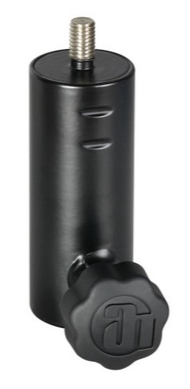
The second adapter is a 3/8" female to 1/4" male adapter (the thread size needed for the Track Box mount).
For example: Manfrotto 015 Adapter 1/4" - 3/8"

Can a Track Box be turned off while it's being charged with ext. power?
No, this is not possible. The Track Box hardware is not designed for being turned off while the Track Box is connected to an ext. power supply. In this situation the box, both passive and active, can not be turned off.