These settings decide how the system handles bib numbers.

Assigning Bib Numbers
By default, the highest bib number +1 will be proposed when entering a new participant. Another option, First free bib number, proposes the lowest unused bib number.
If you do not want to allow certain bib numbers, enter these in the input box Exclude Bib Numbers. Then, these will not be proposed.
When manually adding participants directly in RACE RESULT 14, two settings are available in General Settings > Input Assistance related to assigning bib numbers:
- When creating new participants propose bib: automatically assigns a bib number during data entry, if de-selected a bib must be manually entered.
- When creating new participants suggest contest based on bib ranges: Automatically assigns the contest based on the assigned bib number and the defined bib ranges during data entry.
Bib Ranges
A Bib Range assigns a certain range of bib numbers to one contest. Each bib range can now also include a filter expression. This allows for dynamic assignment based on participant data, such as `[Age]<18` or `[Gender]="f"`. Note that a contest is mandatory for each bib range.
The 'Ignore Bib Ranges' checkbox, located directly above the list of bib ranges, allows you to temporarily disable the bib range logic for Online Registration, import and creating new participants.
Bib Ranges are evaluated for a participant from top to bottom; the first matching range wins. If no bib range is valid, a bib number outside of any defined range will be assigned. For the 'Highest plus 1' assignment method, this will always be a number greater than the highest end of any defined range.
Active Bib Ranges
Ranges can be activated and deactivated throughout an event's workflow, for example activating a specific range with dynamic bib assignment (Dynamic Bib Assignment) and making the old range inactive. Inactive ranges are ignored when new participants are created, registered, imported, or redistributed. However, an inactive range remains valid: bib numbers already assigned from it keep their number and contest and are never invalidated.
Additional Notes:
- For the Special Function Wish Bib Number in Online Registration (see Input Fields - Special Functions), the range must be active and filter expressions will be evaluated. Ensure that Refresh form after change is activated for all fields used in the filter expression.
- You can define different start times per bib range, whether it is active or inactive.
- If using propose bib or propose contest with multiple ranges and filters, adding a note to describe the filter can be helpful to show the details when selecting the bib range during data entry.
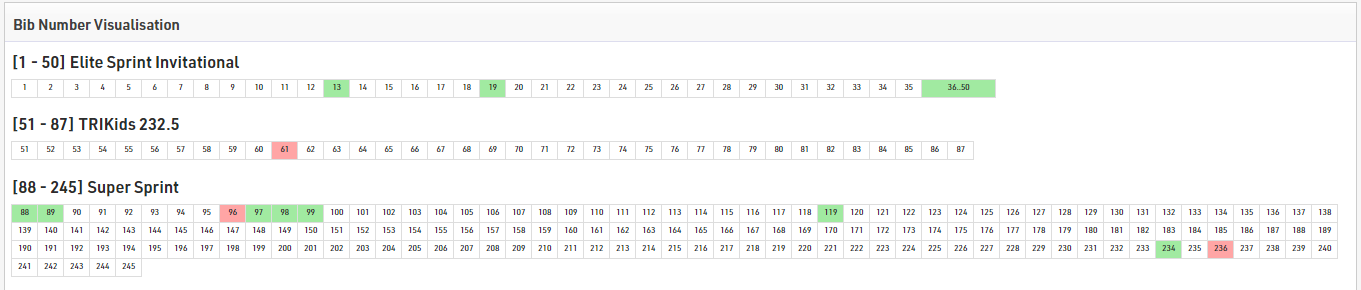
Bib Number Visualisation
The bib number visualisation creates a table with all bib numbers available for each Contest according to the Bib Ranges setup. The bib numbers may be shown in 3 different colors.
White - The bib number is already assigned
Green - The bib number is not assigned yet
Red - The bib number is assigned but the participants Contest does not match the Bib Ranges set