From firmware revision 2.37 support for USB Wi-Fi adapters has been included for decoders which are using the latest compute board inside. This can be checked in the menu as explained below.
Currently the firmware only supports the following adapters:
- Edimax AC600
- Netgear A6100 (AC600)
Other adapters with the same chipset onboard may work but no support will be given for these, the Edimax AC600 has 4 variations; EU, US, AU and RU for regulation conformity.
RACE RESULT does not sell the USB Wi-Fi adapter directly, they are easy to locate through a number of online retailers.
Configuration
Wi-Fi network connection settings are configured through the configuration tab in the decoder browser interface, they cannot be configured via the decoder menu. You can use either DHCP or Static IP configuration when using the Wi-Fi dongle, this is configured via the decoder's Network menu.
Click on the Wi-Fi Configure button to open the configuration page.
You should first select the country of usage to ensure you conform with local regulations and ensure that the performance is maximized, visible Wi-Fi networks will be shown automatically below.
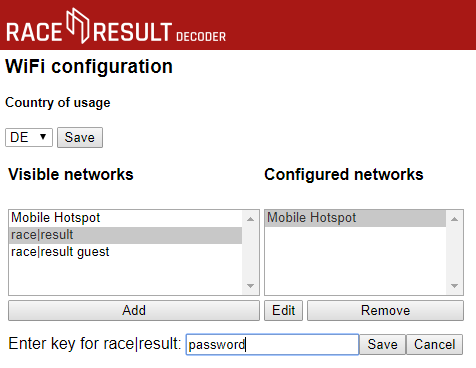
To connect to a network select the network SSID from the list of available networks and click add, a text box will be shown below to enter the passkey for the network. Enter your passkey and click save to add the network to the list of known networks.
When using the Wi-Fi adapter the IP section of the decoder screen will alternate between;
- EN - the IP address via the ethernet port.
- WF - the IP address via the Wi-Fi adapter when connected or will show "no AP found" if there is no known access point available.
- AP - the name of the connected access point.
Checking Compatibility
Only decoders which use the latest version of the compute board will support the Wi-Fi dongles, this is due to the increased memory space available on these boards.
To check the version of your decoder open the Menu and navigate to Info.
The mainboard/hardware and firmware versions of your decoder will be listed, after the hardware version this will show either -0 or -1,
e.g. 'Device MB/FW: 1.3-1.4-1/2.57' (on older versions 'Device HW/FW: 1.4-1/2.42') this shows a decoder with mainboard version 1.3 or 1.4, with a supported compute board and firmware revision 2.57.
If -1 is shown then the USB Wi-Fi adapter is supported. Decoders with -0, showing older hardware versions will not enable the Wi-Fi settings.