The software needs to map the incoming raw timing data to a participant.
If you are using Bib Transponders where the bib number matches the transponder number, or you have ordered bibs with transponders from RACE RESULT then you do not need to take any additional steps. In this case, RACE RESULT 14 will automatically match each transponder to the corresponding bib number.
If you are using transponders with an alphanumeric code, such as active transponders or HuTags, then you will need to create a chip file to assign each transponder accordingly.
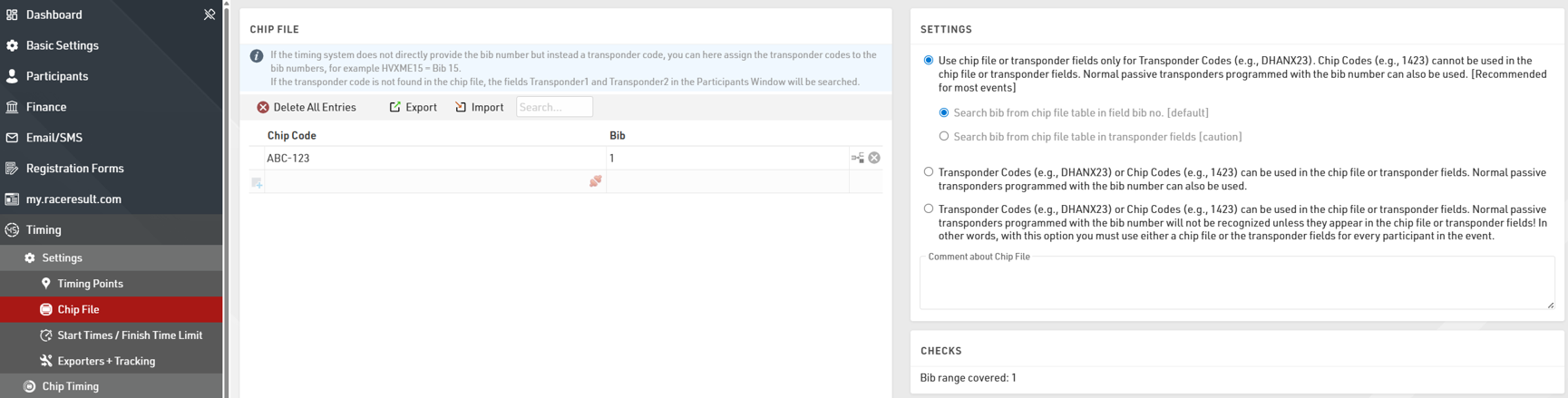
This is a simple list assigning a Chip (Transponder) Code to a bib, you can prepare this in an Excel or CSV file to be imported.
If you are using numeric Bib Transponders but the bib number does NOT match the transponder number then you may need to change the Chip File Settings.