At times, participants may need to transfer their registration to another person while maintaining data privacy and avoiding the exchange of personal information.
A convenient and secure solution is to let a registered participant generate a Voucher (via SimpleAPI). This Voucher can then be used by a new participant as a discount code when registering for the event.
Prerequisites
Before setting up the process, make sure you are familiar with how to use:
- Web Service Calls in RACE RESULT 14
- Self-Service Registration Forms
- User Defined Fields (UDFs)
Voucher Structure
When parsing Voucher data via the API, the JSON structure is as follows. Not all fields are required:
{
  "Code": "EnterVoucherCode",
  "Type": EnterType,
  "Amount": EnterAmount,
  "Tax": EnterTaxValue,
  "Contest": EnterContestID,
  "Category": "",
  "ValidUntil": "",
  "ValidFrom": "",
  "Reusable": 1,
  "UseCounter": 0,
  "Remark": ""
}
* Type Values:
- 0 - Fixed Amount
- 1 - Percentage (1-100)
API Endpoint
To save a Voucher in RACE RESULT 14, use the following API endpoint:
vouchers/save
Set up a Web Service Call with the parameters below.
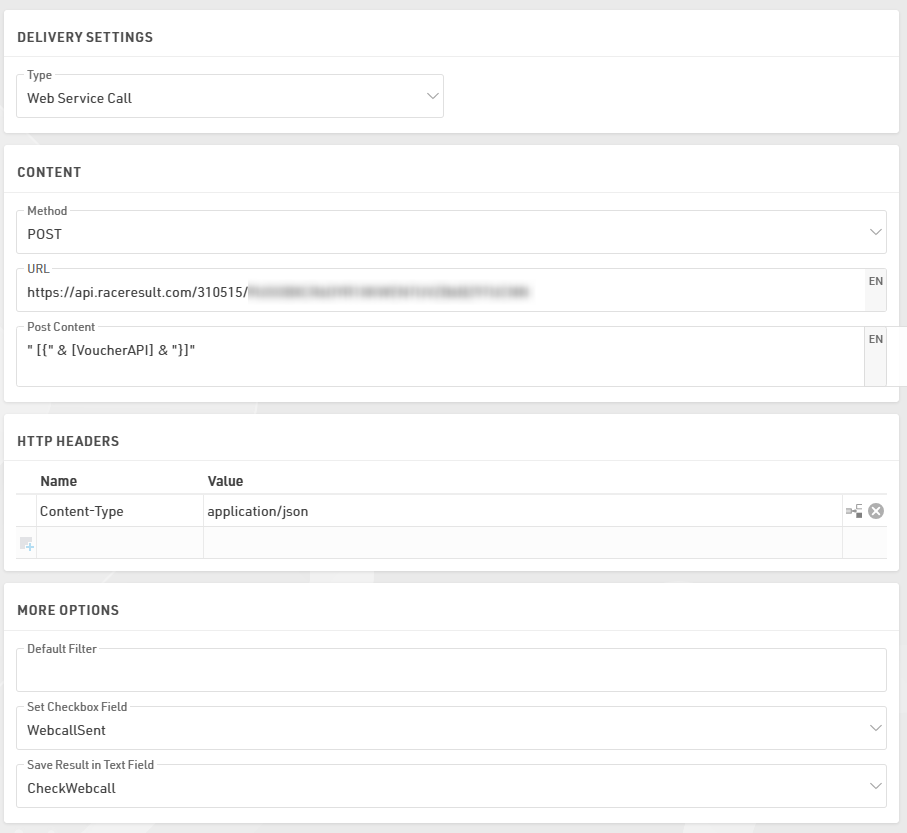
Post Content
Make sure there is a space after the first quotation mark:
Post Content: " [{" & [VoucherAPI] & "}]"
Create the UDF [VoucherAPI]
First, create a set of Additional Fields:
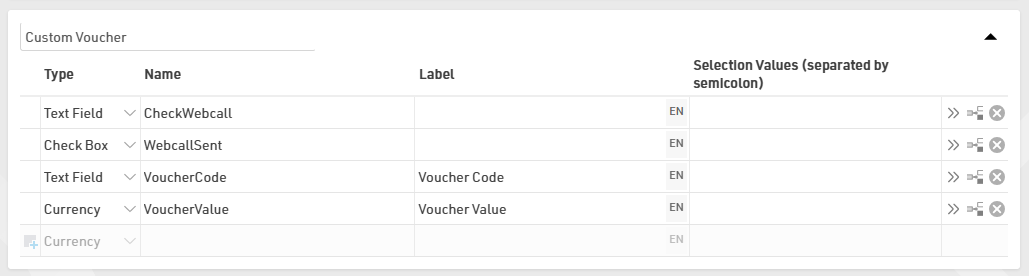
Then proceed with the creation of the User Defined Field VoucherAPI
VoucherAPI: #"Code": "[VoucherCode]", "Remark": "", "Type": 0, "Amount": [VoucherValue], "UseCounter": 0, "Reusable": 1, "Category": "", "ValidUntil": "", "Contest": 0, "OrderPos": 0, "ValidFrom": "", "Tax": 0
Generate the Voucher Code via the Self-Service

To generate the VoucherCode, use Store Additional Values under the Advanced Settings of your Self-Service Registration Form.

Expression - This expression ensures each Voucher can be traced back to the participant ID who created it:
[ID] & "V" & UCase(left(md5([Random]);6))
Automate the API Call
In your After Save Action, select the Voucher Web Call to make the POST request. To prevent multiple API calls for the same participant, add the filter [WebcallSent]=0
Send the Voucher via Email
You can allow participants to enter a receiver email address during the process. This way, the Voucher Code and its value are automatically sent to the recipient via email.
Restrict Additional Voucher Creation
To prevent misuse, use Show if (Old Values) conditions in your Self-Service Form to ensure that once a Voucher is created, the original participant:
- Cannot create additional Voucher Codes.
- Can still view the created Voucher Code and its value

This setup allows a participant to safely transfer their registration by generating a Voucher that another participant can redeem.
It ensures:
- Data privacy (no sharing of personal details)
- Controlled and traceable transfers
- Automation through the RACE RESULT API and Self-Service features