When timing events with multiple stages you will need to use Special Results to calculate your results. It is important to keep a consistent structure here to make it simple to understand and easier to expand as needed.
The basic Stage Race example outlines the basic principles of how you will need to structure Special Results for a stage race.
Individual Stage Results
We first create results for the Start of each day in results 51 and 61. This takes the Maximum after T0, but it is important to note that T0 is set to 0 for this, since the stages on subsequent days may not start at exactly the same time.

For each stage, we create a set of results which will store the raw timing data and the necessary calculations for each stage.
Each stage follows the same logic, with each stage starting at a new hundreds unit, which matches the stage number.
The Finish result always refers to the start detection of that stage, taking the first read from its timing point which satisfies the rule set.

Each subsequent stage will reference the finish time of the previous stage in order to ensure the correct stage start time is used. For example the result for Stage2_Start is defined as the Maximum after T111, where T111 refers to the result Stage1_Finish.

Cumulative Stage results
For displaying the overall rank after each stage, with the relative time, we create a set of results where we sum up the stage times.
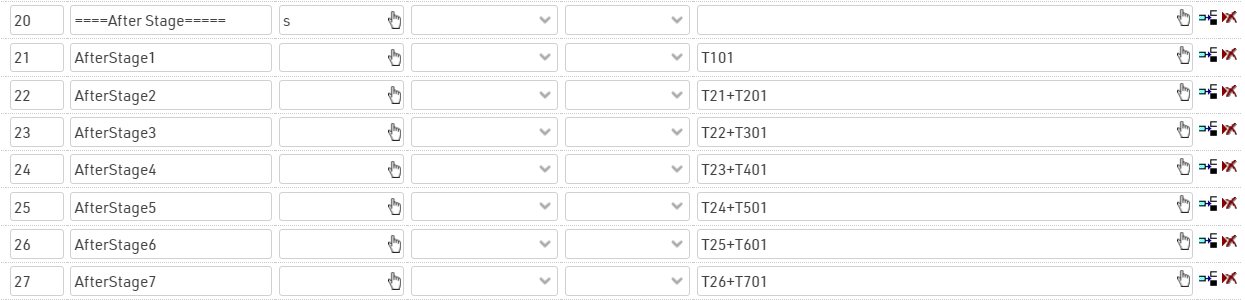
In this case, we don't use TSum() since if a rider does not have a result for a particular stage then the cumulative times for subsequent stages should not be calculated.
Calculation of Sector Times and Penalties
For this event, the regulations state that each rider must complete a full stage in less than 1h30min to avoid incurring in penalties.
A full stage is considered from the finish of the previous stage to the finish of the current stage, for stage 1 this is from the initial start until the finish of stage 1.
We calculate each sector time in a new set of results with IDs 40+, referencing the corresponding raw data results.
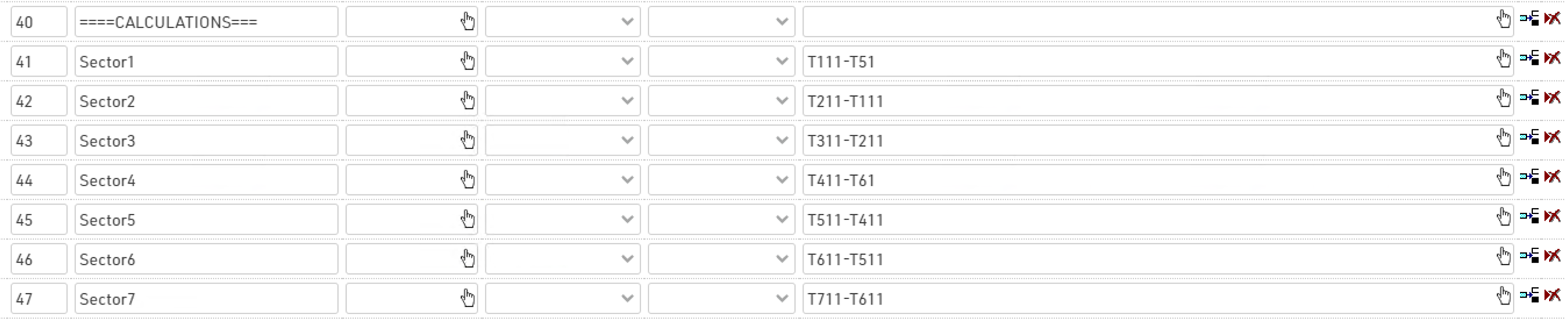
By referencing these results, with a Switch() it is possible to calculate if a penalty has to be applied to riders and how much time to add based on the time needed to cover the whole sector.
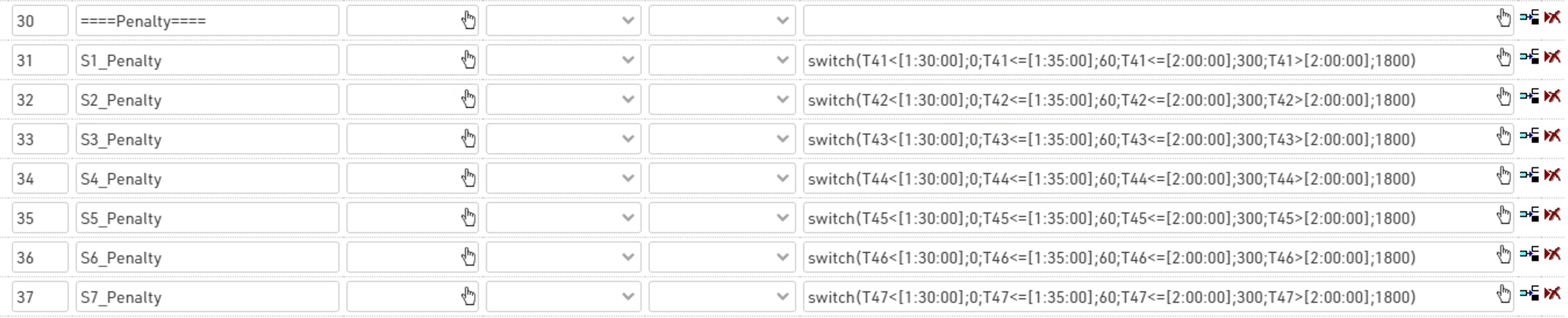
The penalty time to assign follows the table:
|
Sector Time |
Penalties |
| less than 1:30:00 | 0 s |
| between 1:30:00 and 1:35:00 | 60 s |
| between 1:35:00 and 2:00:00 | 300 s |
| more than 2:00:00 | 1800 s |
es. switch(T41<[1:30:00];0;T41<=[1:35:00];60;T41<=[2:00:00];300;T41>[2:00:00];1800)
E.g.: if Sector1Time is smaller than 1:30:00, no penalty is applied. If it is smaller or equal than 1:35:00, then 60 seconds are applied, and so on. Remember that the switch() formula stops at the first true condition!
Overall Results
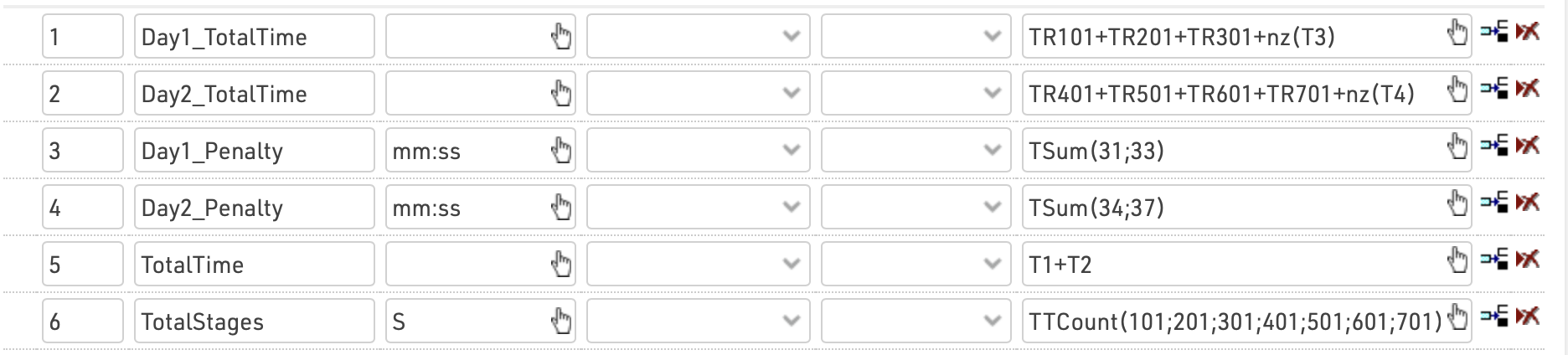
In Results 1-6 we calculate the overall results which are used to create our rankings for each day and the final results.
We first create a sum of times for each day, this uses the rounded times for each stage and the sum of penalties for that day. By using TR we ensure that only participants who have completed all the stages on that day have their total time calculated.
We additionally calculate the sum of penalties for each day using a TSum() function on the corresponding set of results.
We then calculate the total time as the sum of results 1 and 2, which are our individual day totals. Since these results only calculate if all stages have been completed, then the total time is also only calculated if all stages are complete over both days.
As an additional reference we count the number of stages which have been completed by using a TTCount function to count the number of stage results which have a time. Set the time format to s here, so the count is just displayed as a number 1-7.