Additional Fields
Since the event consists of 7 stages, we may need to manage participants' status per each stage, however, RACE RESULT 12 offers only one single field for defining the Status of participants.
Using Additional Fields we can create 7 additional status fields, one for each stage, in order to change the participant's status of a specific stage.
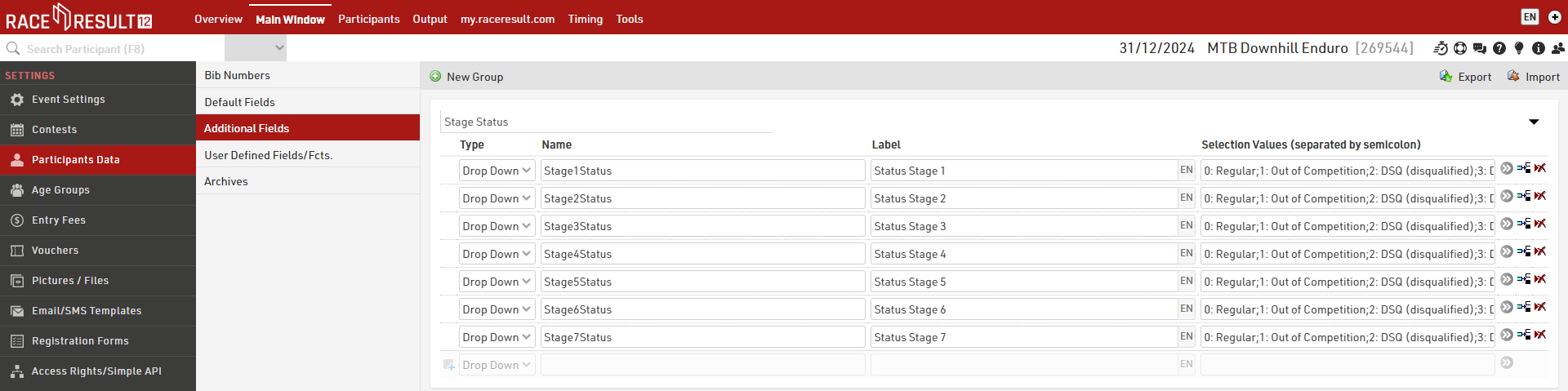
These are defined as a Drop Down and for the selection values we maintain the same logic as the default Status field, using a number and a description for each different status. This format later helps with the sorting of participants in output lists by using the numerical value for sorting.
0: Regular;1: Out of Competition;2: DSQ (disqualified);3: DNF (did not finish);4: DNS (did not start);5: did not show up
Event User Defined Attributes
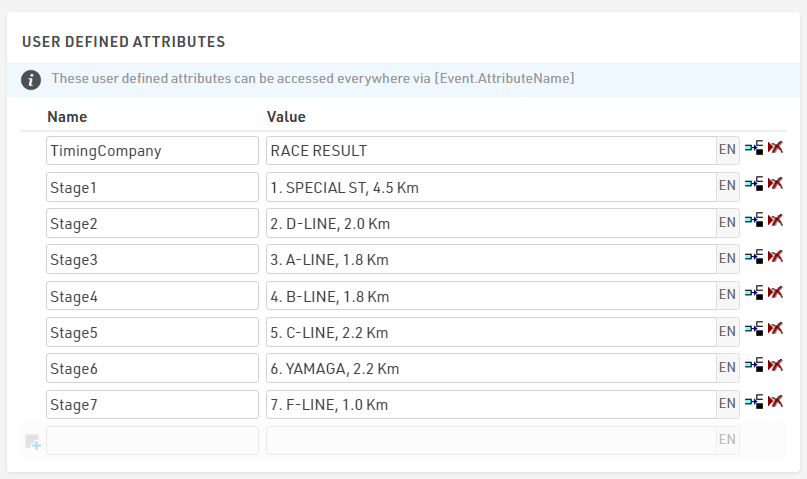
To make it easier to later call the details of each stage in Output lists we use Event User Defined Attributes.
Here we created a User Defined Attribute for each stage giving the stage number, stage name and stage length.
These can be called using for example [Event.Stage1], which returns the same value for each participant. In the event that you have different stages for different participants in different Contests you could choose to store these in Contest User Defined Attributes.
User Defined Fields/Fcts.
User Defined Fields / Functions allow us to create our own functions which can be easily called to make it easier to return specific data without needing to copy long expressions each time.
Here we created two User-Defined Functions to easily call the stage name and participant stage status.
The first is a function called StageName which takes a single parameter which we call StageID, this is purely a placeholder to make it easier to understand what value the function expects to receive.
StageName(StageID) - choose([StageID];[Event.Stage1];[Event.Stage2];[Event.Stage3];[Event.Stage4];[Event.Stage5];[Event.Stage6];[Event.Stage7])
This function uses a choose() function which takes a number input to return a value. In this example, StageName(1) would return the value for [Event.Stage1].
The second function, StageStatus, returns a numerical value for each stage status. Again, this uses StageID as a parameter.
StageStatus(StageID) - left(choose([StageID];[Stage1Status];[Stage2Status];[Stage3Status];[Stage4Status];[Stage5Status];[Stage6Status];[Stage7Status]);1)
This function uses a combination of left() and choose() functions to return only the first character of the stage status fields which we defined earlier in the Additional Fields.
A third UDF, ShowStatus(x) is used for returning the stage status abbreviation whenever (x) is different from zero. This will be used in the announcer list to define the status of participants who did not cross the finish line of each stage. [x] will be filled with the StageStatus(StageID) explained above.
ShowStatus(x) - choose([x]+1;"OK";"a.k.";"DSQ";"DNF";"DNS";"n.a.")