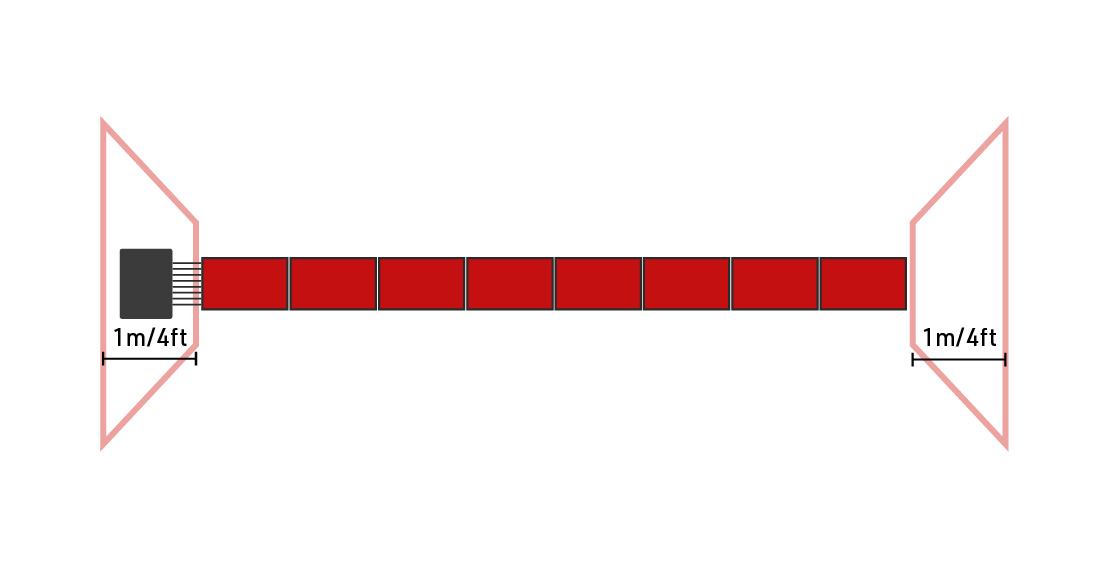
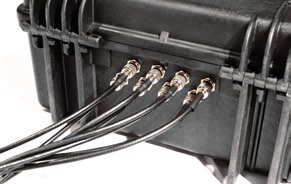
When timing with passive (UHF) the RACE RESULT Folding Ground Antenna is connected to the Decoder using the antenna ports on the rear of the system.
The antenna is simply unfolded to cover the width of the timing point, the standard width of the ground antenna is 4.8m, in this configuration each mat segment contains an antenna. When unfolding the antenna, ensure that the antenna cables are located on the same side as you will place the decoder, this will most likely be on the same side as your timing computer.

To connect the antenna cables to the decoder, line up the notches on the outside of the port with the cutouts on the cable and insert the cable, then twist 90 degrees clockwise to lock the connector in place. The antenna cables can be connected in any order.
Once the system is started the main screen will show the status of the Antenna ports.
| N | o | P | a | s | s | i | n | g | s | T | i | m | e | : | 0 | 0 | : | 0 | 0 | : | 0 | 0 | . | 0 | 0 | 0 | |||||||||||||
| F | i | l | e | N | o | : | 1 | 0 | I | P | : | 1 | 9 | 2 | . | 1 | 6 | 8 | . | 1 | . | 2 | 0 | 0 | P | r | e | s | s | ||||||||||
| U | p | l | o | a | d | : | o | f | f | A | n | t | e | n | n | a | s | : | █ | █ | █ | █ | █ | █ | O | X | S | T | A | R | T | ||||||||
| U | S | B | : | n | / | a | B | a | t | t | e | r | y | : | █ | █ | █ | █ | █ | █ | █ | █ |
A solid black bar indicates that an Antenna is connected to that antenna port. A black outline in place of the bar indicates an antenna is connected and currently detecting a transponder. An X indicates that no antenna is detected.
You should ensure that all the antennas are being correctly displayed as connected, and then additionally ensure that all the antennas detect transponders when being passed over, this is best done in TEST mode before pressing START.
When setting up your timing system you should also take the following considerations into account:
- Ensure that all participants will cross directly over the antenna - the mat should cover the full width of the timing point with no space for participants to go around it. If your timing point is wider than the mat then you may need to set up a barrier to funnel participants across the antenna.
- If your timing point is narrower than the width of the mat then you do not need to connect all the antenna cables. The antenna cables are numbered 1-8 where 1 is the element closest to the system and 8 is the furthest away, antennas which are not being used should be unplugged.
- Protect the system from unwanted intrusions - spectators may want to try and get as close as possible, particularly at the finish line. If they get too close they may stand on the system or the antenna cables which may then damage the cables or rip them out entirely. Create a barrier around the decoder to prevent any accidental damage.
- The antenna will detect all transponders within close proximity - this can include participants standing to the side either having already finished or waiting for their start. In most cases this does not cause a problem as the detections will be ignored by the software, however, it is good practice to create a 1m / 4ft buffer around the antenna to prevent unwanted detections.
- Systems should be placed a minimum of 5m apart from each other - if you are using a separate main and backup line or you have 2 timing systems located next to each other you should ensure a minimum distance of 5m between the antennas. If the fields of the antennas overlap then it can inhibit the performance of the systems to detect transponders. Additionally - for timers using EU frequencies (860-865 MHz) you may need to set the Frequencies of the two systems separately.