Special Results are used when a more complex ruleset may be required for calculating times, or for other custom calculations. Special Results also provide some additional functionality for lap races, with specific settings to define minimum lap times or automatically calculate lap counts, fastest laps and more.
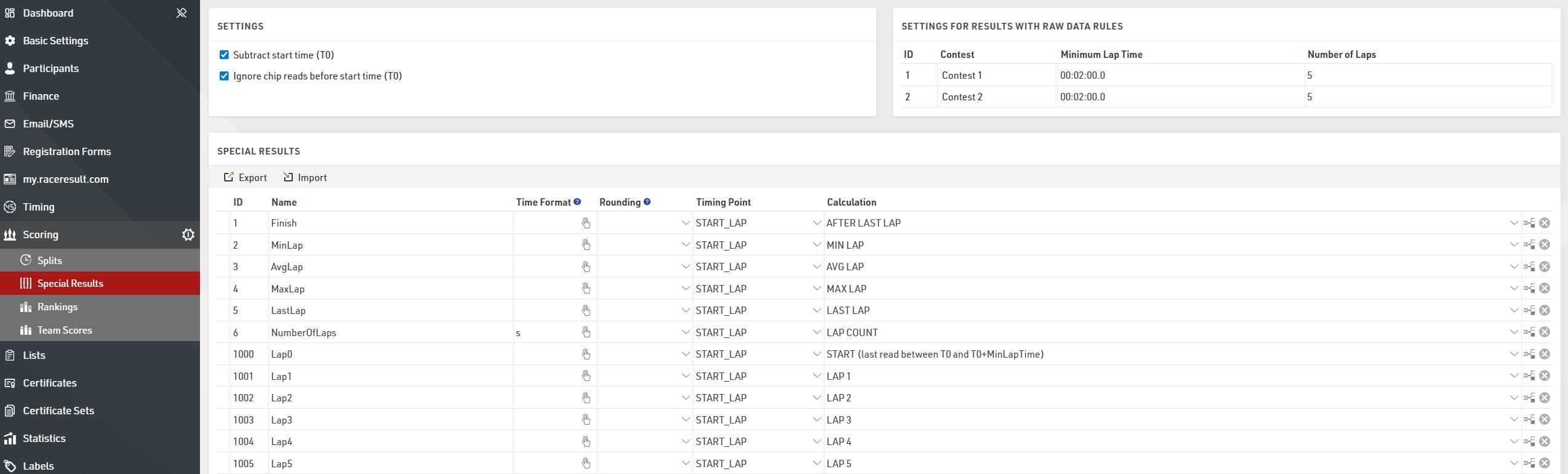
Special Results are applied to all Contests, however the Minimum Lap Time and Number of Laps can be defined for each Contest individually where required. If using advanced Raw Data Calculations then the rules can be set for either All Contests or each Contest individually.
The Calculations for Laps are only available when the Number of Laps value for at least one Contest is greater than 0.
Each result requires a unique ID and a Name.
Results can then either be a Raw Data Calculation - which then uses a Timing Point to call the raw data and calculate the corresponding time, or a standard calculation in which case no Timing Point is selected and the calculation is written manually which can reference any other result, field or function within the event.
Variable Lap Race Template
When creating an event using the Variable Lap Race Templates you will need to enter the maximum number of laps for the event.
This value will be assigned to the Number of Laps setting for each Contest, if different Contests will complete a different number of laps then you should set this accordingly. The minimum lap time by default is 2 minutes for all Contests and again you may need to adjust this.
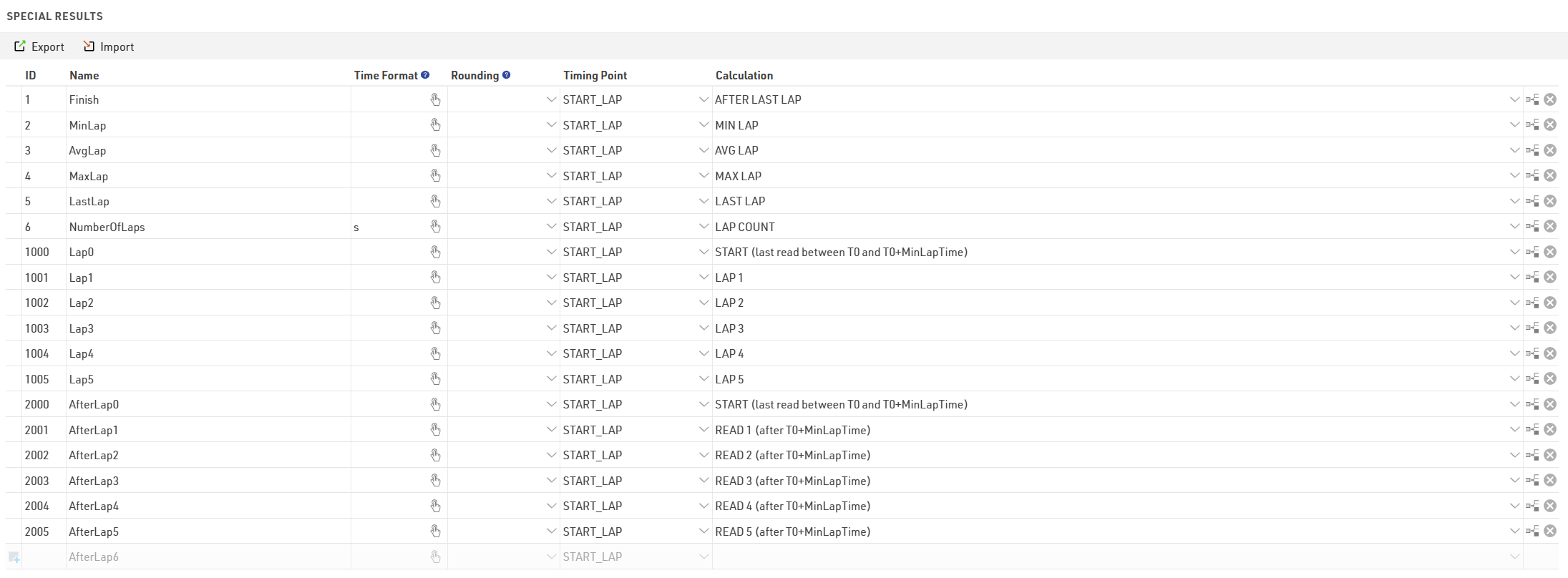 The first result uses the Lap Rule AFTER LAST LAP which uses the time from the end of the last lap the participant has completed. With this any participant who has completed at least 1 lap will be ranked and displayed in the final results. If you only wish to rank participants who complete the full number of laps then this calculation can be changed to FINISH (Read after end of last lap).
Additional results are created for the Minimum (Fastest), Average and Max (Slowest) Laps, as well as the Last Lap and Number of Laps.
When the maximum number of laps is set to 100 or lower then for each lap a result will be created for each lap time (LapX) and additionally the cumulative time at the end of each lap (AfterLapX). When the maximum number of laps is over 100 these are not automatically generated in the Special Results however the individual lap times are still calculated internally and can still be referenced in outputs.
Biathlon (Einzel) Template
The Biathlon template is unique in that it combines both Splits and Special Results, in this setup the Special Results are used to enter penalties which are then summed and added to the Finish Split to calculate a total time.

When a result is created with no Timing Point or Calculation then a time can be entered manually in the Results tab of each participant. In this case there are 4 results created to enter a penalty for each Shooting discipline, each value should be entered as a time in minutes.
The result in ID 10 (Penalty) then calculates the sum of these times and multiplies by 60 to calculate the total time as a value in seconds (which is required for the final calculation).
Result ID 1 adds together [Finish.Decimal] which is the time in the Finish Split and the total Penalty time. This result is then used as the Finish Result in the Contest setup and is then used for the final rankings and results lists.