The display has an integrated backlight and is easy to read in both darkness and sunlight.
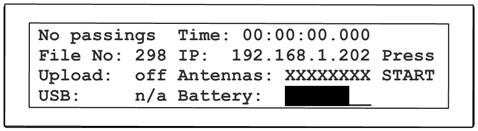

The display shows the following status information:
| Left Column | |
|
Count |
shows the number of detections since the last start, or No Passings. |
|
File No |
shows the number of the current passings file, see Test Mode and Timing Mode |
|
Upload |
shows the status of the server upload, see 2G/3G Upload |
|
USB |
shows the status of the USB stick, see USB Port |
| Middle Column | |
|
Time |
shows the running time (can be time of day or race time, see Time Setup) |
|
IP |
shows the IP address of the system, see Ethernet Connection |
|
Antennas |
shows the status of the eight passive antennas, or details of the Active Extension |
|
Battery |
shows the state of the internal battery, see Battery |
|
Right Column |
shows the ID of the last 4 transponders detected (or Press START when still in Test Mode, see Test Mode and Timing Mode) |