When connected to the internet Ubidium can then connect to the RACE RESULT servers to allow accessing the system remotely for split points or remote timing.
When connected the system will upload current status information and passing information, and can additionally also receive remote commands.
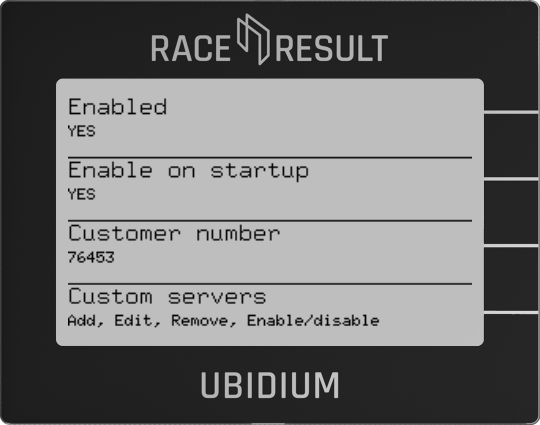
Enabled
Enable or Disable the RACE RESULT Cloud Services.
Enable on Startup
Choose whether the system should automatically attempt to connect to the cloud immediately after startup.
Customer ID
Each system will upload the data linked to a customer ID, this is the numerical ID of your RACE RESULT account. In order to access the system from your account the customer ID field must be set correctly.
Custom servers
Ubidium can connect to your own custom server to send passing and status information. To use Ubidium with your own custom server please contact support@raceresult.com for access to the latest SDK.
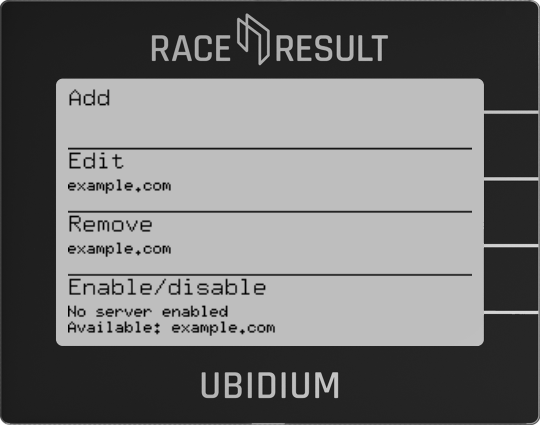
Add
Provide a host address as well as the listening port of your custom server and define whether or not the custom server should be enabled on startup.
Edit
Edit existing custom servers set up on the system.
Remove
Remove existing custom servers set up on the system.
Enable/disable
Manually enable or disable which custom servers should be used, primarily for those which are not automatically enabled on startup.