The keypad of Ubidium is completely sealed inside the top case of the system, rubber keys cover the tactile switches below making the buttons easy to use in all conditions.
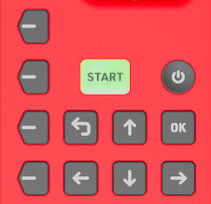 |
| POWER |
Pressure insensitive and slightly recessed to prevent accidental shutdown To turn the system on, push and hold the power button for up to 2 seconds. |
|
| START |
LED Backlit for additional functionality Press once to create a Marker Press and hold to create a new passings file. |
LED Backlight Green - System has GPS fix, active loop or ground antenna connected and either a Cloud connection or connection to a local RACE RESULT 14 instance. Orange - Loading and confirmation of new passings file creation |
| OK | Select or confirm menu items | |
| BACK | Return to the previous menu or cancel current action | |
| Directional Buttons (Up, Down, Left, Right) |
Use Up/Down to scroll through different display screens. Additionally used to interact with menu items / inputs |
|
|
Navigation Buttons |
Correspond to menu items on the display. | |