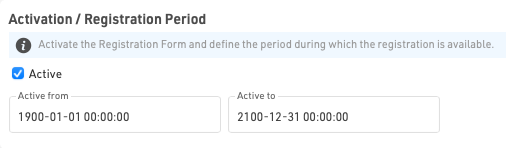
Activation / Registration Period
Define the date range for which a registration form should be available, or manually activate / de-activate a form completely.
Note that the date/time is according to the time zone of your event file.
Registration Type
Set the title and form type for the registration form.

If using a group registration then you must also define the min, max, default and increment values.

Increment is the number of new entries added when the user clicks "add registration" in the form.
When creating a self-service form (either individual or group) you can apply a filter to define for which participants the form should be available, or which participants should be included in the group.
Additionally for group self service forms you can optionally define the identity field - this is the field on which participants should be matched in order to be part of the same group, such as club if managing a club / team registration. By default this will use the GroupID.

Contest / Registration Limit
If the registration form should only be available for a specific contest then select the Contest here and optionally define a registration limit.
If All Contests is selected then the registration limit applies to the total count of participants. Note that individual contest limits can be applied in the registration form.

If you wish to exclude only certain contests from a form then this can be done using the Input Fields Extended Settings
Website Integration
Individual registration forms can be embedded directly to your own website using the integration code for each unique form.
See Website Integration for more information on embedding registration forms in your own website.