Performance
Accuracy (Excluding Stored Passings)
When a transponder passes over a loop the transponder will receive multiple signals (hits) from the loop, the internal algorithm of the transponder then calculates the time which should be transmitted to the timing system, this time should be when the transponder passes the center line of the loop.
V3 Active transponders contain a new advanced algorithm for calculating exact passing time with the highest repeatable accuracy of any transponder, this accuracy is not so greatly impacted by variables in loop setup (width / power) or passing speed. V3 Transponders (excluding ActivePro V3 Performance) require a minimum of 2 hits from the loop to be considered a valid passing. The maximum number of hits reported by a V3 Transponder for a regular passing is 99 hits.
| Transponder | Accuracy | Reaction Time | Internal Resolution | Passing Resolution |
| ActivePro V3 Performance / MotorKart V3 | 0.004s | 125ms | 1/1024s | 1/2048s* |
| ActivePro V3 | 0.004s | 250ms | 1/1024s | 1/2048s* |
| ActiveBasic V3 | 0.2s | 500ms | 1/1024s | 1/2048s* |
| ActivePro V2 | 0.01s | 250ms | 1/256s | 1/1024s |
| MotorKart V2 | 0.004s | 125ms | 1/256s | 1/1024s |
| ActiveBasic V2 | 0.2s | 250ms | 1/256s | 1/1024s |
*Only applicable when using Ubidium
Accuracy: The repeatable accuracy of the passing time calculated by the transponder, if 2 transponders are recorded with a difference greater than the accuracy then the order of passings will be correct.
Reaction Time: The maximum time for which the transponder will wait for a stronger loop signal before transmitting its passing. Lower reaction time = faster transmission of data.
Internal Resolution: The resolution of the transponder's internal time base.
Passing Resolution: The precision to which a passing is calculated.
Store Mode
Store mode allows the transponder to record the time at which it passes a loop in the internal memory, this is actually achieved by calculating the time since the stored passing and as such relies on the transponder's internal time base.
ActivePro (+Performance) / MotorKart V3
The internal time base of every V3 transponder is calibrated during production to provide a clock accuracy of +/- 10ppm.
Additionally the stored passing times are also calculated using a temperature compensation, as particularly at low temperatures there can be greater drift. The optimum working temperature is 25°C.
The result is a time with a maximum drift of just 0.036s per hour, across the transponder's working temperature range.
ActivePro / MotorKart V2
The internal time base of the transponder is dependent on the calibration at the time of manufacturing the internal oscillator. No temperature compensation is applied to the calculated times.
Continuous / Exit Passing
When held over a loop for a prolonged period of time V3 transponders generate additional continuous passings and an exit passing with greater precision than previous versions.
Continuous passings will be sent every 5s after the initial passing is generated by a transponder. These can be identified by a hit count of 254.
Exit passings are sent when the transponder leaves the field of a loop after being within the field for a minimum of 3 seconds. The Exit passing is identified by a hit count of 255.
Exit passings are generated with accuracy according to the type of transponder.
ActivePro V3 Performance: 0.02s
ActivePro V3: 0.1s
ActiveBasic / MotorKart V3: 0.2s
Sensitivity
V3
To ensure maximum accuracy of passings the sensitivity of transponders is adapted during a passing.
Whilst awaiting activation from a loop the sensitivity of transponders is equal to Active V2 transponders. After the first loop packet is received the sensitivity will be increased, this effectively increases the detection range / height of the transponder, which will then continue to observe the loop packets as normal.
Once the transponder leaves the field of the loop the sensitivity will again drop to normal levels.
This increase in sensitivity helps eliminate a passing being generated too early, particularly when worn on the ankle as the transponder move through the field of the loop.
The impact of this can be seen when testing loop detection height - once a transponder is activated by a loop it must be moved much further away to leave the field of the loop. The additional range can be as much as 50cm.
Overlapping Loops
It is always advised to maintain a minimum distance between 2 loops equivalent to maximum speed in km/h divided by 10, in meters. e.g. 60km/h = 6m
V3
Active V3 transponders can internally handle loop data from 2 separate overlapping loops. Whilst observing 2 loops the transponder will choose when to switch from the first to second loop and a passing will be generated for both loops, the accuracy however may be impacted when loop fields are overlapping.
V2
Active V2 transponders cannot handle overlapping loops and such instances can result in loss of data from one or both loops.
2.4GHz Communication
RACE RESULT Active transponders use 2.4GHz to transmit their passing data to the Active system.
2.4GHz Transmission
When data is transmitted from a transponder to the Active System it also expects an acknowledgement from the system, if this acknowledgement is not received then it will continue to retry sending the data.The rate of retry varies with different transponder types, but all follow the pattern of several faster initial retries then with exponentially slower retries until the maximum retry count is hit. If this still fails then the passing will be automatically stored on the transponder (ActivePro / MotorKart only), the same as a passing received in Store mode.
ActivePro V3 Performance
When an ActivePro V3 Performance is activated by a loop it will first send a pre-warn packet via 2.4Ghz, this can be used as an alert that a participant is approaching, useful when displaying data as soon as possible is important. This is not normally used or shown in RACE RESULT 12.
The ActivePro V3 performance also has the fastest and highest rate of retries of any transponder type using the Quad Channel Backup as described below.
Note that when the battery is 2.5V or lower and the temperate is -20°C or lower the output power of 2.4GHz will be reduced to avoid drawing too much power from the battery.
ActiveBasic / ActivePro / MotorKart V3
Since most passings are successfully transmitted to the active system on the first try and with the improved 2.4GHz antenna of V3 transponders, the first attempt to transmit data is done so at a reduced 2.4GHz output power. Similar to the ActivePro V3 Performance the output power will also be reduced when the battery level is <=2.5V and temperature is <= -20°C.
If this first try does not receive a successful acknowledgement then it will be immediately followed by a retry at full power, after which the transponder will continue to retry as described above.
This logic provides significant battery saving over V2 transponders, however it may result in a lower average 2.4GHz RSSI since passings received on the first try were transmitted at a lower power.
If the first try fails then this does not count towards any warnings (NoAck) in the passing data.
Note that the retry logic for ActiveBasic V3 is slower than both the ActivePro and MotorKart.
ActivePro / MotorKart V2
The V2 range of ActivePro and MotorKart also send the pre-warn packet (as described in the ActivePro V3 Performance).
These have a slower rate of retry than V3 transponders and without the reduced power first try.
ActiveBasic V2
The ActiveBasic V2 has the slowest rate of retry with no pre-warnings.
2.4GHz Backup Channels
Each 2.4Ghz channel contains both a primary and backup frequency which helps improve 2.4GHz communication, particularly in environments with high noise / interference. Check Active System 2.4GHz Frequencies to understand the individual frequencies used.
ActivePro V3 Performance - Quad Channel Backup
As the performance version of the ActivePro V3 is aimed at providing the fastest and most reliable possible data transmission this includes a Quad Channel backup for 2.4GHz communication.
With this there are 4 pairs of channels 1/2, 3/4, 5/6 and 7/8, on which the transponder will attempt to transmit data on both the primary and backup frequency for each channel in the pair.
To make use of this a second system can be setup on the alternate channel of the pair, this can be with or without a loop. If connecting a loop to the second channel backup then there should be a sufficient gap between the two loops to prevent interference.
e.g. a primary finish is setup with the loop set to CH1, a second system is setup 5m after the primary on CH2 with no loop connected. Loop ID in this case is not important.
The passing data received will contain the Channel and Loop ID of the loop on which the transponder was activated - in this case the device ID should not be used as a unique identifier.
V3 / V2
All V2 and V3 transponders use a dual channel backup for 2.4GHz communication, with this the frequency will switch between the primary and backup frequencies of the channel.
When using a decoder with an Active Extension the V1 Legacy Mode of the system must be set to AUTO or OFF.
V1
With V1 transponders the 2.4GHz transmission is only on a single frequency. When using V1 transponders either alone or as part of a mixed population (V1/V2/V3) with a decoder and Active Extension then the V1 Legacy mode must be set to AUTO or ON. When the system detects a V1 transponder then the auto-channel switching will be disabled until the system is rebooted.
Active devices with FW version 2.6+ do not support legacy mode and should not be used with V1 transponders.
Tracking
Tracking mode is available on ActivePro V2 / V3 and MotorKart V2 / V3 transponders to be used with RACE RESULT Track Boxes.
Tracking mode does not use a loop setup for recording passings but instead relies on the 2.4GHz of the transponder to broadcast a "Trackping" packet. These packets are detected by the Track Boxes in order to calculate a passing time.
Tracking Activation
Transponders only send Track Pings when tracking mode is activated! The tracking channel set on the transponder must match the channel set on the Track Boxes. If the channels do not match you will not receive any data.
It is recommended that the channel used for tracking mode is not used for timing simultaneously, particularly at high density areas such as the finish as the TrackPings will generate considerable additional noise on the 2.4Ghz channel.
Activation Methods
Depending on the type of transponder there are two different methods to enable tracking mode.
Management Box
Using a Management Box set to TRACK > START mode. The channel of the Management box will be the tracking channel activated on the transponder.
The Management Box will display a counter of unique transponders which have been activated.
Channel 8 / Loop 8 (ActivePro V3 and ActivePro V3 Performance only)
Use any Active system set to Channel 8 Loop 8, this specific combination ONLY will activate tracking mode on Channel 8. When using this method the initial TrackPing interval will be reduced to the slowest rate for that transponder type, and tracking will only start after a 5 second delay to ensure the passing data is successfully transmitted first.
Additionally, the maximum time between activation and the first Track Box must be less than 1 hour (normally 5 hours), after which the Tracking Mode will be deactivated. After the first Track Box the regular algorithm will continue for both TrackPing rate and maximum time between Track Boxes.
Deactivation
Tracking mode on transponders can only be deactivated using a Management Box set to TRACK >Stop mode, or will be automatically disabled according to the maximum intervals outlined below.
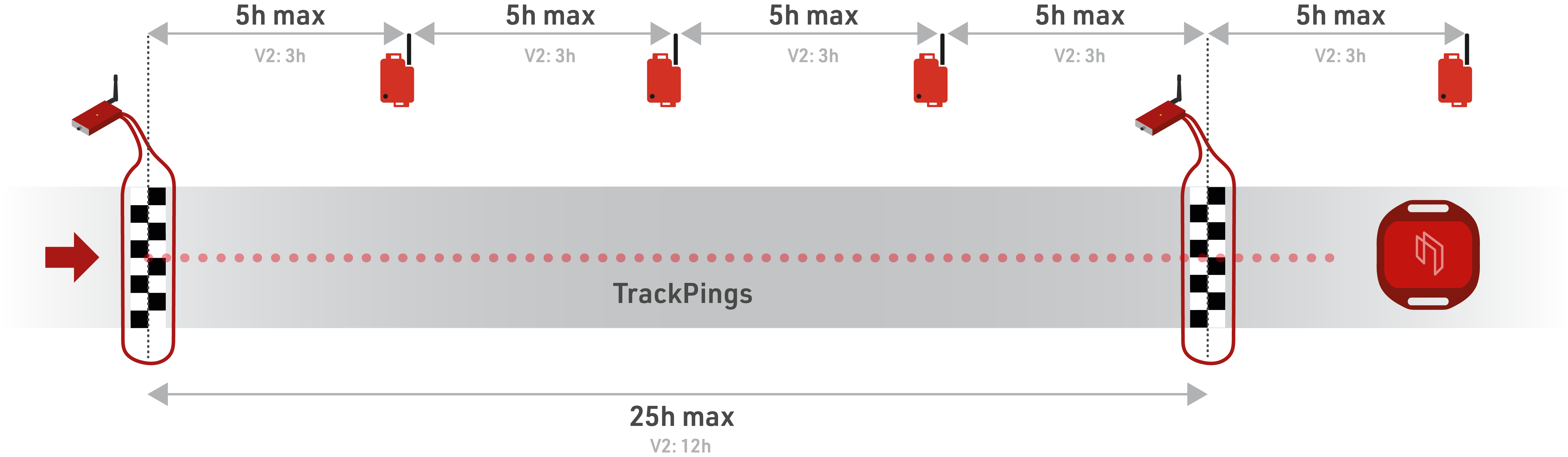
Typical Activation Setups
Manual scanning of transponders (pre-race):
Tracking activation can be done prior to the start of a race, normally this is done before transponders are handed to participants to ensure that all transponders are activated. It is possible to activate transponders individually when they are collected but it is easy to forget this step if it's busy.
This is most commonly achieved using a Management Box with the small supplied brass antenna connected and then scanning transponders in their trays. This allows you to ensure the count of activated transponders on the Management Box matches the number of transponders available.
When activating tracking mode before the start it is important to consider the maximum Track Box intervals, 3h for V2 and 5h for V3. For example if transponders are activated 2 hours prior to the start, the first Track Box must be within 1 or 3 hours of the start, not considering any delays.
For this reason it is recommended to only use a Management Box to activate tracking with this setup, as the maximum interval is reduced to 1 hour when using Channel 8 / Loop 8 activation.
On-Course activation
Setting up a loop on course for tracking activation is especially easier when transponders may be distributed prior to the event, or if the first sector of the race is longer than the maximum interval.
When activating on course then the loop should be setup at a location that all participants will definitely cross, it is not recommended to do this at any pre-start checkpoint in case some athletes (e.g. elites) skip this to get to the front of the starting block. It is also recommended leaving a minimum distance of 20m between any timing loop and a dedicated tracking activation loop to avoid interference between loops.
To ensure all transponders are activated it is best to setup the loop with 60cm width and set loop power to 100% to maximize the detection height. See Setting up the Loop Cable.
If using the Channel 8 / Loop 8 activation method and the timing point will be passed again later during the race for timing then this should be at a lower density point where you do not expect bunches of participants to be within range simultaneously. This is to avoid overloading the 2.4GHz channel with TrackPings which may result in failed transmission of regular loop passing data. Additionally avoid having any Track Boxes within TrackPing range (50m) of the loop, since when within range transponders will increase the TrackPing interval to the fastest possible rate which will create additional noise on the 2.4GHz channel.
If using a Management Box at a high speed location then note that the counter may not reflect the true number of transponders since this relies on an additional acknowledgement from the transponder.
Trackping Rate
When tracking is enabled transponders will emit TrackPings at a variable rate according to the transponder type, different rates are explained below where the interval is the time in seconds between each TrackPing.
The adaptive TrackPing rate in V3 transponders helps increase battery life of transponders.
ActivePro V3 Performance / MotorKart V3
| Time since last Track Box | 0s (within range) | 10s | |
| Adaptive Trackping Interval | 0.5s | 1s | |
ActivePro V3
| Time since last Track Box | 0s (within range) | 10s | 1 hour | |
| Adaptive Trackping Interval | 1s | 1.75s | 4s | |
ActivePro V2
| Fixed Trackping Interval | 1s | |
MotorKart V2
| Fixed Trackping Interval | 0.5s | |
Maximum Track Box Intervals
Once tracking mode is activated then TrackPings will be sent out by the transponder according to the Trackping rate for that transponder type.
In order to keep tracking mode activated, the transponders must communicate with a Track Box at least once every 5 hours (3 hours for ActivePro V2 / MotorKart V2), and pass at least one Active Loop every 25 hours (12 hours for ActivePro V2 / MotorKart V2). If you used Channel 8 / Loop 8 to activate tracking mode (not using a management box), then the first interval between tracking activation and Track Box communication is 1 hour.
After these delays, tracking mode will be automatically deactivated, this is to prevent tracking mode from staying enabled permanently and draining the battery life of the transponder.
Remember that these values are the MAXIMUMS, and so should be calculated on your slowest expected participants. When data is critical for safety it is advisable to build in a buffer of an additional 20% to your maximum expected time.
Status / Warning Flags
The passing data transmitted by the Active Transponder also includes 2 fields which help flag potential issues with the transponder or your timing setup.
Warning Flag
The warning flag is a single bit which is either 1 or 0, where 1 represents that a warning flag has been triggered on the transponder. The warning flag will always only be sent with the next passing and will then be reset, it will only be sent again if the same or another warning is triggered. Thus warning flags are always to be considered from the LAST passing recorded. A passing in this regard is considered a passing from Ubidium, an Active Extension or a Loop Box.
V3
The warning flag is used in combination with the Wake Up Counter (WUC) to indicate the reason for the warning, it may be difficult to ascertain the reason for a warning flag with the first passing but if the warning flag is triggered during the event then this is more reason for concern.
The following combinations are possible:
Warning Flag Set / WUC + 1 (regular passing): Either the transponder was woken up from Deep Sleep mode or the transponder detected high noise and entered Noise Suppression Mode. During an event a transponder should not enter Deep Sleep and so it can be assumed that this is a high noise warning.
Warning Flag Set / WUC + 2: High RX Error count - the transponder could not decode the loop data correctly.
Warning Flag Set / WUC + 5: Very high noise detected - the transponder entered Noise Suppression Mode but was still activated by high noise.
Warning Flag Set / WUC + 10: Transponder rebooted - please contact RACE RESULT.
V2
The warning flag is only used to indicate when a transponder was woken from Deep Sleep mode on V2 transponders.
Battery
The RACE RESULT active transponders report their battery level in the timing module with every passing.
It is not possible to determine the exact voltage brand new transponders should display, since the voltage depends on a number of factors, including temperature, but it should be above 2.7 V.
After a couple of years of usage, you should start monitoring the battery level of your transponders.
We do not recommend using transponders with a voltage of 2.3 V and below. The battery cannot be replaced, as the transponders are sealed and they would not be waterproof anymore after being opened. Once the battery is empty, you will need to buy a new transponder.
The discharge curve of the battery gets very steep at the end of life, at 2.2 V it is almost empty. Theoretically, transponders can work down to 1.8 V, but we cannot guarantee reliable operation, especially when used cold.
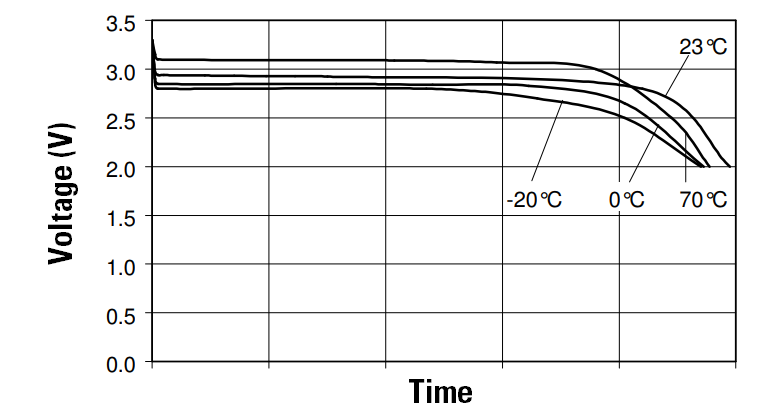
If you have transponders which you suspect are on low battery then read our guide on Active Transponder Battery Testing.
Deep Sleep
If you are a participant purchasing a personal transponder, please be sure to have the transponder scanned by the timing service provider before your first event.
Deep sleep is a mode which can be activated on Active transponders, using the Management Box, designed to preserve battery life of transponders.
When Deep Sleep is activated the transponder operates in a low-power mode, and the sensitivity is reduced. The reduction in power is equivalent to approximately 40% saving.
When purchasing new or renting Active transponders from RACE RESULT, transponders will be shipped in Deep Sleep mode - this is particularly important to note with V3 transponders.
V3
All V3 Active transponders feature Deep Sleep mode which lowers the sensitivity of transponders as much as possible.
The sensitivity of Active V3 transponders is reduced so greatly that they are unusable for timing whilst in Deep Sleep mode.
When using transponders after deep sleep, it is important to activate the transponders beforehand using a loop or brass antenna with any active system. It is also recommended to read this data to verify that all transponders have been activated.
Thanks to the greatly reduced power of V3 transponders Deep Sleep could be enabled after each use without negative impact. V3 Transponders in Deep Sleep will still count up the Management Box counter when scanning them again. In this case, the transponders remain in Deep Sleep. This means, for example after an event, you can set all of your transponders (where some could still be in Deep Sleep as they were not used at the event) to Deep Sleep again and the counter will show you the total number of transponders.
ActivePro / MotorKart V2
Deep Sleep is only available on the ActivePro / MotorKart models of V2 transponders.
Whilst the sensitivity is reduced the transponder may still be activated by strong external interference or passing over a loop at relatively low height (<1m).
It is still advisable to activate transponders prior to use using a loop or brass antenna.
Deep Sleep should only be enabled on V2 transponders where they will not be used for a minimum of 4 weeks - as the additional power to enable / disable Deep Sleep mode will negate any benefits. A V2 transponder set to Deep Sleep will not count up the Management Box counter when scanning it again for Deep Sleep Mode.
Noise Suppression Mode
Noise suppression mode is only applicable to ActivePro V3 / ActiveBasic V3, it is not enabled for ActivePro V3 Performance or MotorKart due to the higher demands of these transponders.
The loop of RACE RESULT Active systems emits a 125kHz signal, which contains a series of information to identify it as a RACE RESULT loop and the Channel / Loop IDs of the system. This signal is what activates the internal processing of the Active transponders which must first process the data to check whether this is a valid RACE RESULT loop or not, before generating a passing.
All electronic devices emit electromagnetic noise on a range of different frequencies, some of these devices can emit noise on the same 125kHz frequency as used by the RACE RESULT loop. If such noise is detected by a RACE RESULT Active transponder then the internal processor will always try to decode this signal to check whether it should generate a passing.
If a transponder is activated by a 125kHz signal which is NOT recognised as a RACE RESULT loop then this will be logged internally, if this occurs more than once between sequential valid RACE RESULT loops then the transponder will enter Noise Suppression Mode. Whilst this mode is activated the transponder will temporarily reduce the sensitivity of the 125kHz receiver, and thus will require a stronger signal to activate it again.
Noise Suppression Mode is then monitored in 5 second intervals, if the source of the noise is no longer present at the next check then the transponder will return to regular sensitivity.
When Noise Suppression Mode is triggered then the transponder will also log a Warning Flag for high noise which will be transmitted with the next passing.
If a transponder is still activated by external noise whilst in Noise Suppression mode then this will trigger a very high noise warning flag.
Factors impacting Battery Life
In order to maximize the battery life of your transponders there are some key factors which affect the battery drain, understanding these will help to ensure you achieve the maximum life of your transponders.
Transponder Activation
The largest source of battery drain on a transponder is when the transponder is being activated by a 125kHz electromagnetic field, when it is activated it is constantly checking for a valid loop pattern.
The primary source of this comes from a RACE RESULT Active loop, therefore if a transponder is held over a loop for a prolonged period of time, then battery drain is significantly increased. A V2 transponder held over a loop for 10s is approximately equivalent to 20 passings (<0.5s). The V3 transponder contains a smart logic recognizing the loop and only sending a continuous passing every 5s, as well as an Exit Passing when leaving the detection field, hence battery drain when held over the loop has been drastically improved.
Allowing V2 transponders to be held over a loop, such as at a start line, for long periods should be avoided.
Other sources of 125kHz noise that can result in increased battery drain include:
- Mains power cables (AC power)
- Cars with keyless start
- Motors / Machinery
V3 transponders include Noise Suppression Mode which helps to eliminate excessive battery drain due to external sources of noise.
Temperature
Cold temperatures will reduce battery performance of any electronic device, at lower temperatures there is greater internal resistance which thus lowers the transponder's ability to provide the power. Capacity is unaffected by cold temperatures and so remains the same, when returned to normal temperatures the transponder can still provide regular power.
Prolonged exposure to higher temperatures will result in reduced battery life as at high temperature the battery will deliver more power.
V3
V3 transponders provide the greatest performance across a greater range of temperatures thanks to the reduced power consumption of the on-board microcontroller. With this they may be used at temperatures from -25°C (-13°F) to +70°C (158°F) across the entire life of the battery.
The on-board battery calculations have also been improved to give a better indication of remaining battery voltage.
V2
V2 transponders do not compensate for cold temperatures and so the battery life is only guaranteed at temperatures above -10°C (14°F).
They may still be used at a temperature range of -25°C (-13°F) to +70°C (158°F) however a battery voltage of 2.6V when at 25°C (77°F) may still reset when at -10°C (14°F).
Tracking
Using tracking mode on transponders uses additional battery resources, the rate of this depends on the model as outlined below. The best option is to activate transponders at the start of an event and deactivate them using a management box as soon as possible at the end of the race.
When reviewing the values below, remember that battery usage is cumulative. For ActivePro Transponders with a 5‑year guarantee, the maximum tracking time is reduced by 20% after the first year.
ActivePro V3 Performance / MotorKart V3
| Tracking Mode Speed | Maximum Tracking Time | 20 hours as % of Max. |
| Slow | 300 days (7,200 hours) | 0.28% |
| Fast | 150 days (3,600 hours) | 0.56% |
ActivePro V3
| Tracking Mode Speed | Maximum Tracking Time | 20 hours as % of Max. |
| Slow | 1000 days (24,000 hours) | 0.08% |
| Fast | 400 days (9,600 hours) | 0.21% |
ActiveProV2
| Tracking Mode Speed | Maximum Tracking Time | 20 hours as % of Max. |
| Fixed | 2,000 hours | 1% |
Deep Sleep Mode
Deep sleep mode can extend the standby life of a Transponder by up to 40%.
When entering deep sleep mode you should consider that power is drawn when activating the transponder to enter deep sleep mode and again when coming out of deep sleep, particularly common when scanning trays of transponders as each may be activated multiple times.
Therefore as a general rule we recommend only entering deep sleep if transponders will not be used for 2 weeks or more.
Storage of Transponders
Taking note of the factors which affect batteries, how and where transponders are stored will affect their battery life. These tips will ensure maximum life of your Active transponders
- Store in a cool, dry environment, <20°C, when not in use.
- Keep away from power cables or any source of AC power, remember that cables may be embedded in walls.
- Don't store next to machinery which may draw large amounts of power or contain motors such as commercial printers.
- Avoid leaving in vehicles when not necessary, especially those with keyless start / entry.
- De-activate tracking mode as early as possible.
- Use a Management Box to put transponders to deep sleep when not used for prolonged periods of time.
- Scan your storage space with our 125kHz Detektor to ensure the absence of any electromagnetic interference
- Ideally, store the transponders in an Aluminium box separated from any noise emitting devices to protect the transponders further from any interference.
Active Transponder Battery Testing
Active V3 Transponder
When the transponder reports a battery status of 2.4V at room temperature (20°C), it is good enough to be used in the cold as well. With the V3 Transponder there is no need to test the battery in the cold (like it was before with V2 transponders). If the transponder reports 2.3V or less, it should not be used in the cold, and you will need to replace the transponder soon.
Active V2 Transponder
Almost empty batteries will start to create problems in the cold. When a battery is too low it may result in a reset, this leads to lost stored passings and deactivated tracking. A reset can best be detected by looking at the wakeup count - if it reports a lower value than before, the transponder has reset (a continued counting from 2000 shows that the restart is caused by a low battery). It is important to understand that voltage alone does not provide a valid indication. It can only be meaningfully evaluated in combination with the temperature.
This would be a typical empty battery transponder. It was able to generate a first passing with a regular Wake Up Count (WUC). Then it reset after sending the prewarn (which generated a rescue passing) during a passing. On the next WUC it restarted with 2001.
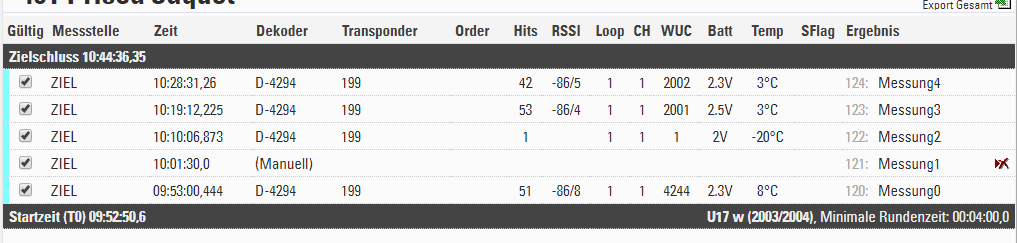
How to test if the battery is almost empty:
- Put your transponders in a normal refrigerator, cooling them down to about 5°C (40°F). You will need to leave them there for several hours for the transponders to actually cool down. Scan your transponders. If you see battery values 2.3V and below at around 5°C (40° F) you should be cautious to use them in cold conditions, the battery capacity is well below 50% - most likely they will be good enough for another summer season but will need to be replaced soon.
- Only if you are timing winter sports: put your transponders in a freezer overnight to make them cool down, then check if they still detect. Be aware: they are expected to stop detecting below -10°C (14°F) when they have under 50% battery. They will still be perfectly fine for normal temperatures, but if temperatures below -10°C are expected at your event, you need to use newer transponders.
Active Transponder Warranty
We guarantee a certain battery life for our Active Transponders. This warranty is limited to transponders not using Tracking Mode, and we also need to take into account further considerations.
As the transponders are sealed and the battery is inside the transponders, there is no way of disconnecting the battery to reduce its consumption. The transponder has a constant drain on the battery to stay "alive". When being activated, the battery consumption is highest, therefore, if there is any electromagnetic interference, the standby consumption will increase.
The Deep Sleep Mode is the only option to reduce battery consumption as much as possible when not being used and extend the shelf-life as much as possible. Learn more about the transponder battery and its consumption in this video.
Furthermore, to grant the above warranty the following preconditions must be met:
a) Transponders are stored in proper conditions. This means there is no electromagnetic interference which may drain the battery. Please note that any electrical device has the potential to activate the transponder and draw the transponder's battery unnecessarily. If you want to check your storage conditions, we recommend checking the area with our 125kHz Detector, which is available in our Online Shop.
b) Transponders are not constantly held within the activation field of a loop, neither for testing nor after collecting them at the end of an event. It is of course not a problem to detect transponders for testing, but letting them sit in the detection area for several minutes, or even hours, will drastically reduce the battery life.
What happens if your transponder's batteries are empty before the end of the warranty? If the above preconditions are met, we will offer you two options:
a) we will provide rental transponders until the end of the warranty period.
b) we will offer you a "trade-in" discount accounting for the loss of warranty time, based on periods of six months. For every six months the battery life falls short of the warranty, we will give you a proportional discount based on your initial purchase price to replace your "empty transponders" with new ones.
Technical Specification Comparisons
Active V3 Transponder Technical Specifications Comparison
Active Transponders |
ActiveBasic |
ActivePro |
ActivePro Performance |
MotorKart |
|---|---|---|---|---|
| Warranty* / Battery lifetime | ||||
| Years | 4 years | 5 years | 3.5 years | 3.5 years |
| Passings | 50,000 | 100,000 | 50,000 | 300,000 |
| Tracking fast / slow | - | 400 / 1,000 days | 150 / 300 days | 150 / 300 days |
| Detection | ||||
| Accuracy | 0.2s | 0.004s | 0.004s | 0.004s |
| Max. speed | 60 km/h | 120 km/h | 150 km/h | 120 km/h |
| Resolution** | 0.001s | 0.001s | 0.001s | 0.001s |
| 2.4 GHz Backup | Dual | Dual | Quad | Dual |
| Exit Passing Precision | 170ms | 100ms | 50ms | 170ms |
| Reaction Time | 500ms | 250ms | 125ms | 125ms |
| Loop Antenna | 2D | 3D | 3D | 3D |
| Prewarn | no | no | yes | no |
| Detection Height | 2 m | 2 m | 2 m |
0.5 m |
| Tracking | ||||
| Max. time between Track Boxes | - | 5 h | 5 h | 5 h |
| Max. time between Loops | - | 25 h | 25 h | 25 h |
| Typical Track Ping range | - | 50 m | 200 m | 50 m |
| Activation | - |
Management Box Channel 8 + Loop 8 |
Management Box Channel 8 + Loop 8 |
Management Box |
| Adaptive Track Ping Intervals | - | 4s / 1.75s / 1s | 1s / 0.5s | 1s / 0.5s |
| Store Mode | ||||
| Max. passings stored | - | 64 | 128 | 128 |
| Max. store time | 12h | 24h | 12h | |
| Store More Precision | Temperature compensated +-5 ppm | |||
| Temperature | -25°C - 70°C | |||
| Features | ||||
| Extra Transponder Code | yes | yes | yes | yes |
| Adaptive Noise Avoidance | yes | yes | no | no |
| Key-value store | yes | yes | yes | yes |
| Deep Sleep Mode | yes | yes | yes | yes |
|
Dimensions / Weight |
36mm x 40mm x 9mm / 16.8g |
|||
|
Housing |
IP69 TPE molded case sealed with PU compound 100% salt water proof |
|||
|
Shock Resistance |
>1,000G |
|||
Please note: All data apply to the optimal configuration of the RACE RESULT hardware.
* the value reached first is applied
** when using Ubidium
Active V2 Transponder Technical Specification Comparison
Active Transponders |
ActiveBasic |
ActivePro |
MotorKart |
|---|---|---|---|
|
Loop Detection Antenna |
1D activation antenna |
3D activation antenna |
|
|
Max Detection Speed |
75km/h (45mph) |
150km/h (90mph) [1] |
250km/h (155mph) [1] |
|
Timing Accuracy |
2/10th second |
1/100th second |
4/1,000th second |
|
Precision Sweet Spot |
30 - 60km/h |
60-90km/h |
|
|
Reaction Time |
250ms |
125ms |
|
|
Passings Storage |
no |
64 passings up to 24 hours time drift of ± 70ms per hour (20ppm) |
128 passings up to 24 hours time drift of ± 70ms per hour (20ppm) |
|
Tracking Mode |
no |
1 trackping per second |
2 trackpings per second |
|
Deep Sleep |
no |
reduces power consumption by 40% |
reduces power consumption by 70% |
|
Prewarn Before Passing for Fast Identification |
no |
yes |
yes prewarn acknowledgement |
|
Expected Battery Life [2] |
12 years / 300,000 passings |
7 years / 200,000 passings |
4 years / 300,000 passings |
|
Guaranteed Battery Life [3,4,5] |
7 years / 150,000 passings |
5 years / 100,000 passings / |
3 years / 200,000 passings / |
|
Battery Indicator |
battery status data in passing |
||
|
Dimensions / Weight |
36mm x 40mm x 9mm / 16.8g |
||
|
Housing |
IP69 TPE molded case sealed with PU compound 100% salt water proof |
||
|
Temperature |
-25°C to 70°C |
||
|
Shock Resistance |
>1,000G |
||
[1] At 30% loop power & 30cm wide loop
[2] Expectation based on usage with 50% deep sleep & without tracking mode
[3] Whichever comes first
[4] Battery consumption is cumulative, e.g. 50,000 passings & 1,000 tracking hours exploit the guarantee
[5] Battery warranty limited to temperatures above -10°C