Next, we'll look at settings for the entry fees, Finance → Entry Fees . Defining entry fees is important for payment during online registration. Additionally, you can print the entry fee on lists, labels, etc.
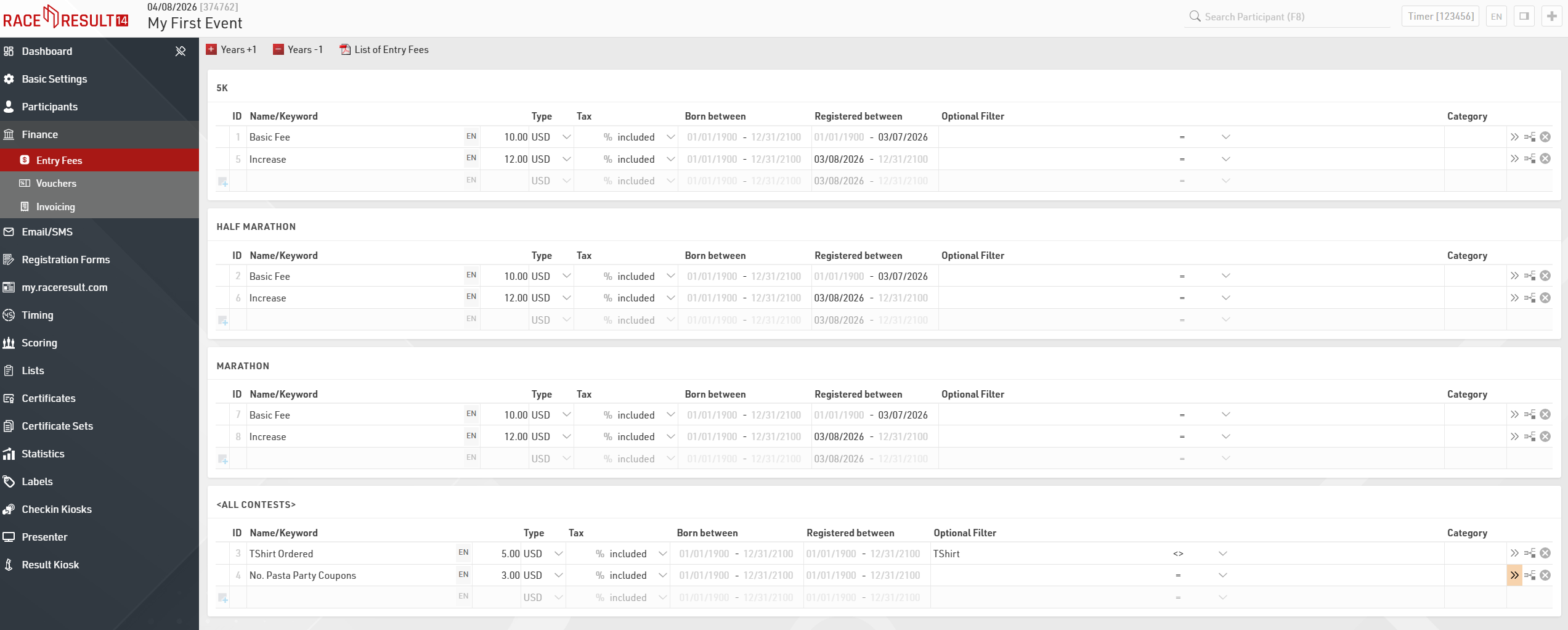
You can define a variety of fees for each contest, which can be charged either for all participants or only those who registered in a certain time period or those of a certain age or those fulling certain criteria (for example TShirt ordered). The total entry fee will be calculated by summing up all applicable entry fees.
Here some examples:
- Entry fee of $10 for all participants: Name the entry fee e.g. "General Entry Fee", enter the value of $10 and make sure that 01/01/1900 - 12/31/2100 is entered as "Born Between" and "Registered between".
- Increase by $2 from 03/08/2026 on: define the entry fee as above, but enter "01/01/1900 - 03/07/2026" in "Registered between". Then, define a second entry fee with value $12 and set "03/08/2026-31/12/2100" as "Registered between". Make sure that the date spans do not overlap and that there are no gaps (otherwise you may register for free for one day).
- Additional $5 for everyone who ordered a TShirt (if a TShirt was ordered, the size is in Additional Field [TShirt]): Create a new entry fee with value $5 and enter the Optional Filter: [TShirt]<> (empty)
- Number of pasta party coupons saved in Additional Field [PastaCoupon], $3 per coupon: Create a new entry fee with value $3 and use Val([PastaCoupon]) in Multiply with (in the advanced settings >>).