Wi-Fi network connection settings are configured through the configuration tab in the decoder browser interface, they cannot be configured via the decoder menu. You can use either DHCP or Static IP configuration when using the Wi-Fi dongle, this is configured via the decoder's Network menu.
Click on the Wi-Fi Configure button to open the configuration page.
You should first select the country of usage to ensure you conform with local regulations and ensure that the performance is maximized, visible Wi-Fi networks will be shown automatically below.
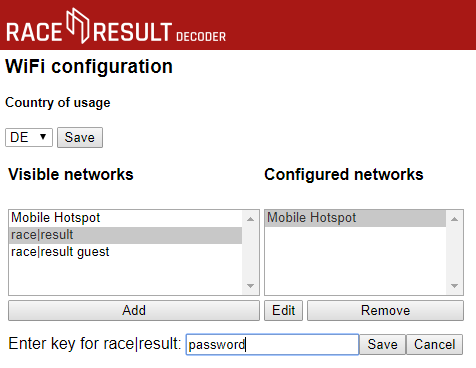
To connect to a network select the network SSID from the list of available networks and click add, a text box will be shown below to enter the passkey for the network. Enter your passkey and click save to add the network to the list of known networks.
When using the Wi-Fi adapter the IP section of the decoder screen will alternate between;
- EN - the IP address via the ethernet port.
- WF - the IP address via the Wi-Fi adapter when connected or will show "no AP found" if there is no known access point available.
- AP - the name of the connected access point.