


Each event file contains only a single invoice layout, this can be designed similarly to Certificates using the same elements and formatting techniques.
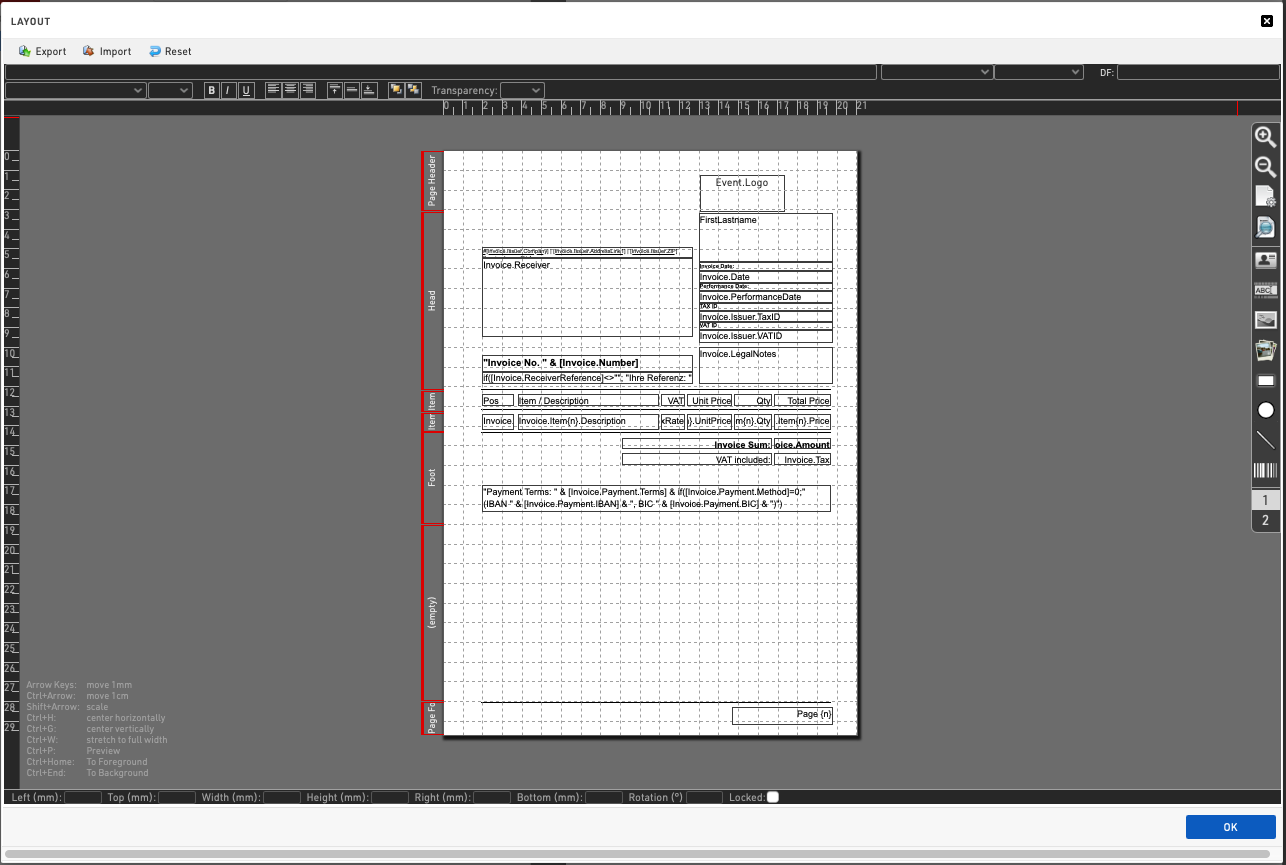
Importantly - invoices should refer to the specific Invoice Fields and not participant fields. Although it is still possible to query participant fields - these may differ from the required invoicing details.
Furthermore, the invoice layout contains several distinct zones and each element belongs to the zone in which its top edge lies.

The height of each zone can be adjusted by clicking and dragging the upper and lower bounds of the red zone highlighter on the left side of the layout, hovering over this area will highlight the area covered by that zone.
Each zone has a distinct behaviour
-
Page Header – repeated on every page, this could be a full-page graphic provided the top of the graphic lies within the page header zone.
-
Head – displayed only on the first page, typically including the recipient, invoice date, invoice number, etc.
-
Item Head – repeated on every page. After each page break this is positioned directly below the page header.
-
Item – repeated for each individual invoice item. On a page break, the next item is placed below the item head. This can be used with the {n} record multiplier to query the specific line number.
-
Foot – displayed only once after the last item on the last page.
-
(empty) – placeholder only.
-
Page Foot – repeated at the bottom of every page.