Antennas
To optimize performance in a small form factor the Track Box Passive contains 2 antennas internally, TX (transmit) and RX (receive). The TX antenna is located in the lower half of the box and the RX is in the upper half, each antenna needs a clear line of sight to transponders in order to receive passings.
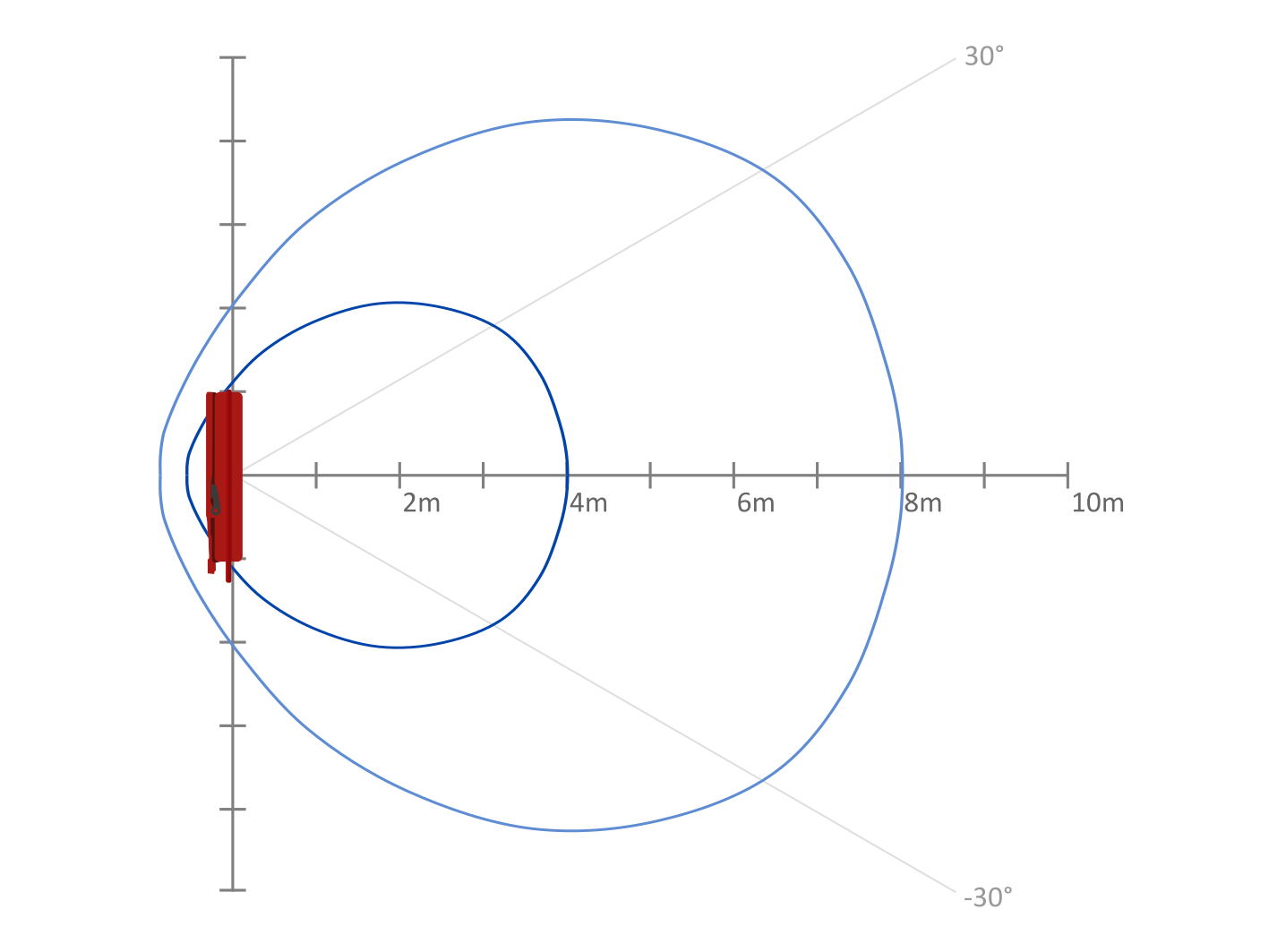
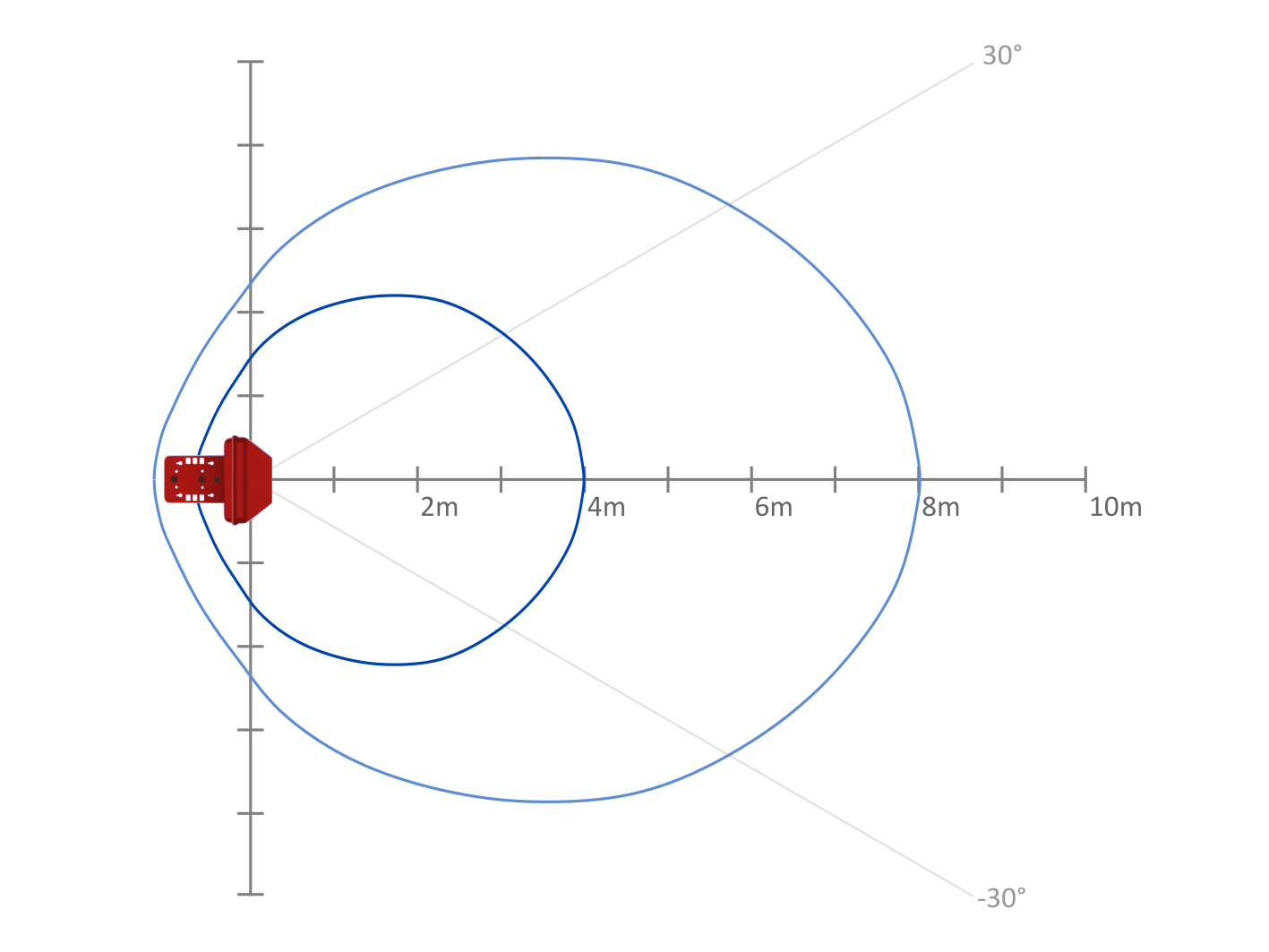
The below diagrams show the shape of the antenna field, the inner line represents expected 99% read rate at 4m from the front of the antenna, the outer line shows the 8m line with 90% expected read rate (with a single box).
Side View
Top View
Algorithms
Passive Transponders
Reaction Time & Dead Time
Similar to the RACE RESULT Decoder the Track Box (Passive) uses a detection algorithm to maximise the accuracy of recorded times.
The 2 key settings are the Reaction Time and Dead Time, which by default are set differently on Track Boxes due to their design.
The default Reaction Time is 10 seconds, the reason for this is that with antennas mounted to the side there is much greater chance of early detections, particularly if the Track Box is facing participants. A low reaction time may result in a less accurate time being recorded, by increasing this to 10 seconds it provides greater chance to record an accurate time. This does result in data being sent to the servers after a minimum of 10 seconds, so if speed of data is more critical than accuracy then this could be reduced.
Dead Time is set by default to 20 seconds, meaning that after a time is recorded then another passing will not be captured for 20 seconds, beware if using this on short laps or turnarounds. If multiple passings are expected within a shorter time then this can be reduced as necessary.
Both reaction time and dead time can be configured using Track Box Configuration Rules.
Hits & RSSI
When using the Track Box (Passive) you should also expect less hits compared to a RACE RESULT Decoder with standard antenna, this is due to the communication protocol used between Track Box and Transponder.
The reader will only communicate with each transponder in one of every 5 cycles, this maximises the opportunity for other transponders to communicate with the reader and thus maximising overall read rates.
Guidelines for RSSI values remain the same as Decoder detection data.
Passive Modes
The Mode set through Track Box Configuration Rules affects the read rate of the UHF antennas, data transmission and thus also has an impact on battery performance. The Track Box Passive supports normal, slow and standby mode. Fast mode is a Track Box Active mode; if it is set on a Track Box Passive the box runs in normal mode instead..
| Normal | Slow | Standby | |
|---|---|---|---|
| Recommended for | General timing | Slow-moving particpants and only a few transponders in the read field at the same time | Overnights, before or after the event, boxes that are set up buy not yet needed |
| UHF reader | On, 50 reads per second | On, 10 reads per second | Off, no transponders detected |
| Dual Track Box synchronisation | Available | Switsched off | Not applicable |
| Status call | Every 4 minutes, Every 15 seconds while traveling or has many passings waiting | Same as Normal | Every 15 Minutes |
| GPS | Switched off automatically while the box is not moving | Same as Normal | Switched on shortly before a status call if the box has moved since the last status |
| Battery use | Normal | Reduced | Lowest |
Normal
Normal mode is the best compromise for general timing and recommended for most applications. In this mode, the GPS module is shut down if the box does not move and the device status will be updated every 4 minutes, or every 15 seconds while the box is moving or still has passings to upload.
In normal mode the antennas are reading 50 times per second, and passings will be uploaded in small chunks with smart processing to minimise delay and data consumption accordingly. When two boxes run as a synchronized pair, the read rate of each is reduced — see Track Box Synchronization. If there is no data transmission pending then the modem will disconnect from the network.
Slow
Slow mode reduces the power consumption of the UHF reader while still detecting transponders. Use it where participants move slowly past the timing point and only a few transponders are in the read field at the same time — typical examples are checkpoints on trail runs, hikes or other slow-moving events.
In slow mode the antennas are reading 10 times per second instead of 50, and Track Box Synchronization is switched off. Note that this means slow mode should not be used where two boxes are set up as a synchronized pair. The status interval and GPS module behaviour remain the same as normal mode.
Active Track Pings received by the box are finalized 60 seconds after the strongest Track Ping instead of 10 seconds, or up to 120 seconds for a weak signal, so these pings reach the server considerably later than in Normal mode.
In slow mode, you can expect battery life of over 24 hours from a full charge.
Standby
In standby the UHF reader is switched off and transponders are not detected, and the box only sends a status call every 15 minutes. See Standby Mode. The box continues to receive Active Track Pings while in standby.
Other read rate reductions
Independently of the Mode, the read rate is reduced if the box runs on a solar panel that delivers little power and the battery is below 75%, where it drops to about 33 reads per second.
Automatic switch to Standby
In some situations the box switches to Standby on its own, regardless of the configured Mode, and returns to the configured Mode once the condition ends:
Auto Standby: During the time window set in the Auto Standby rule of the Track Box Configuration Rules
Low battery: When the battery is almost empty, to keep the box able to report its status and position for longer
Excessive current draw: If the box detects an abnormally high current draw
When does a mode change take effect
The box receives its configuration with each status call, so a new Mode takes effect with the next status call; within up to 4 minutes in Normal mode, or up to 15 minutes from Standby. The box sends a status call as soon as the Mode changes, so the new Mode is visible in RACE RESULT 14 right away. After a restart, the box starts in Normal mode and applies the configured Mode with its first status call.
Track Box Synchronization
As with all UHF timing systems a transponder should only be in the field of one reader at any one time, furthermore, the strong output of one reader may inhibit the receive antenna of another box when directly facing each other.
To avoid interference between devices, Track Boxes are able to synchronize using the on-board 2.4Ghz which prevents the collision of the UHF readers. There are 2 modes of synchronization - pairing (2 boxes) and multi (more than 2 boxes).
Two or more boxes will automatically synchronize their UHF Readers to optimize read performance when:
- The boxes are within close range to each other (approx. 20m)
- The same 2.4GHz channel is set
- The reader is turned on (not in standby or laying flat)
- The reader is in NORMAL mode (not SLOW)
When synchronization is active the green LED (to indicate GPS & Network OK) will switch to a quick double blink.
Dual box synchronization is always enabled automatically regardless of the orientation of antennas, as even 2 boxes with their back to each other may experience some interference.
Synchronization is automatically disabled if the above criteria are no longer met, for example if the boxes are moved apart or the channels of the boxes are changed. It is also possible to disable dual box synchronization using Custom Track Box Configuration Rules.
As Track Box synchronization and Active Track Ping Detection both rely on the 2.4GHz antenna it is not advised to use the Track Box synchronization whilst also expecting Active Track Pings, since this will reduce possibility for the Track Boxes to receive Active Track Pings. Additionally, Track Boxes can only operate on a single channel, so changing the channel for pairing devices will change the channel on which the device is expecting to receive Track Pings.
Track Box Pairing
Using two Track Boxes together allows to cover a greater width of timing point and also maximises the chance for a clear line of sight between the antennas and transponders. When in pairing mode the Track Boxes will report SYNC in the RACE RESULT 14 Timing tab.
When in pairing mode the read rate of each box will be reduced by just over half to around 20x per second (down from approx 50x a second for a single unpaired box), this will result in reduced hits per box, for each transponder. When comparing a pair of boxes to single box performance you can expect roughly similar hits however the sum of the pair is still likely to be slightly lower due to having just under half the available read time per box.
If you have multiple boxes in close range, then you can create pairs of devices by setting the channel accordingly for each device. In this case, you should take care that any 2 boxes which are not synchronized do not have overlapping fields which may cause interference.
Multi Track Box
When more than 2 Track Boxes are in close range and meet the synchronization criteria they will enter Multi mode, this is also indicated in the RACE RESULT 14 Timing tab (MULT)
In Multi mode each box will drastically reduce its read rate to a much slower random mode. This mode is intended for use with indoor applications with many boxes in close proximity and is not intended for sports timing.