


The Results tab shows the relevant information according to your timing and scoring setup for that participant.
The Results Tab will show different tables for Splits, Legs and Results, Ranks, Team Scores and Participant Attributes, each showing the corresponding information.
For each Split the table shows Time of Day, time from Gun, time from Chip, Rank (from Gun or Chip according to the Contest Time Mode), Sector time (from previous Split) and Speed.
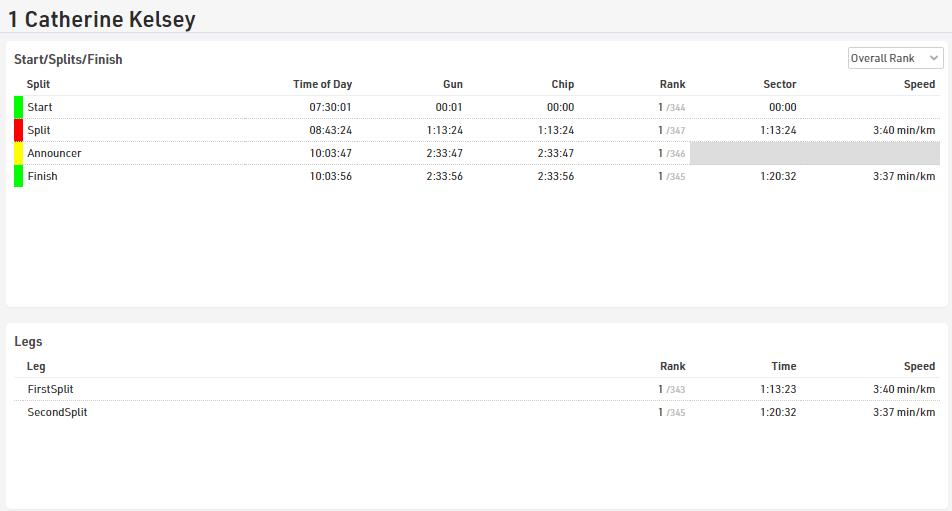
For splits which have not yet been reached or are missed then the Predicted Times are shown, a predicted time can be turned into a manual Raw Data Record by clicking the + symbol. The Time of Day can then be edited and saved by pressing the enter key.
The Rank includes a drop-down to switch between Overall, Gender, Age Group or None, speed shows the SpeedOrPace field for the sector according to the default format of the split.
For each Leg the Rank, Leg Time and Leg SpeedOrPace is shown, the Rank is controlled by the same dropdown as per the Splits table.
Results are listed in order of the Result ID with T0 always listed first, Ranks and Team Results are shown in order of their ID so you can quickly look up an individual's rank.
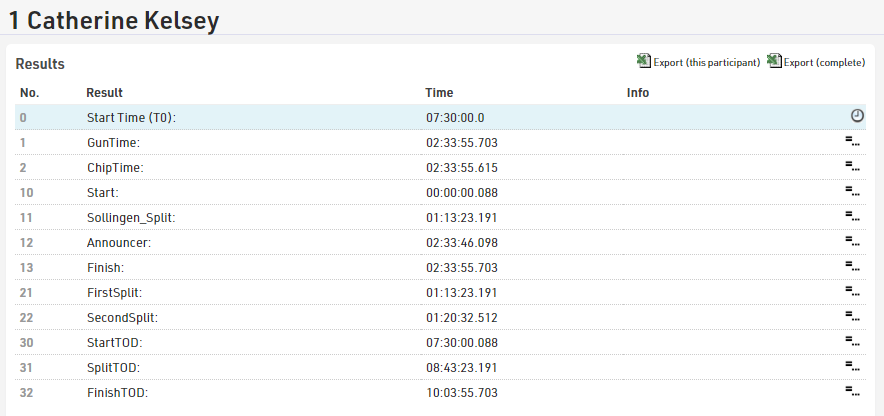
Using Raw Mode a Result can be manually overwritten by hovering over the result and selecting the edit icon. The result field will become editable. Once entered the adjusted result will turn red indicating the time has been overwritten. Should the raw data be recalculated, the overwritten value will remain.
To delete the overwritten result, select the red cross next to the result to return the raw data calculation. If you need to delete all overwritten results refer to Delete Overwrite Values.