


Data is captured using the Data Entry in the bottom right.
Normally you will enter the bib number of the participant and hit enter to record a time as they cross the timing point, if multiple finishers are approaching or the bib cannot be seen then you can also just hit enter to record a time (bib numbers can be filled in later on).
When capturing a time the time will be listed in the section above, normally with the Time, Bib and participant information. The record will also be highlighted with a colour depending on the status:
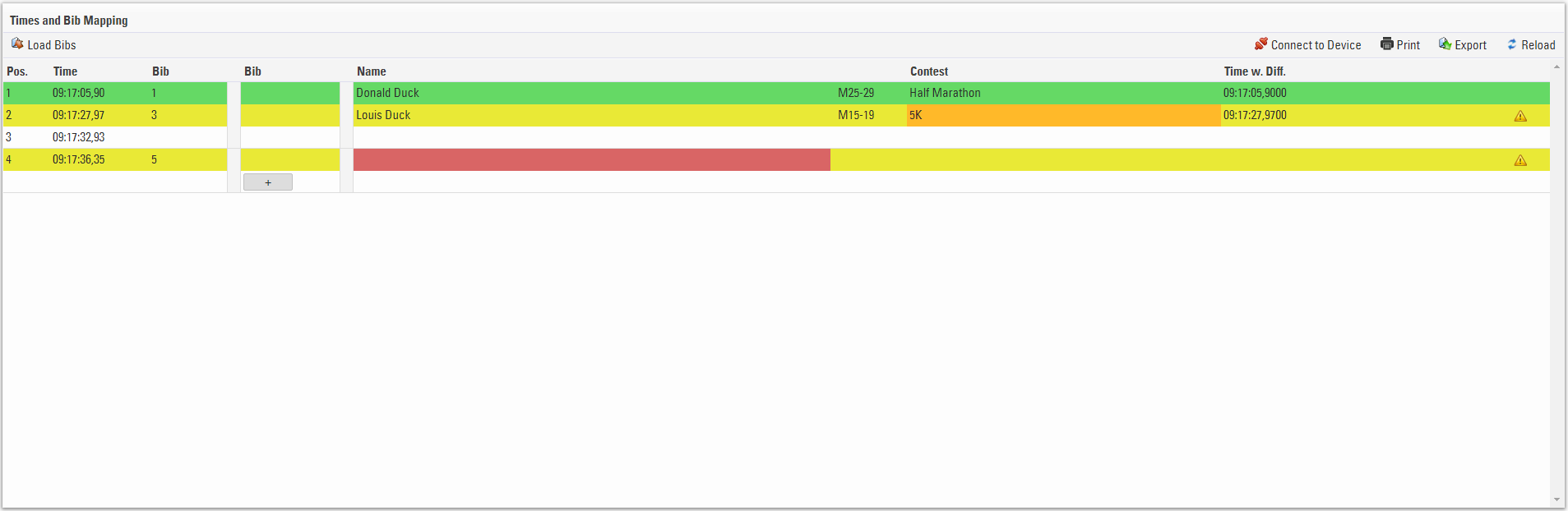
- Green - The bib number is recognised and the participant is valid / accepted
- Yellow - The bib number is not in the accepted Contest
- White - No bib number was recorded for the time
- Red - The bib number is not recognised.
If no bib number was captured for a time or you need to change the bib then clicking on the first bib column allows you to edit this value, save the field by pressing the down arrow key, times can also be edited in this way.

You may also wish to capture times and bibs separately, for this you can use the Load Bibs / Load Times feature which is where the second Bib column is used, see the Manual Timing Guide for more information on this.
Records can be manuallly inserted or deleted, hovering over the times will show the insert line and delete record options.
