


Event File
Times are recorded at the entrance and exit of the transition area, and on the finish line.
An additional system is used as a swim check-in, to let the organizer know who actually started and make sure all participants come out of the water. The public can follow the race live on my.raceresult.com.
This example shows the ActivePro transponder in use with two Loop Boxes at the transition area wirelessly transmitting passings to a USB Timing Box at the finish line.
It is possible to use the passive system and HuTags, the setup of the event file remains the same.
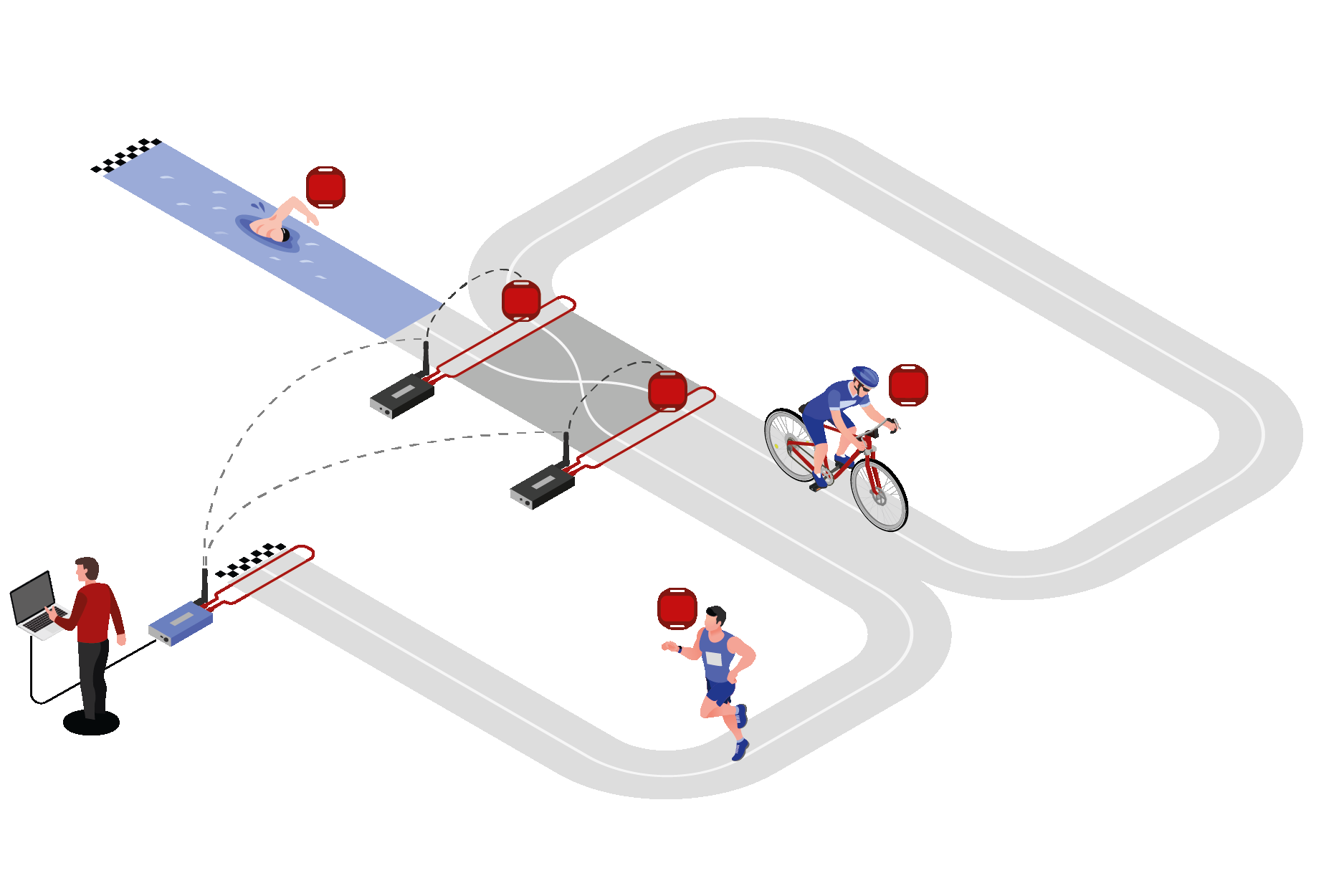
Timing Locations
Start Check-In, Transition In, Transition Out, Finish.
Preparing the Event File
- Download a copy of the triathlon event file.
- Define the event settings (date, location, time zone)
- Confirm the contest information
- Import the participants
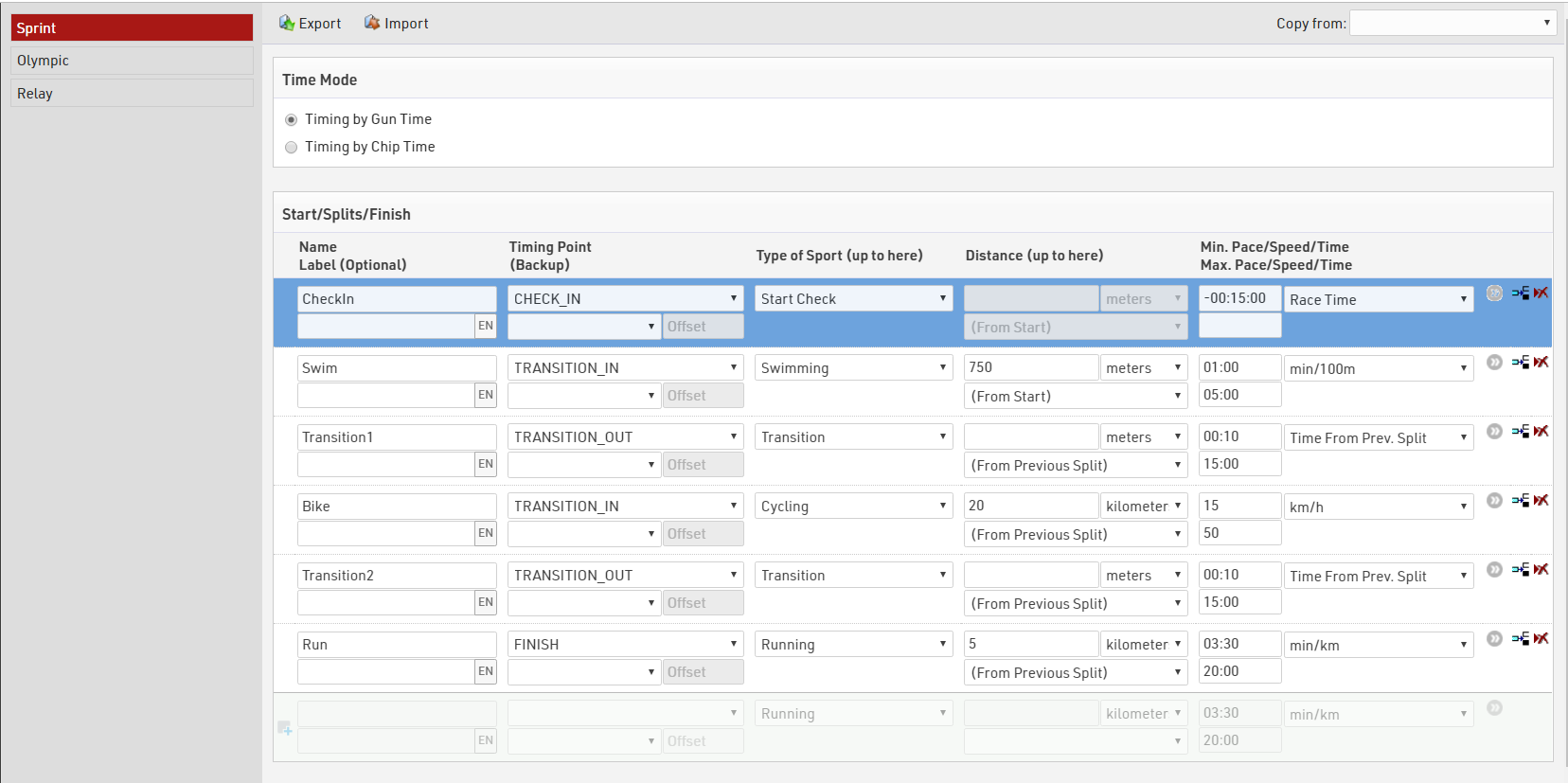
Splits Setup
Splits are setup for each Contest accordingly, Time Mode is set to Gun Time. Since we have no additional Splits we don't define additional Legs here as the Split Sector times will give us the leg times.
Team Members
In this example, a team member completes one leg of the course. One transponder is issued to the team and is transferred between team members after each leg.
Additional Text Fields are used to capture the firstname, lastname and gender of participant 2 and participant 3.
Displaying Team Members
To display all team members on multiple reports easily, we create a user-defined field to display the 2nd and 3rd participants. Another user-defined field DisplayName has already corrected firstname and lastname to the correct case for each team member.
DisplayNames:
[DisplayName] & if([DisplayName2]<>" ";" / " & [DisplayName2]) & if([DisplayName3]<>" ";" / " & [DisplayName3])
Output: Katherine WADDELL / Jo LAMBRICK / Marina TYSON
User Defined Functions - Determining Team Gender
We can determine the gender of the team automatically. To qualify as a single gender team, the genders of each participant must be the same. First we create a function to convert the gender to either 0, or 1 and add together the values for each team member, from the sum of these Gender values we can determine whether the team is all female, mixed or all male.
GenderToNumber(x): Translate([x];0;1)

GenderSum: Val(GenderToNumber([Gender])+GenderToNumber([Gender 2])+GenderToNumber([Gender 3]))

TeamGender: Choose([GenderSum]+1;"female";"mixed";"mixed";"male")
Statistic Report
At any time the organiser or officials may need to know how many participants are at what point on the course. We can determine an overview by using a statistic set. Our statistics set will look at a User-Defined FIeld called LastSeen, this is built using {LastSplit} a special function to enable the calling of fields from the last participant at which the participant recorded a time.
Switch([{LastSplit}.Name]="CheckIn";"0. Check-In";
[{LastSplit}.Name]="Swim";"1. Swim Finish";
[{LastSplit}.Name]="Transition1";"2.Bike Start";
[{LastSplit}.Name]="Bike";"3.Bike Finish";
[{LastSplit}.Name]="Transition2";"4. Run Start";
[{LastSplit}.Name]="Run";"5. Finish";
[Started]=0;"Not Started")
Using the Statistics Settings > Columns Format WithStatus([LastSeen])
The statistic set will produce the output below.
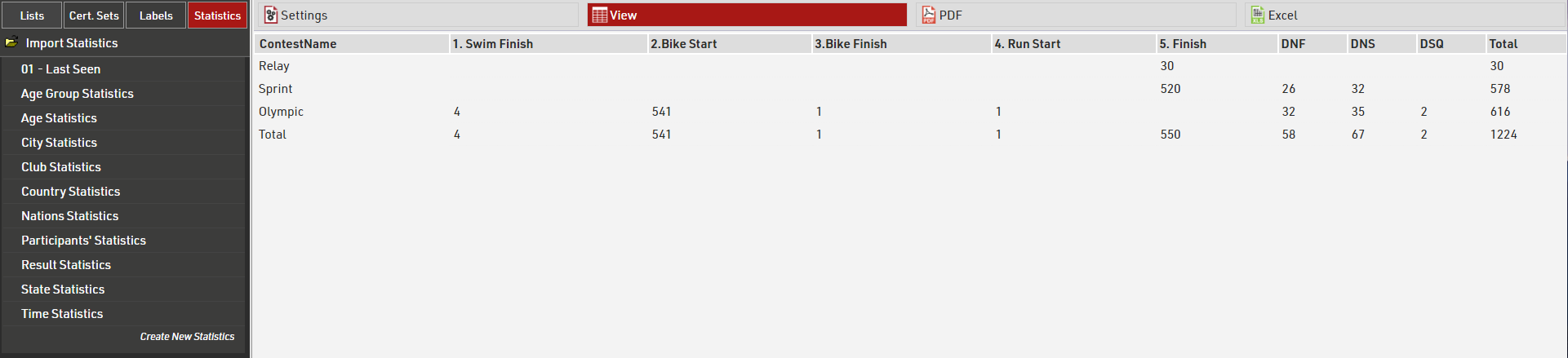
If a participant's status is regular, the last split seen at will be used, otherwise their status is shown.
We can see in the Relay and Sprint Contests everybody is accounted for at the finish or recorded as DNF/DNS/DSQ. In the Olympic race 4 participants were last seen at the SwimFinish and so presumed to be still in Transition 1, 541 participants on the Bike course, 1 in Transition 2 and 1 on the Run course.
Result Outputs
- Live has a leaderboard which groups all participants by their last seen location, ranked by cumulative race time. We use the {LastSplit} special field to sort participants and show the relevant times. Using {LastSplit}.Gender we see their gender position at their last split, this will remain the same until they reach the next split.
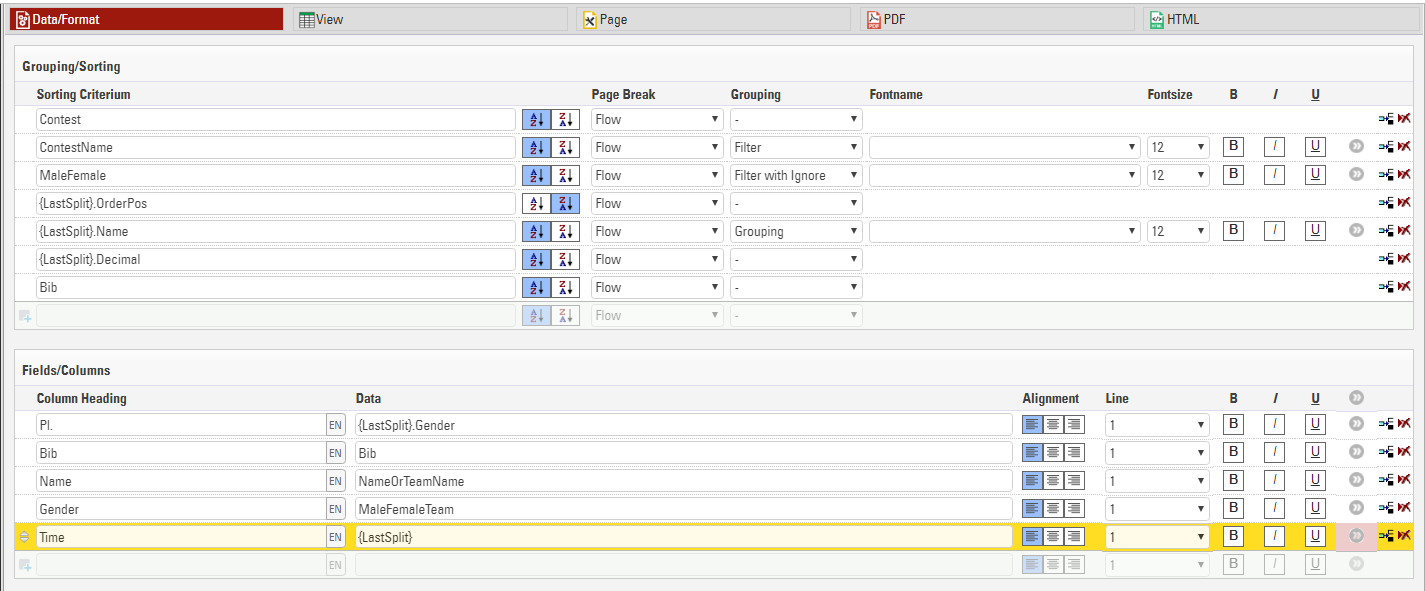
We enabled the filter for Contest and Gender so spectators can choose which race to look at and can look at a specific gender category if they choose.
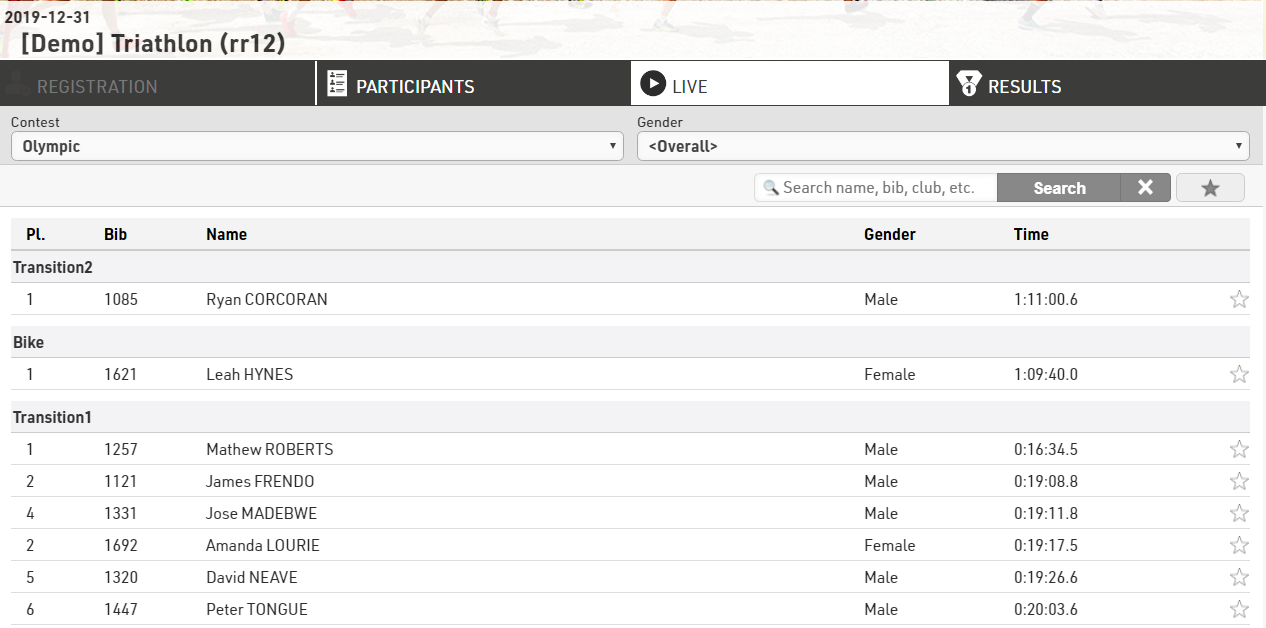
From this we can see that in the Olympic Contest Justin Appelman was the first Male to leave transition 1, however he has not been seen since and we have those who are further on the course ahead with their respective ranks at those splits.
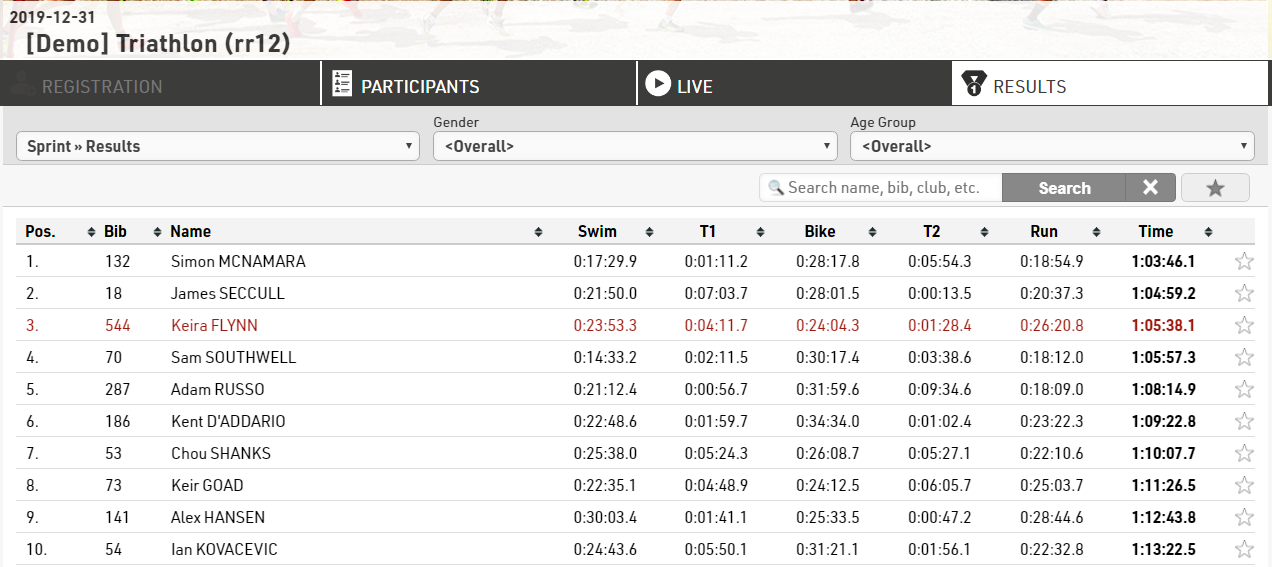
- Final Results shows the rank, bib, name and split times for each leg and overall finish time.
Details List
Selecting a specific participant displays an in-depth look at their Split times, and an additional details list with their personal info is shown below.
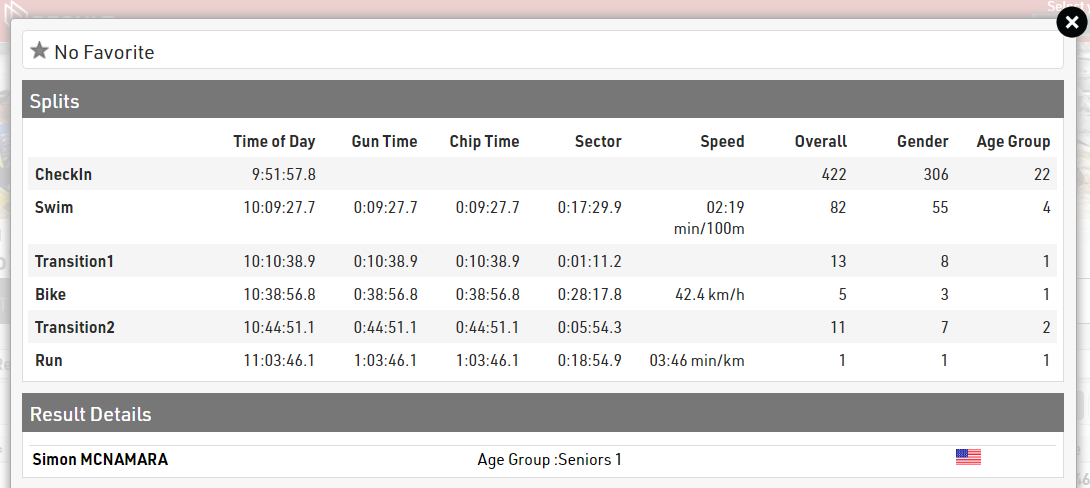
This is achieved by enabling Show Splits under Certificates / Details settings and also publishing the output Individual Details under the details list for the corresponding output.