


Manual timing is a great option for smaller events or as a manual backup for your main system to verify your winners.
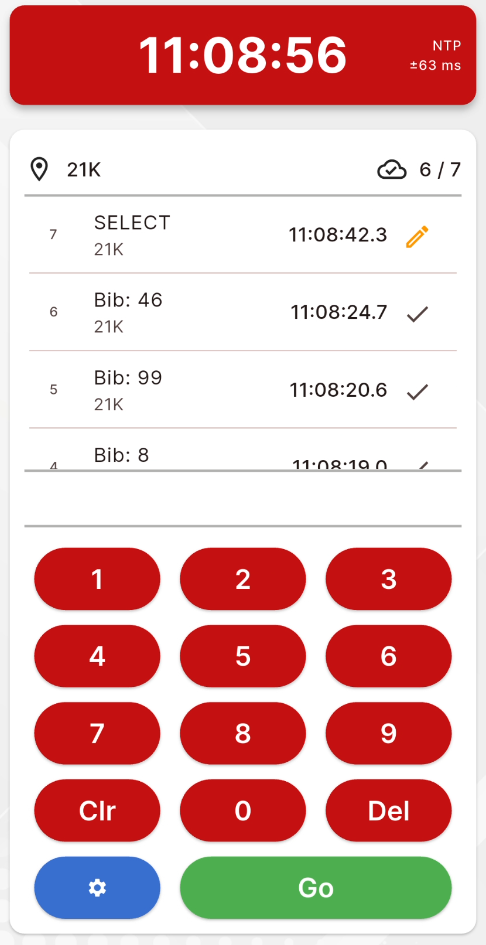
The RACE RESULT EventTools manual timing is a simple interface for recording times to a specific bib number, simply select the timing point, enter the bib number in the keypad and hit Go to save the time.
Entering a bib number of 0 will create a manual marker instead.
Hitting Go with no bib entered will create a SELECT record, this is useful if you have multiple times to record at the same time. These will not be uploaded until you click the edit button to set the bib number for the record.
Time Source
The time will be automatically taken from your device's internal clock, since this normally runs on NTP (Network time protocol) it is accurate enough for manual timing.
The timing screen will automatically try to check the difference between your device time and an online server and will display a warning if this differs by more than 2 seconds.
If a time sync warning is displayed you may wish to compare the time to a decoder set to GPS and update your device time manually.
When initialising the timing screen the app will check if any start date is set in the RACE RESULT 14 Timing tab for mult-day events. If a start date is set then this will be used automatically by the app to calculate the time. If enabled then this will be shown below the main clock.
Data
When a bib is recorded it will be immediately shown on the display and uploaded to your event file, the right side indicates whether the read has been successfully uploaded.
In the event that the internet connection is lost then the app will continuously retry to reupload chip reads.
All chip reads are backed up to a local database on your device, in the event that internet connection is lost and not restored by the end of the event then these can be reuploaded from the settings dialog.