In RACE RESULT 14 all times are stored in the database as a value in seconds, this is referred to as a decimal time, a formatted time is a time string as you would expect to read it normally. For example:
Decimal Time: 36015.125
Formatted Time: 10:00:15.125
DecimalTime is considered a number whereas a formatted time is considered a string of characters. In computer programming, we call these different types of values Data Types.
In both of the above examples, we also have milliseconds which are represented by the numbers after the decimal place. The milliseconds will be the same in a formatted time as they are in a decimal time.
When to use DecimalTime?
Decimal time should be used any time you need to make a mathematical calculation or when sorting/ordering by a time.
Mathematics
For example, say we want to add 00:30:00 to 00:15:00. As a human, we can easily see that this would add to 45 minutes but a computer does not see this as we do. For a computer, the times first need to be converted to decimal time, added together, then formatted as a time so we can easily read it.
00:30:00 is equivalent to 1800 seconds.
00:15:00 is equivalent to 900 seconds.
If we add 1800 to 900 we get 2700 seconds. We can then reformat this time to 00:45:00.
You can use tools like Time to Decimal Time or Decimal to Time to make these conversions.
Sorting/Ordering
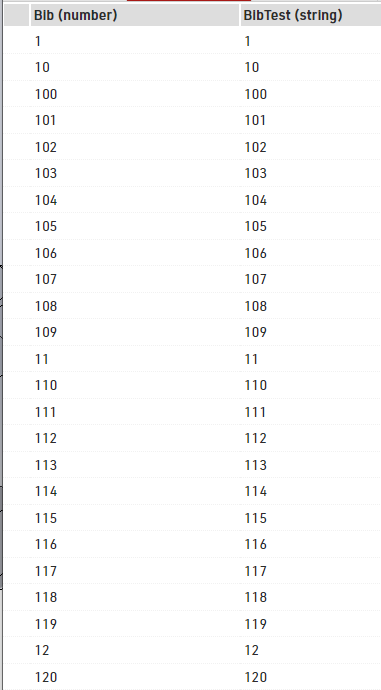
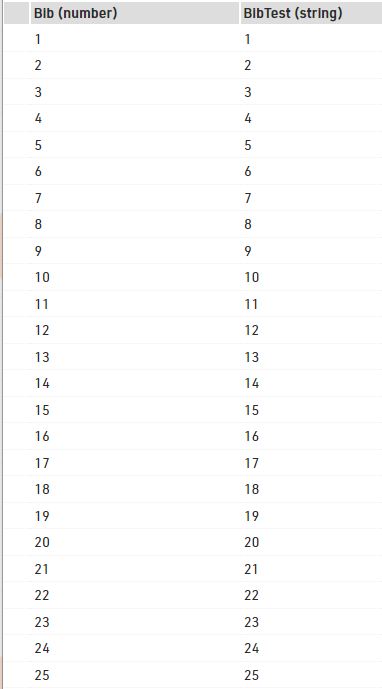
When sorting/ordering by a value you will also notice a difference between strings and numbers. On the left is a report sorted by BibTest which is a string. On the right is the same list sorted by Bib which is a number. When sorting by a string you can see the list is sorted by the first character then by the second character and so on. When sorting by a number the entire number is considered rather than just one character at a time.