


If you receive a notification that the driver installation has failed, or if you do not manage to use the USB Timing Box with any software, you need to check the connection first.
For this, look for the Device Manager in your Windows Start menu. Under Ports (COM & LPT), you should see a device connected to USB Serial Port (COMx).

If that is not the case, you need to install the drivers manually. Proceed as follows:
- Unplug the USB Timing Box from your computer.
- Download the "TagTool" from the RACE RESULT website. Select the setup version, as the portable version does not include the drivers.
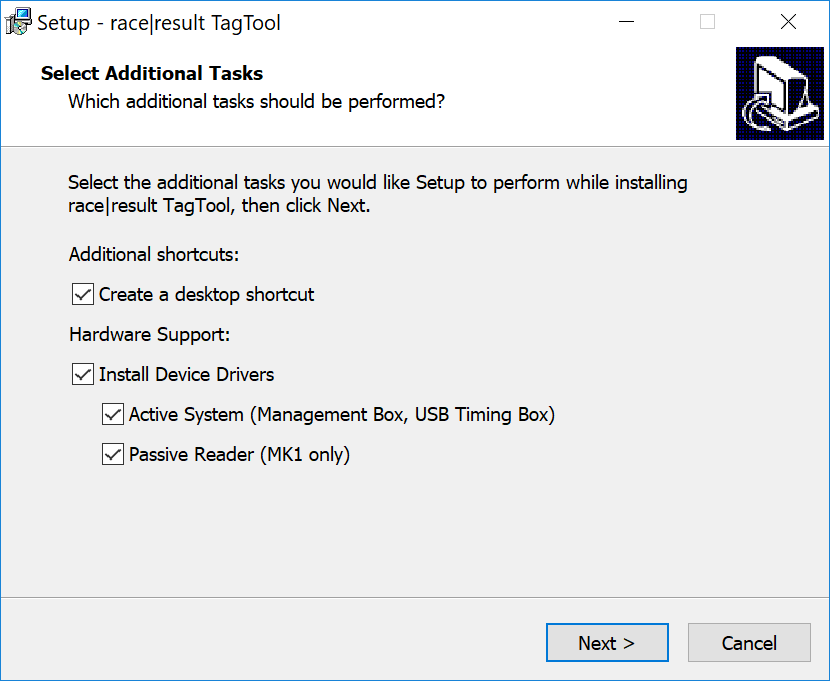
- In the first screen of the wizard, tick the box "Active System (Management Box, USB Timing Box)" under "Install Device Drivers". You can deactivate the option "Passive Reader" if you want, it is not needed for the USB Timing Box.
After the installation, connect the USB Timing Box and go back to the Device Manager to check whether the installation was successful this time.