


These settings control how the data is displayed.
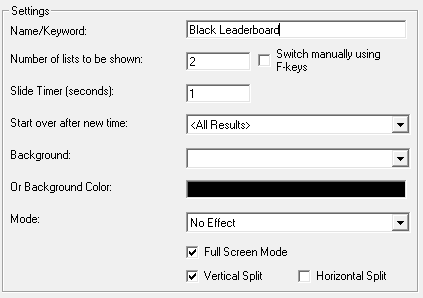
Name/Keyword: A name for the settings profile
Number of lists to be shown: The Presenter can be used to show multiple output lists either side-by-side (see vertical / horizontal split), or sequentially. Enter the number of output lists you wish to display on the screen. If not using split screen then the presenter will cycle between output lists once it reaches the end of a list, alternatively there is a tick-box to enable manual switching only using the F-keys. With manual switching enabled use F1-F12 keys to select the related list.
Slide Timer: The frequency of updating the display either with new data, or cycling through multiple pages of a single output list.
Start over after a new time: You can force the display to update when a new result is calculated, you can select either all results which would be useful for a leaderboard or a particular result such as the Finish result.
Background: The presenter can use an image from any of the pictures which are saved in your event file (under Main Window-Pictures).
Or Background Color: Alternatively you can simply set a fixed background color.
Mode: This controls the transition between multiple pages / output lists. Choose from: no effect, Slide in from top / bottom / left / right or manual scrolling / sliding.
Full Screen Mode: The display will be in full-screen with no taskbar above, to exit full screen hit esc.
Vertical Split: Used to show 2 output lists simultaneously, left and right sides of the screen split down the middle.
Horizontal Split: Used to show 2 output lists simultaneously, top and bottom halves of the screen.
If Vertical / Horizontal split are used together then up to 4 output lists can be displayed simultaneously.