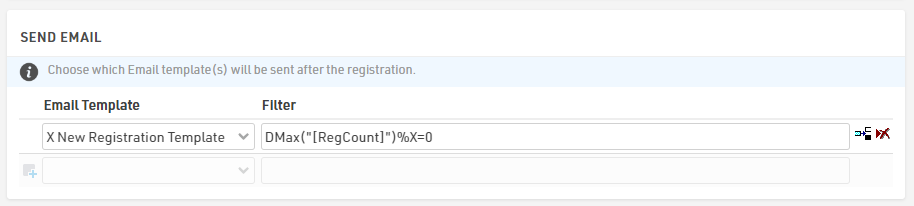
To enable automatic notifications after every X new registrations through the Registration Forms, it is necessary to include an additional field (e.g., [RegCount]) where the total number of registered participants is stored.
Additionally, an email template must be created with the appropriate recipient's email address.
Creating an Additional Field to store Registered Participants
Under Main Window > Participants Data > Additional Fields, create a Field type Number (Integer) called, for example, RegCount.

Configuring RegCount in the Registration Form
To track the number of registered participants, select the "Max. Value +1" option in the Store Additional Values section, available under the Advanced Settings of the registration form.
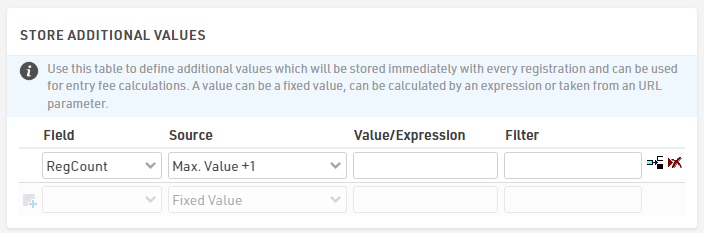
This configuration will automatically populate the [RegCount] field with the current total of registered participants for each new registration.
Creating an Email Template for Notification
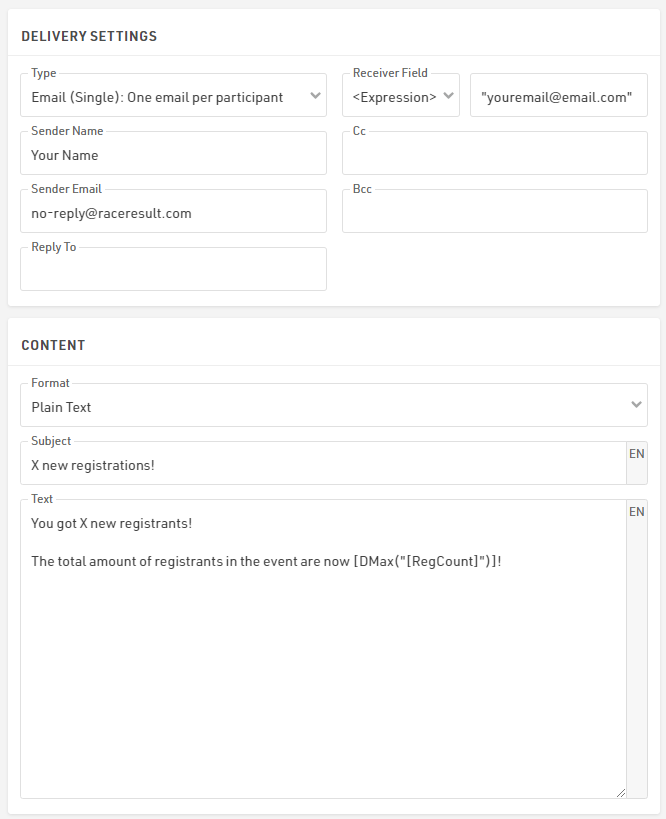
The email template is designed to notify the recipient when X new participants have registered, including the total number of registrants. The function DMax() can be used to calculate the total number of participants.
Since the email will always be sent to the same address, the recipient’s email can be entered directly as an expression in the Receiver Field.
Triggering the Notification After Every X Registrations
To trigger the email notification after every X new registrants, apply the following filter in the Send Email module under the After Save Actions of the Registration Form:
DMax("[RegCount]")%X=0
This formula checks if [RegCount] is a multiple of X. When the remainder of the division is zero, the system sends the email notification.