
Upload Analysis Data - Analyse-Daten hochladen
In manchen Fällen werden Sie vom RACE RESULT Support gebeten, Analyse-Daten von Ihrem System hochzuladen. Die Analyse-Daten beinhalten ausschließlich die Passings Files der letzten 72 Stunden. Laden Sie die Daten ohne Aufforderung hoch, schreiben Sie eine kurze Email an support@raceresult.com mit den Problemen, die Sie mit den Detektionen hatten.
Upload Diagnostics - Diagnose-Daten hochladen
Laden Sie die internen Systemlogs direkt an RACE RESULT für folgenden Zeitraum hoch:
- Seit (letztem) Hochfahren
- Von heute
- Letzte 96 Stunden
- Alles
Firmware Upgrades
Für vollständige Informationen zum Ablauf von Updates, lesen Sie bitte den Ubidium Firmware Leitfaden.
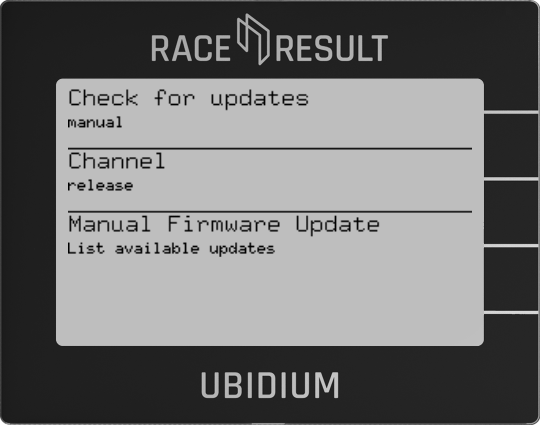
Check For Updates - Auf Updates prüfen
Wählen Sie, wie Updates installiert werden sollen - automatisch oder manuell.
Channel - Kanal
Wählen Sie zwischen Release- und Beta-Kanal für Firmare-Updates.
Manual Firmware Update - Manuelles Firmware Update
Diese Einstellung ist nur im manuellen Update-Modus vorhanden. Drücken Sie die Navigationstaste um verfügbare Updates anzuzeigen und für ein Update auszuwählen.
Settings

Store all Settings to List
Creates a settings configuration list with the current system settings, the list will be saved with the entered name
Settings lists stored on the system will be automatically copied to an external USB drive when connected
Settlings List
Choose from a previously saved settings list, or remove previously saved settings lists
Load from USB-Stick
If a USB drive is connected then it will be scanned for available settings lists which can be imported to the system
Reset all Settings
Will do a full factory restore on all system settings to return the system to it's original state, the system will restart after completing a factory reset